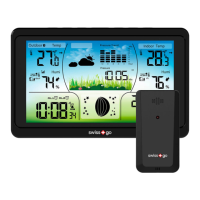
5. RCC signal
6. Alarm clock icon
7. Time
8. Weather forecast
9. Barometer and pressure trend display
10. Indoor temperature and humidity
11. Indoor temperature ale icon
12.13.14 Schedule
15. Wall mount slot
16. foot
17. Compament for 3xAAA baeries (baeries not included)
18. USB charging po
19. External power socket
20. Wireless signal indicator (Blinks when data is being sent to the display unit)
21. Hole for wall mounting of outdoor sensor
22. Outdoor sensor channel selector
23. Compament 2x AAA baeries (baeries not included) of the sensor
Buons:
A. SNZ/LIGHT buon
B.MODE buon
C. SET buon
D. ALARM buon
E. RF buon
F. DOWN buon
G. UP buon
Installing or replacing baeries:
We recommend using high quality baeries to get the best peormance from the product. The
use of standard or rechargeable baeries is not recommended. The outdoor sensor requires li-
thium baeries in low temperature conditions, as low temperatures may cause alkaline baeries to
malfunction.
Do not mix old and new baeries. Do not mix alkaline, standard and/or rechargeable baeries.
Default seings
1. Default time: 0:00 (Time form: 24H)
2. Default date: 1/1 (Year: 2020, date form: D/M)
3. Default week: MIT (Language: GER, 7 languages can be selected)
4. Weather forecast: Paly sunny
5. Default temperature:
6. Barometer unit: hpa
7. Default alarm: 00:00, default snooze time: 5min.
LCD active for 3 seconds when changing new baery or reset.
Scan with your smaphone
and download the Manual


 To Next Page
 Loading...