
 Need help?
Do you have a question about the Swissvoice Avena 266 and is the answer not in the manual?
General safety warnings about handset loudness, signal tones, and battery usage.
Instructions and warnings regarding the use, charging, and safety of rechargeable batteries.
Describes ECO mode for reducing electromagnetic radiation when the handset is idle.
Steps for connecting the telephone connector cable and mains cable.
Recommendations for optimal placement of the base station for range and signal quality.
Instructions for correctly positioning and connecting the base station and charging unit.
Warning to use only approved rechargeable batteries.
Details on locating and opening the battery compartment in the handset.
Correct procedure for inserting batteries, emphasizing polarity.
Information on initial battery charging and charging status symbols.
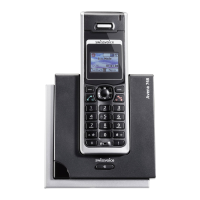
Overview of the keys on the telephone handset and their functions.
Procedure for initiating an external phone call.
Instructions for making free calls between registered handsets.
How to switch between call partners or set up a 3-party conference.
Procedure for transferring an active call to another handset.
Steps for entering and correcting numbers before dialling.
How to call another internal handset while on an external call.
How to make an external call while on another external call.
How to terminate an ongoing phone call.
Procedure for answering an incoming call.
How to activate and use the handsfree speakerphone function.
How to modify existing entries in the directory.
Steps to add a new contact to the directory.
Procedures for removing contacts from the directory.
How to make calls using numbers stored in the directory.
How to view and call numbers from the call history.
Setting up call forwarding to redirect incoming calls to another number.
Notifies the user of an incoming call during an active call.
Options for handling a waiting call (reject, accept/end, accept/hold).
Introduction to sending and receiving SMS messages.
Reading and managing incoming SMS messages.
How to compose and send SMS messages.
How to control the answer machine using the handset.
How to record a personal outgoing message and revert to standard.
How to play back, skip, and replay messages on the answer machine.
How to control the answer machine directly from the base station.
Switching the answer machine on or off via the base station.
How to delete all listened messages from the answer machine.
Managing recorded messages using base station controls.
Detailed steps for operating the answer machine remotely.
Deleting all messages that have been listened to.
Details on ECO Mode for reduced radiation and power saving.
Explains the ECO Mode for reducing electromagnetic radiation.
How power transmission is regulated when ECO Mode is ON.
Changing the system PIN for security and handset registration.
Step-by-step guide to registering new handsets with the base station.
How to reset the telephone to its default factory settings.
 General
| Display | LCD |
|---|---|
| Battery Life | Up to 10 hours |
| Standby Time | Up to 100 hours |
| Phonebook Capacity | 100 entries |
| Ringtones | 10 |
| Hearing Aid Compatible | Yes |
| Answering Machine | No |
| Speakerphone | Yes |
| Caller ID | Yes |
| Handsets | 1 |
| Headset Jack | Yes |
| Power Consumption (Standby) | 0.5 W |
| Type | DECT |
| Range | Up to 300 meters outdoors / 50 meters indoors |
| Frequency | 1.9 GHz |
| Intercom | Yes |
| Conference Call | Yes |


 To Next Page