
 Need help?
Do you have a question about the Swissvoice Xtra 2155 and is the answer not in the manual?
Steps for installing and charging the rechargeable batteries for the handset.
Instructions on connecting the telephone line and power adapter to the base unit.
Details on how to connect the power adapter to the mains socket.
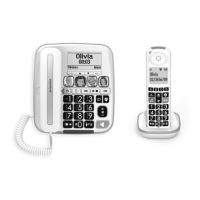
Description of the different parts and buttons on the cordless handset.
Description of the different parts and indicators on the base station.
Explanation of icons and symbols displayed on the handset's LCD screen.
Guide to setting the date, time, and language on the phone.
Methods to dial a phone number using the handset or base.
How to pick up an incoming call on the handset or base.
Procedures to disconnect an active phone call.
How to program speed dial memories with photos and voice tags.
How to control the audio volume for calls.
Feature to enhance call clarity and loudness through the earpiece.
Adjusting the audio quality (Bass, Natural, Treble) for calls.
Accessing and redialing the last dialed numbers.
Customizing the ringtones and volume for handset and base.
Enabling or disabling tones for low battery or out-of-range status.
Configuring the display format for date and time.
Enabling or disabling audible spoken tones for key presses.
Adjusting the duration of the flash hook function.
Restoring the phone to its factory default settings.
Procedure for registering a cordless handset to the base station.
Locating a misplaced handset by paging it from the base.
Instructions for joining an external call with multiple handsets.
How to move an ongoing call between handsets or to the base.
Using the phone for internal conversations between handsets or base.
Accessing and reviewing the history of incoming calls.
Saving numbers from the call list into the phonebook.
Adding numbers from the call list to the blacklist.
Removing specific entries from the call history.
Clearing the entire call log.
Managing incoming calls when already on a call.
Information about accessing voicemail services.
Steps to add new contacts with names and numbers.
How to display stored contact details.
Finding contacts by name or initial.
Modifying existing contact information.
Assigning phonebook entries to speed dial keys.
Removing contacts from the phonebook.
Assigning numbers to speed dial keys from the phonebook.
Checking the number of used and available phonebook entries.
Programming numbers directly to speed dial keys.
Displaying the number and name assigned to a speed dial key.
Modifying existing speed dial entries.
Removing entries from speed dial keys.
Adding phone numbers to the list to block incoming calls.
Displaying the numbers currently blocked.
Modifying numbers in the blacklist.
Removing numbers from the blacklist.
Clearing the entire blacklist.
Checking the number of used and available blacklist entries.
Setting up personalized alarms with time and recurrence.
Choosing a sound for the alarm reminder.
Assigning a custom name to an alarm.
Recording a voice message for the alarm reminder.
Activating or deactivating the device's answering system.
Listening to recorded messages left by callers.
Removing stored messages from the answering system.
Recording a personal message for other users.
Setting up the greeting message callers hear.
Configuration options for the answering machine.
 General
| Type | Analog/DECT telephone |
|---|---|
| Ringer type | Polyphonic |
| Handset type | Wireless handset |
| Answering machine | Yes |
| Number of melodies | 10 |
| Maximum indoor range | 50 m |
| Maximum outdoor range | 300 m |
| Number of ringer volume levels | 5 |
| Number of handset volume levels | 6 |
| Mounting type | Freestanding |
| Product color | White |
| Phonebook capacity | 100 entries |
| Call log entries | 30 |
| Volume control | Buttons |
| Personalization | Icons, Ringtones |
| Languages support | DEU, DUT, ENG, ESP, FRE, ITA, POR |
| Backlight color | Blue |
| Display number of lines | 2 lines |
| Battery type | AAA |
| Standby time | 100 h |
| Battery technology | Nickel-Metal Hydride (NiMH) |
| Number of batteries supported | 3 |
| Number of handsets included | 1 |
 Weight and Dimensions
| Base dimensions | 170 x 120 x 55 mm |
|---|---|
| Handset dimensions (WxDxH) | 61 x 30 x 194 mm |


 To Next Page