Need help?
Do you have a question about the switel CA 2000 and is the answer not in the manual?
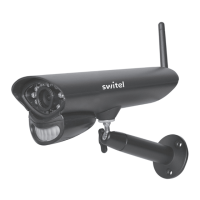
Detects motion in front of the lens and emits detection signal to transmitter.
Receives & Sends signals to or from the Receiver.
Use the bracket to mount the camera on a wall or other flat surfaces.
Connect the DC 9V Power Adaptor to the Camera.
Located on the back of the camera behind the stand mount.
Position camera, connect power, check view on monitor, and adjust as needed.
Read manual, avoid hazardous exposure, use correct power adapters, and check cables for damage.
Use website service form for technical questions; links provided for different languages.
 General
| Brand | switel |
|---|---|
| Model | CA 2000 |
| Category | Security Camera |
| Language | English |

 To Next Page