I-PLUG pdf
IPST8 V.2 aug 2017 I-Plug pdf Page 3 of 8
Understanding'the'LEDs'indicators
'
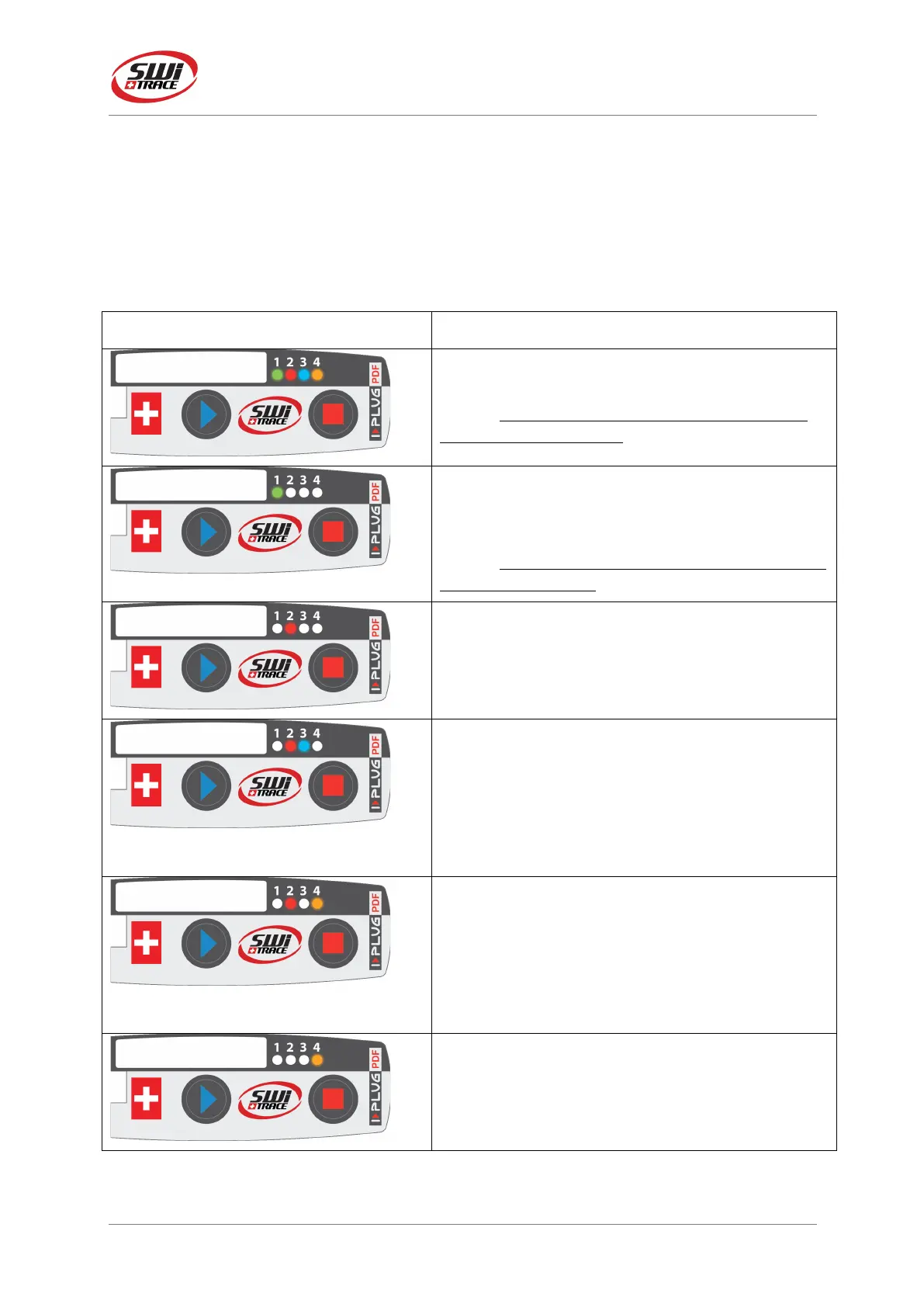
The LEDS will give you valuable information of the conditions of your shipment as indicated
in below table.
If you press START or STOP button briefly, while I-PLUG is running, LEDs will blink.
Here are the meanings:
Appearance%of%I-PLUG%pdf%
4 blinking LEDs
Ready state / Device has not been started.
NOTE: When the device is in a Ready state, only
the start button is active.
In a RUNNING state, when a button is pressed:
Blinking Green
This confirms that the device is already started.
NOTE: there is a fixed green LED during the first 2
minutes of recording.
Fixed Red
Device is in a STOP state.
In a STOP or RUNNING state, when a button is
pressed:
Blinking Blue
Low alarm has been triggered.
Fixed Blue
Ultra-low alarm has been triggered.
In a STOP or RUNNING state, when a button is
pressed:
Blinking Orange
High alarm has been triggered
Fixed Orange
Ultra-high alarm has been triggered.
SAMPLING state.
Orange LED automatically lights for 2 seconds
every time the device performed a temperature
record.


 To Next Page