
 Need help?
Do you have a question about the Sygonix 2380478 and is the answer not in the manual?
Details the meaning of warning symbols used in the manual, like electrical shock and important information.
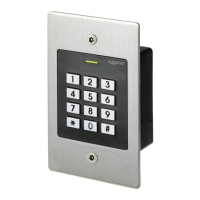
Lists all items included in the product package, such as the code lock and accessories.
Provides instructions on mounting the code lock unit on the wall using provided screws and frame.
Details wiring diagrams for connecting the code lock to a power supply and door openers (fail-secure/fail-safe).
Explains how to connect the code lock to an alarm system, noting the relay switching function.
Describes two options for using the Wiegand interface: code lock as a reader or reader connected to the code lock.
Initial steps after installation, including powering on and standby mode indication.
Instructions on how to enter and exit the programming mode using the master code.
Step-by-step guide to changing the default master code for enhanced security.
Details methods for pairing user transponders via keypad or master transponder.
Describes quick pairing and saving transponders to specific memory cells using the keypad.
Explains how to pair user transponders using the master transponder.
Procedure for deleting transponders using the keypad, either by transponder or memory cell number.
Method for deleting user transponders using the master transponder.
Function to erase all stored user transponders, codes, and visitor data from memory.
Default access mode requiring only a valid transponder or user code.
High-security mode requiring both a transponder and a personal identification number.
Access mode that only requires a valid user transponder.
Procedure for users to change their PIN using their assigned transponder.
Method to change a user's PIN using the memory cell number if the transponder is unavailable.
Configures the duration of the alarm when protection against incorrect entries is activated.
Instructions for pairing visitor transponders and setting their access attempt limits.
Details on saving visitor codes with specific access attempt limitations.
Procedure for removing visitor transponders or codes from memory.
Steps to reset the code lock to defaults and pair a new master transponder.
Procedure for resetting the code lock to factory defaults without pairing a master transponder.
Overview of the initial steps for operating the code lock after installation and setup.
How to gain access using a paired user transponder.
How to gain access using a stored user code.
How to gain access using both a transponder and a user PIN.
Description of accessing via the dedicated door opener button.
Troubleshooting steps for when the door opener mechanism fails to operate.
Addresses issues where the changeover contact stays active or does not switch back.
Solutions for when the RFID sensor fails to read the transponder.
Common reasons and fixes for failure to pair new user transponders.
Troubleshooting for issues encountered when trying to save a user code.
Guidance on resolving problems with the Wiegand interface connection.
 General
| Brand | Sygonix |
|---|---|
| Model | 2380478 |
| Category | Rfid Systems |
| Language | English |

 To Next Page
