EasyManua.ls Logo

SYKIK Rider CR1 - User Manual

Default Icon
2 pages
Print Icon
To Next Page IconTo Next Page
Loading...

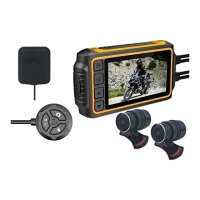
Sykik Rider CR1
Thank you for choosing Sykik. For more informaon and complete user manual,
please visit www.SYKIK.com
Quick Test
 
  !"#$%& !'()"
# !*+#*
, -*".")
Quick Installaon Guide
 /012*."$(.- 
$($#(
 -*#"##*
$"#.- #*(
, 2#)*)$,3.".#(

4  "5"##
0.)6.*#2..0)
"")#7"8.))#9).#)
:)680#9)
Question and Answer IconNeed help?

Do you have a question about the SYKIK Rider CR1 and is the answer not in the manual?

Summary

Sykik Rider CR1 Installation Guide

Initial Quick Test Procedure

Perform a quick test of the DVR host and cameras before proceeding with installation.

Step-by-Step Installation

Instructions for fixing and connecting cameras, controller, and DVR unit using 3M tape or screws.

Camera Adjustment Guide

Horizontal View Angle Adjustment

How to adjust the camera's horizontal view angle by loosening the lens cap and rotating the body.

Overview

This document provides a quick installation guide for the Sykik Rider CR1, a device designed for motorcycle use, likely a dashcam or DVR system.

Function Description:

The Sykik Rider CR1 is a DVR (Digital Video Recorder) system for motorcycles, featuring two cameras (front and rear) and a display unit. It is designed to record footage during rides and can be configured to start and stop recording automatically with the motorcycle's ignition or based on movement. An optional wired controller and GPS tracker enhance its functionality.

Important Technical Specifications (inferred from the document):

  • Display: 2-inch display on the DVR unit.
  • Cameras: Two cameras (Camera 1 and Camera 2) for front and rear recording.
  • Power Input: The system can be powered via a special USB power cable (8" USB to 6-pin round) for testing, or through a standard power module (12V-5V) for permanent installation.
  • Power Connection Options:
    • Standard Power Module: Recommended to connect to the motorcycle's ignition (fuse box, radio, lights, etc.) so the system powers on and off with the bike. Alternatively, it can be connected directly to the battery, but requires manual shutdown to prevent battery drain.
    • Smart Park Module (Optional): Connects directly to the battery. It starts recording when the bike is moved and stops 3 minutes after no movement. It can also be connected to the ignition for engine-synchronized operation.
  • Storage: The system uses a memory card (implied, as "FORMAT THE CARD EVERY WEEK IN MENU" is mentioned).
  • Connectivity:
    • USB for testing.
    • 6-pin round connector for power.
    • Camera inputs.
    • Optional wired controller input.
    • Optional GPS tracker input.
  • Cable Lengths (inferred): A specific instruction mentions "4" DO NOT BEND THIS PART" which might refer to a critical cable section or component.
  • Environmental Considerations: The DVR unit and lens cables should be kept away from high-voltage circuits (e.g., xenon lamps, ignition plugs). For motorcycles with traditional carburetor systems, changing to a suitable R-value ignition plug is suggested to prevent interference.

Usage Features:

  • Quick Test: Before full installation, users can connect the cameras to the DVR and power the DVR via a power bank or USB adapter using the provided special USB power cable. This allows for a quick check to ensure the unit powers up and cameras display footage.
  • Automatic Recording: When connected to the ignition, the system starts and stops recording with the motorcycle.
  • Parking Mode (with Smart Park Module): If the optional Smart Park module is used and connected directly to the battery, the system will automatically start recording when the bike is moved and stop 3 minutes after no movement, providing security while parked.
  • Wired Controller (Optional): An optional wired controller can be fixed over the handlebar for easy access and control.
  • GPS Tracking (Optional): An optional waterproof GPS tracker module can be integrated. It should be placed at least 30cm away from the DVR host and cameras, with the "GPS" icon facing the sky to ensure optimal signal reception and avoid interference.
  • Adjustable Camera Angle: The horizontal view angle of the cameras can be adjusted by loosening the lens cap and rotating the lens body while viewing the screen.

Maintenance Features:

  • Memory Card Formatting: The document explicitly states "FORMAT THE CARD EVERY WEEK IN MENU," indicating a regular maintenance task to ensure optimal recording performance and prevent storage issues.
  • Cable Management: Users are advised to plan the path of camera, power, wired controller, and GPS tracker cables carefully before installation.
  • Component Placement: Recommendations are provided for optimal placement of components:
    • DVR unit: Recommended to be placed under the seat.
    • Front & Rear Cameras: Fixed in appropriate locations.
    • Wired Controller: Fixed over the handlebar.
    • GPS Tracker: Placed 30cm away from the DVR and cameras, with the "GPS" icon facing the sky.
  • Fixing Methods: Components can be fixed using 3M tape, screws, or cable ties, depending on the user's preference and the specific location.
  • Interference Avoidance: Users are cautioned to keep the DVR and lens cables away from high-voltage circuits to prevent interference.

SYKIK Rider CR1 Specifications

General IconGeneral
BrandSYKIK
ModelRider CR1
CategoryDigital Camera
LanguageEnglish

Related product manuals