EasyManua.ls Logo

Sylvania CR202SL8 - User Manual

Sylvania CR202SL8
26 pages
Print Icon
To Next Page IconTo Next Page
Loading...
WATCHING TVINTRODUCTION CONNECTION INITIAL SETTING
OPTIONAL SETTING
INFORMATION
TROUBLESHOOTING
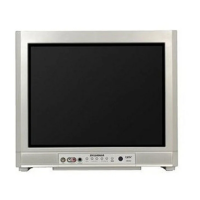
20” Digital / Analog
Television
Owners Manual
CR202SL8
IF YOU NEED ADDITIONAL ASSISTANCE WITH SETUP OR OPERATING AFTER
READING OWNER’S MANUAL, PLEASE CALL TOLL FREE 1-800-968-3429, OR
VISIT OUR WEB SITE AT http://www.SylvaniaConsumerElectronics.com
TO RECEIVE DIGITAL/ANALOG SIGNAL,
YOU MUST CONNECT ANTENNA.
VIDEO
HEADPHONE
MENU VOLUME CHANNEL
POWER
AUDIO RL
P7150UT_EN.indd 1P7150UT_EN.indd 1 2006/11/27 20:53:592006/11/27 20:53:59

Other manuals for Sylvania CR202SL8

Questions and Answers

  • T
    Tina DelgadoAug 15, 2025
    How to fix Sylvania CR202SL8 TV when there is no power?
    • O
      Omar OneillAug 15, 2025
      First, ensure the power cord is securely plugged in. If a power failure has occurred, unplug the power cord for 30 minutes to allow the Sylvania TV to reset.
  • M
    Mary JonesAug 18, 2025
    Why does my Sylvania CR202SL8 have no color?
    • S
      Samantha RothAug 18, 2025
      If your Sylvania TV has no color, check the antenna or cable connection to the main unit. If using an outside antenna, check the wire condition and connection. View other TV channels to see if the problem is limited to the broadcasting station. Also, adjust the COLOR setting in the PICTURE menu.
  • J
    Joseph HernandezAug 21, 2025
    What to do if my Sylvania TV has no picture or sound?
    • B
      brentgarciaAug 21, 2025
      If your Sylvania TV has no picture or sound, check the following: * Ensure the TV is powered on. * Verify the outlet connection. * Check the antenna or cable connection to the main unit. * If using an outside antenna, check its wire condition and connection. * Try viewing other TV channels, as the issue might be with the broadcasting station. * Turn the power off, wait about one minute, and then turn it back on.
  • M
    Marie RiceAug 25, 2025
    Why is the picture quality poor on my Sylvania CR202SL8 but the sound is OK?
    • M
      michaelcherryAug 25, 2025
      If the picture quality is poor but the sound is OK on your Sylvania TV, check the antenna or cable connection to the main unit. If you are using an outside antenna, check the wire condition and connection. Electrical interference from nearby appliances may also affect picture quality, so adjust the CONTRAST and BRIGHT settings in the PICTURE menu. You may also want to view other TV channels, as the problem might be limited to the broadcasting station.
  • J
    Jason HansenAug 27, 2025
    How to improve a weak picture on Sylvania CR202SL8?
    • J
      Jennifer StricklandAug 27, 2025
      To improve a weak picture on your Sylvania TV, check the antenna or cable connection to the main unit. If you're using an outside antenna, inspect the wire condition and connection. Adjust the CONTRAST and BRIGHT settings in the PICTURE menu. Also, view other TV channels to see if the problem is limited to a specific broadcasting station.
  • T
    Thomas LesterAug 30, 2025
    What causes ghosts in the picture on my Sylvania TV?
    • D
      Danny WebsterAug 30, 2025
      If you are seeing ghosts in the picture on your Sylvania TV, check the antenna or cable connection to the main unit. Also, if an outside antenna is being used, check the wire condition and connection. Electrical interference from nearby appliances may affect picture quality. Try viewing other TV channels as the problem might be with the broadcasting station.
  • N
    npalmerSep 2, 2025
    Why is the reception poor on some channels on my Sylvania CR202SL8?
    • P
      Paul PerezSep 2, 2025
      If you're experiencing poor reception on some channels with your Sylvania TV, check the antenna or cable connection to the main unit. If using an outside antenna, check the wire condition and connection. Electrical interference from nearby appliances may also affect picture quality. Try viewing other TV channels to see if the problem is limited to the broadcasting station.
  • C
    Connie MendozaSep 5, 2025
    What causes different color marks on the Sylvania CR202SL8 screen?
    • S
      Sandra KennedySep 5, 2025
      If you notice different color marks on your Sylvania TV screen, try moving the unit away from nearby electric appliances. Turn off the power and wait 30 minutes before turning it back on. You can also view other TV channels to see if the problem is limited to the broadcasting station.
  • M
    Michelle AnthonySep 8, 2025
    Why is the sound poor on my Sylvania CR202SL8 when the picture is OK?
    • S
      Samantha JimenezSep 8, 2025
      If the sound is poor but the picture is OK on your Sylvania TV, electrical interference from nearby appliances may affect sound quality. Try viewing other TV channels to see if the problem is limited to the broadcasting station.
  • B
    brianmillerSep 12, 2025
    Why does the picture roll vertically on my Sylvania CR202SL8?
    • K
      Kevin RobinsonSep 12, 2025
      If the picture rolls vertically on your Sylvania TV, check the wire condition and connection if you are using an outside antenna. Electrical interference from nearby appliances may affect picture quality. Try viewing other TV channels to see if the problem is limited to the broadcasting station.

Summary

Introduction

Important Safeguards

Essential safety instructions for operating the television safely.

Precautions

Warnings and precautions to prevent damage or electric shock.

Remote Control Functions

Detailed explanation of the remote control's buttons and their functions.

Connection

Basic Connection Guide

Instructions for connecting the TV to an antenna or cable/satellite box.

External Device Connections

Guides for connecting external devices like DVD players, VCRs, and game consoles.

Initial Setting

First-Time Setup

Step-by-step guide for the initial setup of the television.

Auto Channel Scanning

How to automatically scan and tune in available TV channels.

Watching TV

Channel Selection Methods

Methods for selecting channels using the remote control or buttons.

Digital vs. Analog Mode

Instructions for switching between digital (DTV) and analog (TV) broadcast modes.

Optional Setting

Closed Caption Settings

How to enable and configure closed captioning for programs.

V-Chip Parental Control

How to block programming based on age ratings for parental control.

Troubleshooting

Troubleshooting Guide

A guide to diagnose and resolve common TV operational issues.

Sylvania CR202SL8 Specifications

General IconGeneral
Aspect Ratio16:9
InputsHDMI, Component, Composite, VGA, RF
Refresh Rate60 Hz
Resolution1366 x 768 (HD)
Display TypeLCD

Related product manuals