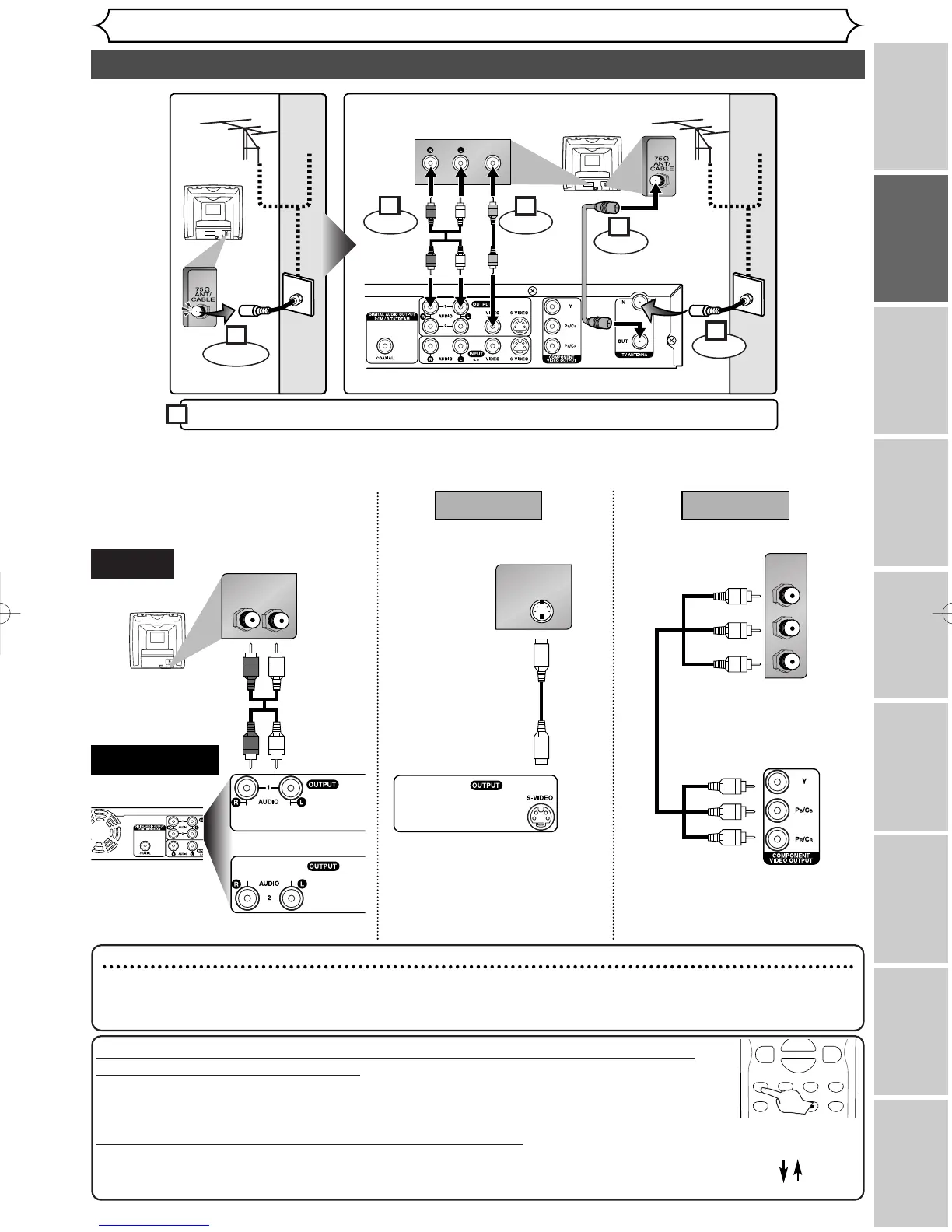
Connection to a TV
Connections
Recording
Playing discs EditingBefore you start Connections Getting started
Changing the SETUP menu
Others Español
Make one of the following connections, depending on the capabilities of your existing equipment.
Note
•
Connect this unit directly to the TV. If the A/V cables are connected to a VCR, pictures may be distorted due to the copy
protection system.
•
When progressive scanning mode is selected, no video signal will be output from the VIDEO OUT or S-VIDEO OUT jack.
If your TV is compatible with 525p (480p) progressive scanning and you want
to enjoy that high quality picture;
You must select the connection Method 2 above and progressive scanning mode.To set
the mode, press and hold the SETUP button on the remote control for more than 3 sec-
onds during DVD playback, so that “P.SCAN” will appear on the display of this unit.
If your TV is not compatible with progressive scanning;
Use this unit in interlace mode. Make sure that no “P.SCAN” is on the display of this unit.
If not, press and hold the SETUP button on the remote control for more than 3 seconds
during DVD playback, so that “P.SCAN” on the display of this unit will disappear.



 To Next Page