EasyManua.ls Logo

Sylvania DVR90DEA - Page 69

Sylvania DVR90DEA
100 pages
Print Icon
To Next Page IconTo Next Page
To Previous Page IconTo Previous Page
Loading...
69
Editing DVD-RW discs in VR mode (Original) (cont’d)
Editing
Recording
Playing discs EditingBefore you start Connections Getting started
Changing the SETUP menu
Others Español
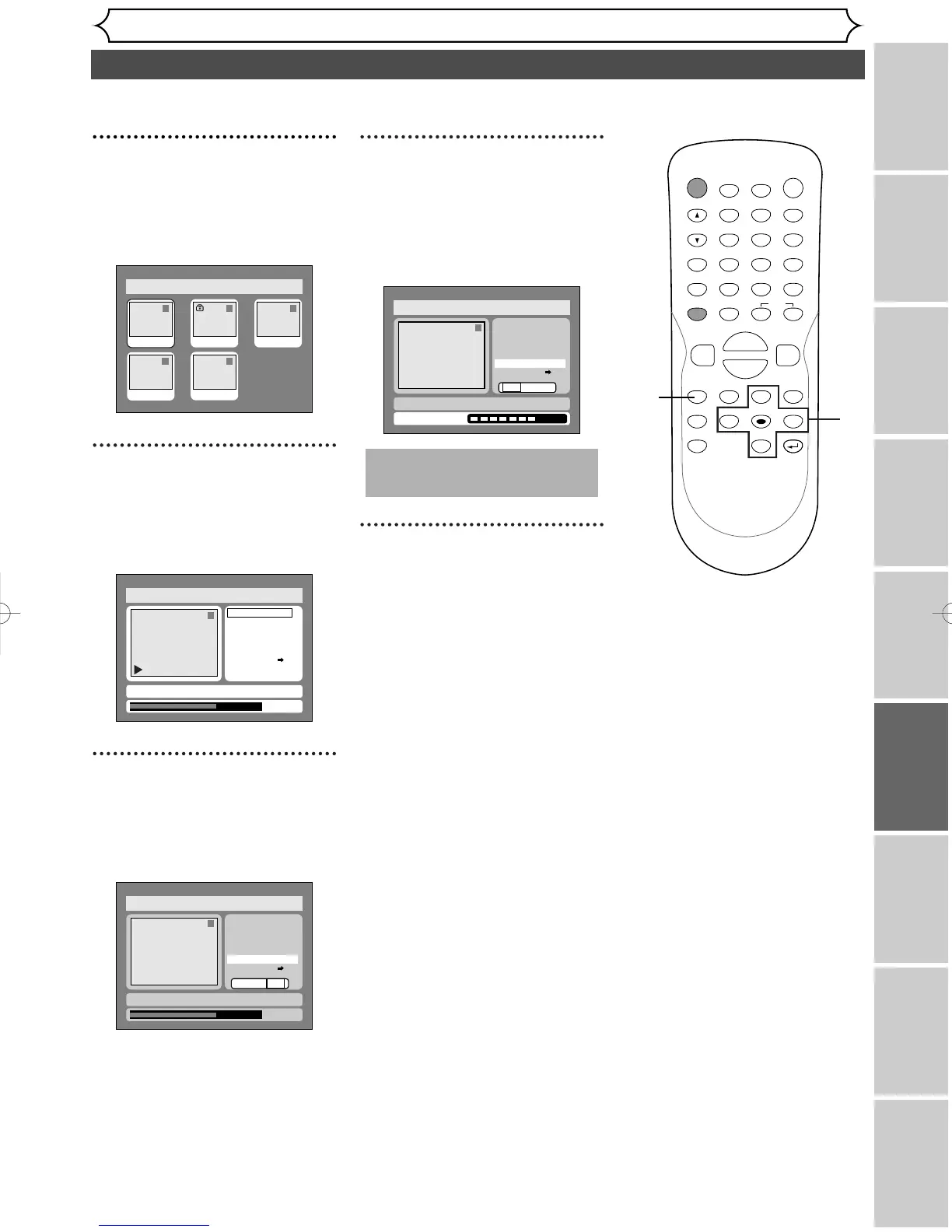
3
Select “Original” using { / B
buttons, then press ENTER
button.
Original list will appear.
4
Select a desired title using K /
L / { / B buttons, then press
ENTER button.
Original menu will appear.
5
Select “Index Picture Set”
using
K / L buttons, then
press ENTER button.
Option window will appear.
6
Select “Yes” using { / B but-
tons, then press ENTER but-
ton.
A picture for thumbnail will be
set.
7
After writing to disc is com-
pleted, press SETUP button
to exit DISC menu.
This operation may take a
while to be completed.
Disc > Edit > Original
1
Yes No
Title Delete
Scene Delete
Edit Title Name
Chapter Mark
Index Picture Set
Protect OFF
ON
Writing to Disc
JAN/ 1 1:00AM CH12 XP
Disc > Edit > Original
1
0:01:25
Yes No
Title Delete
Scene Delete
Edit Title Name
Chapter Mark
Index Picture Set
Protect OFF
ON
JAN/ 1 1:00AM CH12 XP
F
Disc > Edit > Original
1
Title Delete
Scene Delete
Edit Title Name
Chapter Mark
Index Picture Set
Protect OFF
JAN/ 1 1:00AM CH12 XP
0:01:25
ON
Disc > Edit > Original
1 1 32
54
JAN/1 1:00AM
JAN/1 4:00AM
JAN/1 2:00AM JAN/1 3:00AM
JAN/1 5:00AM
POWER
DISPLAY
REC SPEED CLEAR
CM SKIP
SKIP
REC
PAUSE
SETUP
REPEAT
ZOOM
ENTER
RETURN
REC
MONITOR
OPEN/CLOSE
TIMER
PROG.
MENU/LIST
TOP MENU
SPACE
1
2
3
4
5
6
7
8
9
0
F
A
{B
FWD
g
STOP
C
PLAY
B
REV
h
HG
CH
.@/:
ABC
DEF
GHI
JKL
MNO
PQRS
TUV
WXYZ
K
L
7
3
4
5
6
E6501UD_DVR90DEA.qx3 04.3.17 16:27 Page 69

Table of Contents