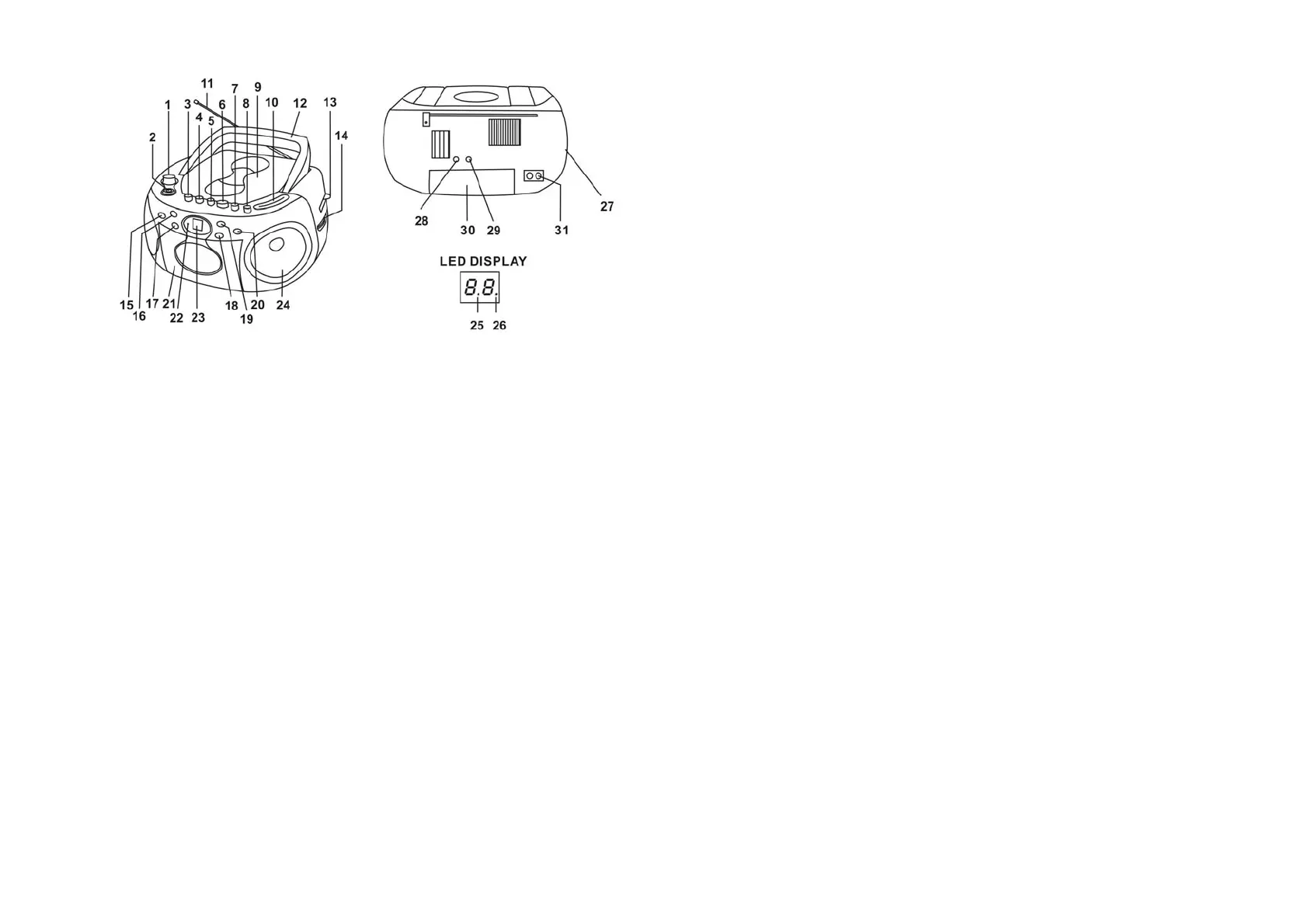
LOCATIONS OF CONTROLS
1 Volume Control 17 CD SKIP/SEARCH BACKWARD Button
2 Open CD Door Button 18 CD REPEAT Button
3 Cassette STOP Button 19 CD PLAY/PAUSE Button
4 Cassette F.FWD Button 20 CD STOP Button
5 Cassette REWIND Button 21 Cassette Compartment
6 Cassette PLAY Button 22 Power Indicator
7 Cassette RECORD Button 23 LED Display
8 Cassette EJECT Button 24 Speaker
9 CD Door 25 REPEAT Indicator
10 Dial Pointer 26 PLAY/PAUSE Indicator
11 FM Antenna 27 FUNCTION Selector
12 Carry Handle 28 HEADPHONE Jack
13 BAND selector 29 Aux-in Jack
14 Tuning Control 30 Battery Door
15 CD PROGRAM Button 31 AC Socket
16 CD SKIP/SEARCH FORWARD Button
- EN 4 -
AC OPERATION
Connect the plug to the AC socket of the unit and the other end to a standard AC outlet.
ATTENTION
1. Do not plug or unplug the power cable if you have wet hands.
2. If you are not planning to use the unit for an extended period of time, disconnect the power
cable from the wall outlet.
3. When disconnecting the power cord from the wall outlet. In order to avoid damage to the power
cord and electric shock, do not pull on the cord; pull firmly at the base of the plug.
BATTERY OPERATION
Disconnect the AC Cord completely. Open the Battery Compartment Door and insert six "C" size
batteries into the battery compartment with the battery polarity matching the polarity as shown inside
the battery compartment.
RADIO OPERATION
1. Set the FUNCTION Selector to the RADIO position.
2. Slide the BAND Selector to the AM or FM position.
3. Turn the TUNING Control to your desired radio station.
4. Adjust the sound level by rotating the VOLUME Control.
ANTENNA
For best reception, fully extend the FM Antenna to receive FM stations. For AM reception, the unit
has a built-in antenna, turn the whole unit for the best reception.
CD FUNCTION
To play a CD, please follow these steps.
1. Set the FUNCTION Selector to the CD position.
2. Insert the CD disc in the CD compartment and close the CD door, the unit will start reading the
disc, the LED display will show the total number of tracks of the entire disc after reading.
3. Press the CD PLAY/PAUSE button to start playing the CD.
4. Adjust the VOLUME Control to the desired volume level.
5. Press the CD STOP button, to stop playing the CD.
Skip Mode
1. During play or pause mode, if the CD SKIP/SEARCH FORWARD button is pressed, it will go to
the next track and display the track number on the LED Display. If in play mode, the next track
will begin to play. If in pause mode, it will remain paused.
2. During play or pause mode, if the CD SKIP/SEARCH BACKWARD button is pressed once, it
will go back to the beginning of the track and display the number on the LED Display. If in play
mode, the next track will begin to play. If in pause mode, it will remain paused.
3. During play or pause mode, if the CD SKIP/SEARCH BACKWARD button is pressed twice, it
will go to the previous track.
- EN 5 -


 To Next Page