OPERATIONS (Continued)
• When you select the rating category and turn it [BLOCK], the higher rating will torn [BLOCK[
automatically. Also, the lower rating will torn [VIEW] automatically.
• When you torn "G" to [BLOCK[ or [VIEW], the all ratings will turn to [BLOCK] or [VIEWl
automatically.
• When you torn "X" to [VIEW], the all ratings will turn to [VIEW] automatically.
6) Press the MENU button to exit the menu.
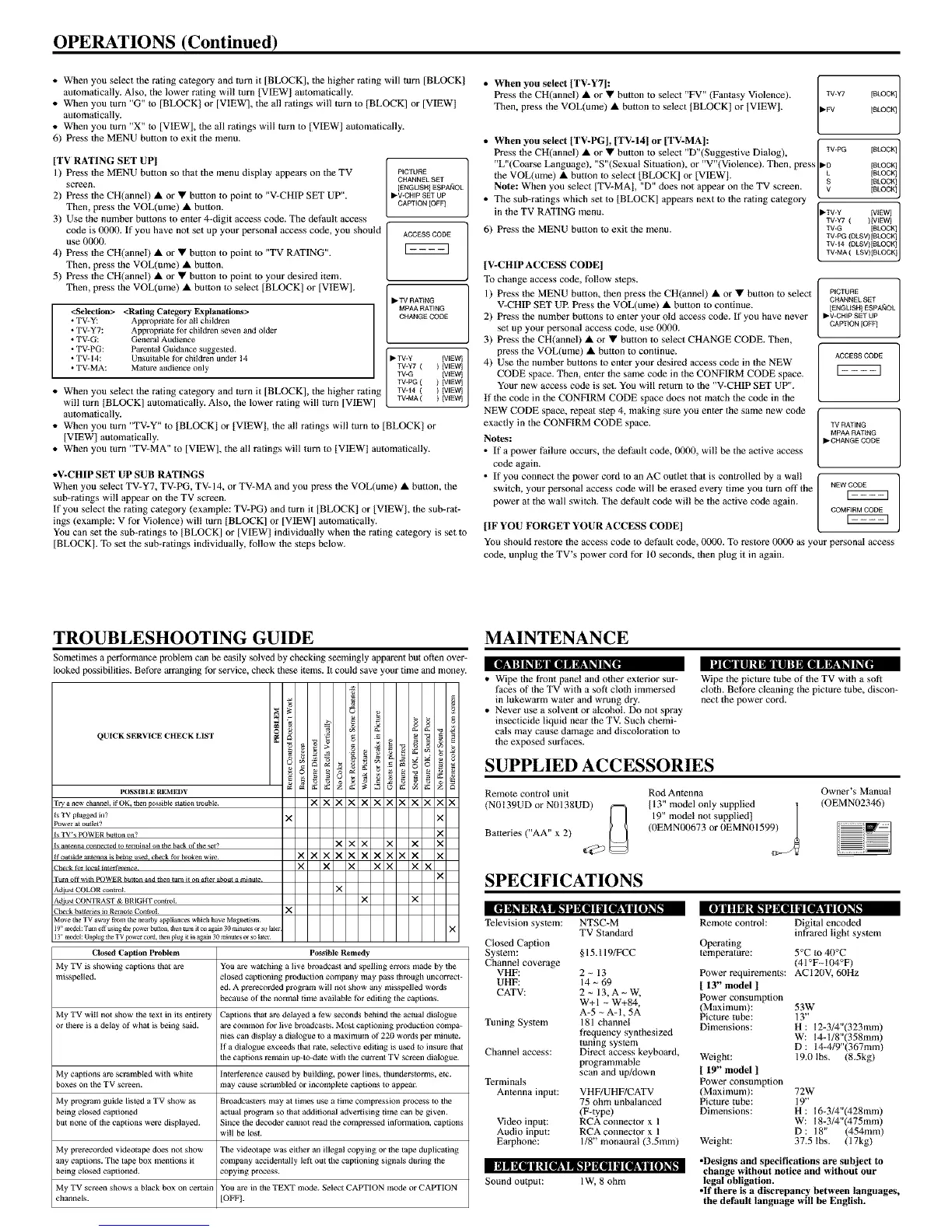
[TV RATING SET UP]
1) Press the MENU button so that the menu display appears on the TV
screen,
2) Press the CH(annel) • or • button to point to "V-CHIP SET UP".
Then, press the VOL(ume) • button.
3) Use tile number buttons to enter 4-digit access code. The default access
code is 00fKh If you have not set up your personal access code, you should
use 0000.
4) Press the CH(annel) • or • button to point to "TV RATING".
Then, press the VOL(ume) • button,
5) Press the CH(annel) • or • button to point to your desired item.
Then, press the VOL(ume) • button to select [BLOCK] or [VIEW].
<Selection> <Rating Category Explanations>
• TV-Y: Appropriale for eli children
• TV-Y7: Appropriate for children seven and older
• TV-G: Genel_t Audience
• TV-PG: Parental Guidance suggested.
• TV-14: Unsuitable for children under 14
• TV-MA: Matm_ audience only
• When you select the rating category and turn it [BLOCK], the higher rating
will turn [BLOCK] automatically. Also, the lower rating will torn [VIEW]
automatically.
PICTURE
CHANNEL SET
[ENGUSH] £SPA_OL
I1_V-CHIP SET UP
CAPTION [OFFI
ACC£SS CODE
• TV RATING
MPAA FtAT_NG
CHANGE CODE
I_TV*Y IVIEWl ]
TVW7 ( ) FIEWl
TV-G [VIEW]
TV*PG ( ) [VIEW]
TV44 ( ) IWEWl
TWMA ( ) IWEW]
• When you turn "TV-Y" to [BLOCK] or [VIEW], the all ratings will torn to [BLOCK] or
[VIEW] automatically.
• When you torn "TV-MA" to [VIEW], the all ratings will turn to [VIEWl automatically.
• V-CHIP SET UP SUB RATINGS
When you select TV-Y7, TV-PG, TV-14, or TV-MA and you press the VOL(ume) • button, the
sul>ratings will appear on the TV screen.
If you select the rating category (example: TV-PG) and turn it IBLOCK] or [VIEW), the sub-rat-
ings (example: V for Violence) will turn [BLOCK] or ]VIEW] automatically.
You can set the sub-ratings to [BLOCK] or [VIEWI individually when the rating category is set to
[BLOCK]. To set the sub-ratings individually, follow the steps below.
• When you select [TV-Y7]:
Press the CH(annel) • or • button to select "FV" (Fantasy Violence).
Then, press the VOL(ume) • button to select IBLOCK] or ]VIEW].
• When you select [TV-PG], [TV-14] or [TV:MA]:
Press the CH(annel) • or • button to select "D"(Suggestive Dialog),
"L"(Coarse Language), "S"(Sexual Situation), or "V"(Violence). Then, press
the VOL(ume) • button to select [BLOCK] or [VIEWI.
Note: When you select [TV-MAI, "D" does not appear on the TV screen.
• The sub-ratings which set to [BLOCK] appears next to the rating category
in the TV RATING menu.
6) Press the MENU button to exit the menu.
,7' :2:
TV*PG [BLOCK]
_'D [BLOCK]
L [BLOCK1
S [BLOCK]V [BLOCKl
_'TV-Y [VIEW1
TV*Y7 ( ) [VIEW1
TV*G [BLOCK]
TV*MA ( LSV)[BLOCK 1
TV*PG (DLSV)[BLOCK]
TV*14 (DLSV)[BLOCK 1
PICTURE
CHANNEL SET
[ENGLISH l ESPA_IOL
,V_CHIP SET UP
CAPTION [OFF]
ACCESS CODE
TV RATING
MPAA RATING
_-CHANGE CODE
NEW CODE
r====q
COMFtRM CODE
r====q
[V-CH1P ACCESS CODE]
To change access code, follow steps.
l) Press the MENU button, then press the CH(annel) • or • button to select
V-CHIP SET UE Press the VOL(ume) • button to continue.
2) Press the number buttons to enter your old access code. If you have never
set up your personal access code, use OIKKI.
3) Press the CH(annel) • or • button to select CHANGE CODE. Then,
press *he VOL(ume) • button to continue.
4) Use the number buttons to enter your desired access code in the NEW
CODE space. Then, enter tbe same code in the CONFIRM CODE space.
Your new access code is set. You will return to the "V-CHIP SET UP".
if the code in *he CONFIRM CODE space does not match the code in the
NEW CODE space, repeat step 4, making sure you enter the same new code
exactly in the CONFIRM CODE space.
Notes:
• If a power l_ilure occurs, the default code, 0IKKh will be the active access
code again.
• If you connect the power cord to an AC outlet that is controlled by a wall
switch, your personal access code will be erased every time you turn off the
power at the wall switch. The default code will be the active code again.
[IF YOU FORGET YOUR ACCESS CODE]
You should restore the access code to default code, 0000. To restore 0000 as your personal access
code, unplug the TV's power cord for 10 seconds, then plug it in again.
TROUBLESHOOTING GUIDE
Sometimes a peffommnce problem can be easily solved by checking seemingly apparent but often over-
looked possibilities. Before arranging for service, check these items. It could save your time and money.
IU[II|II'4_ I Ill H If m _IL'! I_[.[IILIIIIIi_I_IIIIIIIImlll_lII_I
QUICK SERVICE CHECK L1KF
PtlSSIBLE REMEDY
r a new channel, if OK, then possible statiolt trouble.
Is TV plugged in?
Po'_ er at outlet?
Is TV's POWER button on?
Is altgelma connected to terlnlnal Olt the back of the set?
If outside antenna is being used check for broken wi_
_eck for local interference¸
Turn off with POWER button aad then runt it oil after about a minute
Adjust COLOR control¸
Adiust CONTRAST & BRIGHI" control
Check bat _efie.s in Remote Comrol
Move tim TV away from the nearby appiianc_ which have Magnetism¸
19" model: q'u_ _ using the power bu[ton, then tun] it on again 30 minutes _ so la[er
13" model: Unpltlg lhe TV power co_, [hen plug i[ in _ain 30 mlnu_es or so lale_
Clost_l Caption Problem
My TV is showing captions that are
misspelled.
_a
"3
x
x
>_
>
x
x
x xx
x xx
= ©
XX X
X
11] I | I I It['t ',i_[111|[ll| U[1|_Ill _1_1_!'ILl Ill.'! 'JP(Ii I |[ll¥ l (ll_k
PossiMe Remedy
You are watching a live broadcast and spelling errol_s made by the
closed captioning production company may pass through UTlCorrect-
ed. A prerecorded program will not show any misspelled words
because of the normal time available _r editing the captions.
My TV will not show the text in its entirety Captions that are delayed a few seconds behind the actual dialogue
or there is a delay of what is being said. are common for live broadcasts. Most captioning production compa-
nies can display a dialogue to a maximum of 220 words per minute.
If a dialogue exceeds that rate, selective editing is used to insure that
• e captions remain up-to-date with the current TV screen dialogue.
My captions are scrambled with white Interference caused by building, power lines, thunders_rms, etc.
boxes on the TV screen, may cause scrambled or incomplete captions to appear.
My program guide listed a TV show as Broadcasters may at times use a time compression process to the
being closed captioned actual program so that additional advertising gme can be given.
but none of the captions were displayed. Since the decoder cannot read the compressed information, captions
will be lost.
My prerecorded videotape does not show The videotape was either an illegal copying or the tape duplicating
any captions. The tape box mentions it company accidentally left out the captioning signals during the
being closed captioned, copying process.
My TV screen shows a black box on certain You are in the 'I_XT mode. Select CAtq'ION mode or CAPPION
channels. [OFF L
MAINTENANCE
• Wipe the front panel and other exterior sur-
faces of the TV with a soft cloth immersed
in lukewarm water and wrung dry.
• Never use a solvent or alcohol. Do not spray
insecticide liquid near the TV. Such chemi-
cals may cause damage and discoloration to
the exposed surfaces.
Wipe the picture tube of the TV with a soft
cloth. Before cleaning the picture tube, discon-
nect the power cord.
SUPPLIED ACCESSORIES
Remote control unit
(NO 139UD or NIl138UD)
Batteries ("AA" x 2)
Rod Antenna
113:: "::°°ddeeln°nlySpPPlPileide_ n
(0EMN00673 or I/EMN01599)
Owner's Manual
(OEMN02346)
SPECIFICATIONS
Television system: NTSC-M
TV Standard
Closed Caption
System:
Channel coverage
VHE:
UHE:
CATV:
Tuning Systom
Channel access:
§15.119_CC
2~13
14 ~ 69
2 ~ 13, A ~ W,
W+l ~ W+84,
A-5 ~ A-I, 5A
181 channel
frecluency synthesized
tuning system
Direct access keyboard,
programmable
scan and up/down
Terminals
Antenna input: VHF/UHF/CATV
75 ohm unbalanced
(F4ype)
Video input: RCA connector x 1
Audio input: RCA connecter x l
Earphone: 1/8" monaural (3.5ram)
Sound output: 1W, 8 ohm
Remote control: Digital encoded
infrared light system
Operating
temperature: 5°C to 40°C
(41 °F~104°F)
Power requirements: AC120V, 60Hz
[ 13" model ]
Power consumption
(Maximum):
Picture tube:
Dimensions:
Weight:
[ 19" model ]
Power consumption
(Maximum):
Picture tube:
Dimensions:
Weight:
53W
13"
H : 12-3/4"(323mm)
W: 14q/8"(358mm)
D: 144/9"(367mm)
19.0 Ibs. (8.5kg)
72W
19"
H : 16-3/4"(428mm)
W: 18-3/4"(475mm)
D : 18" (454mm)
37.5 Ibs. (17kg)
•Designs and specifications are subject to
change without notice and without our
legal obligation.
•If there is a discrepancy between languages,
the default language will be English.



 To Previous Page
 Loading...