General Description
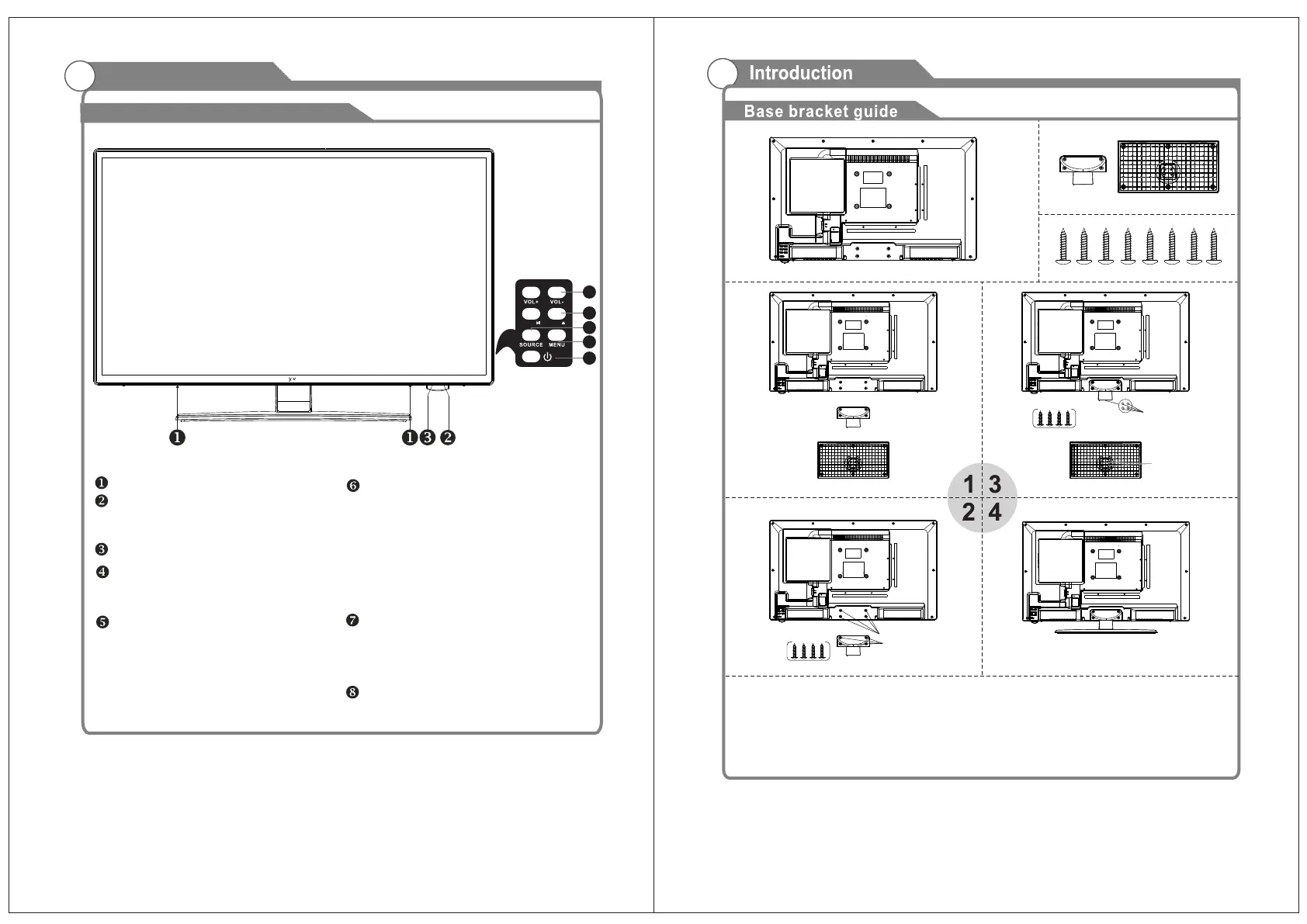
Overview of front and side panel
5
SPEAKER
REMOTE CONTROL SENSOR
POWER INDICATOR
Green: In power on mode.
Red: In standby mode.
MENU
Press to see an on-screen menu of your
TV's features.
SOURCE
Change and select the desired mode.
CH+/-
Press to change channels.
In the on-screen menu, use the CH +/-
buttons as up/down arrow buttons.
VOL+/-
Press to increase or decrease the volume.
In the on-screen menu, use the VOL +/-
buttons as left/right arrow buttons.
POWER
Press this button to turn the TV on or off.
6
5
4
8
S l
o
x
7
6
Instruction:
1.Place the TV unit on a flat and clean table.
2.Fix stand by 4 pcs screws via screw hole B and A.
3.Fix stand by 4 pcs screws via screw hole D and C.
Screw
Screw hole A
Screw hole B
Screw
Screw hole C
Screw hole D
PLAY
Play/stop DVD (in DVD mode).
EJECT
Eject DVD.
CH+ / CH- /


 To Next Page