External Connection
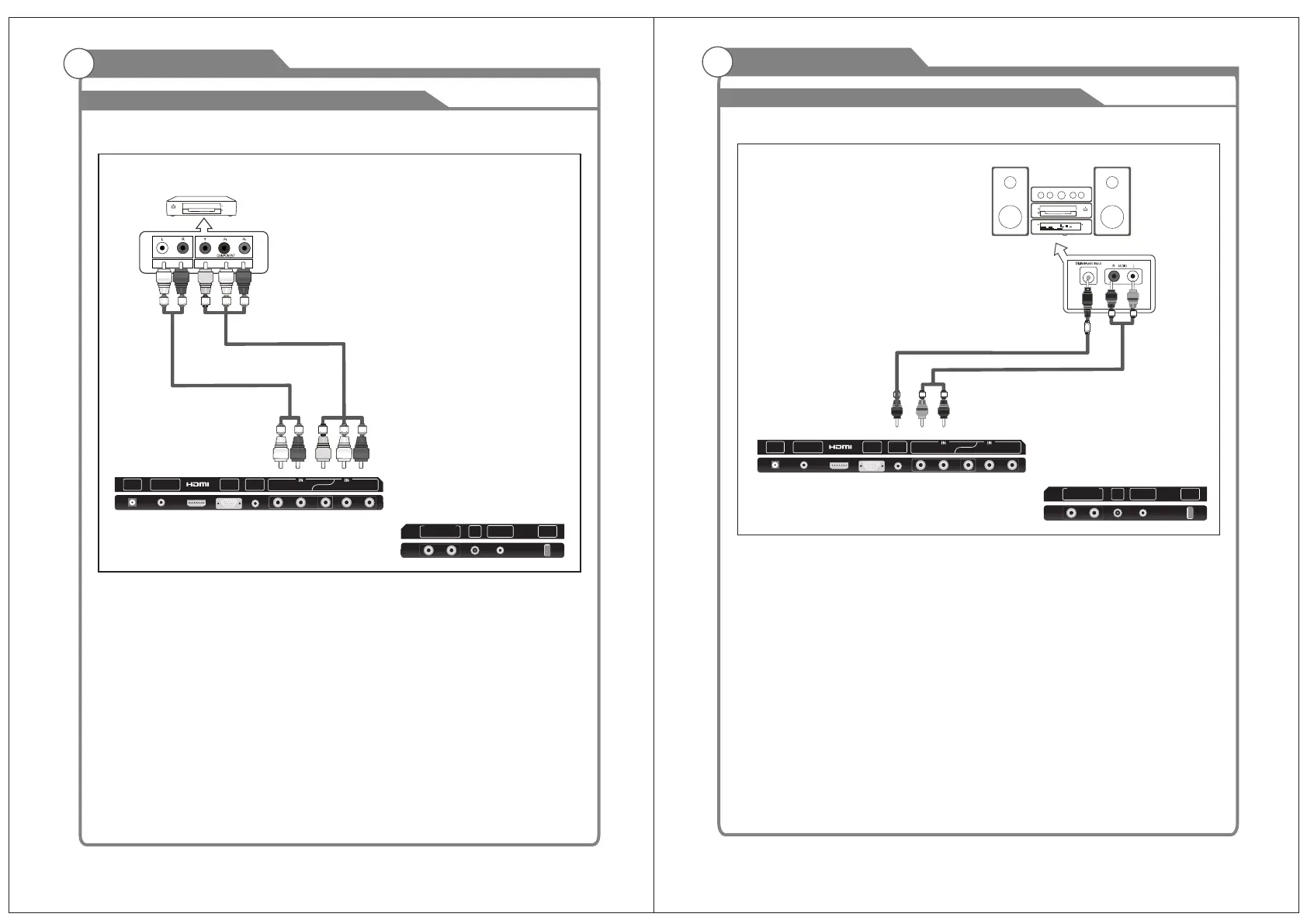
Connecting DVD Player/Set-Top Box
and the AUDIO OUT jacks on the DVD player.
the TV and the COMPONENT [Y, PB, PR] jacks on the DVD player.
The rear panel jacks on your TV make it easy to connect a DVD to your TV.
Component video separates the video into Y (Luminance (brightness)), Pb (Blue) and Pr
(Red) for enhanced video quality.
Be sure to match the component video and audio connections.
For example, if connecting the video cable to COMPONENT IN, connect the audio
cable to COMPONENT IN also.
Each DVD player/STB has a different back panel configuration.
When connecting a DVD player/STB, match the color of the connection terminal to the
cable.
We recommend the use of cables with a Ferrite Core.
1. Connect a Component Cable between the COMPONENT IN [Y, PB, PR] jacks on
2. Connect Audio Cables between the COMPONENT IN [R-AUDIO-L] jacks on the TV
Component Cable (Not supplied)
DVD Player/Set-Top Box
Audio Cable (Not supplied)
11
12
External Connection
Connecting Digital Audio System
The rear panel jacks on your TV make it easy to connect a Digital Audio System to your TV.
5.1 CH audio is possible when the TV is connected to an external device supporting 5.1
CH.
We recommend the use of cables with a Ferrite Core.
Digital Audio System
2.R/L audio out
Audio out: output single from TV, AV, HDMI, PC.
Audio Out can be used to connect to an external Amp, Wallmount Stereo or Home
Entertainment System.
This volume output is not controlled by the volume control on the TV or Remote Control.
To use this function, turn down the volume on the TV and use the volume control
from AV Amp / Stereo / Tuner or Home Theater System.
COAXIAL
AUDIO Cable (Not supplied)
1.Connect COAXIAL Cable between the COAXIAL jacks on the TV and the Digital
Audio amplifier.
Input jacks on the Digital Audio System. When a Digital Audio System is connected
to the COAXIAL terminal: Decrease the gain (volume) of the TV, and adjust the
volume level using the Digital Audio system's volume control.
COAXIAL Cable
(Not supplied)
RF USB
COAXIAL
OUT
L
R
AUDIO OUT
EARPHONE
OUT
L
R
Y
VIDEO
Pb
Pr
DC IN
VGA
IN
PC
AUDIO
IN
RF USB
COAXIAL
OUT
L
R
AUDIO OUT
EARPHONE
OUT
L
R
Y
VIDEO
Pb
Pr
DC IN
VGA
IN
PC
AUDIO
IN


 To Next Page
 Loading...