EasyManua.ls Logo

SYNACORP i-Copy V300CD-PRO - User Manual

SYNACORP i-Copy V300CD-PRO
5 pages
Print Icon
To Next Page IconTo Next Page
Loading...
_____________________________________________________________________________________
For purchase & enquiries, please contact sales@synacorp.com.my or call 04-5860026
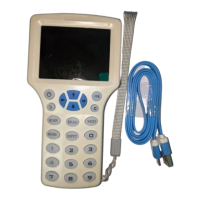
RFID Copier Duplicator i-Copy V300CD-PRO
Introduction:
Easily duplicate your access card or key FOB with this Handheld V300CD-PRO. Manual
key input supported so that you can manually input the serial number if you do not have the
physical access to the card / tag.
Features:
2.9-Inch HD full color LCD display, multilingual English & Chinese.
Supported frequency 125KHz, 250KHz, 375KHz, 500KHz, 625KHz, 750KHz, 875KHz, 1000
KHz & 13.56MHz.
Comes with keypad for easy manual card/tag number input.
Can use with battery (4pcs AAA Battery) or with 5v Micro USB power input sources
(Compatible with 5v phone charger, Power bank, PC etc.).
Buzzer indicator for operation.
PC Software included for more advance features.
Question and Answer IconNeed help?

Do you have a question about the SYNACORP i-Copy V300CD-PRO and is the answer not in the manual?

Summary

Introduction to RFID Copier Duplicator

Device Overview and Components

Procedures for RFID Card Operations

How to Copy RFID Cards;Tags

Step-by-step guide on duplicating access cards or RFID tags using the device's scanning and writing functions.

Connecting Device with PC Software

Instructions for connecting the device to a PC via USB and installing the provided Windows software for advanced features.

Program Features and Functionality

HighFreqCard for 13.56 MHz

Details on using the software's HighFreqCard module for 13.56 MHz RFID cards, including decode, read, and write operations.

LowFreqCard for 125-1000 KHz

Details on using the software's LowFreqCard module for 125 KHz to 1000 KHz RFID cards, including read and write functions.

DataCompare Feature

Functionality to compare dumped data between different RFID cards using the software interface.

System Update Center

Information regarding the system's update center for checking and applying software or firmware updates.

Summary

Introduction to RFID Copier Duplicator

Device Overview and Components

Procedures for RFID Card Operations

How to Copy RFID Cards;Tags

Step-by-step guide on duplicating access cards or RFID tags using the device's scanning and writing functions.

Connecting Device with PC Software

Instructions for connecting the device to a PC via USB and installing the provided Windows software for advanced features.

Program Features and Functionality

HighFreqCard for 13.56 MHz

Details on using the software's HighFreqCard module for 13.56 MHz RFID cards, including decode, read, and write operations.

LowFreqCard for 125-1000 KHz

Details on using the software's LowFreqCard module for 125 KHz to 1000 KHz RFID cards, including read and write functions.

DataCompare Feature

Functionality to compare dumped data between different RFID cards using the software interface.

System Update Center

Information regarding the system's update center for checking and applying software or firmware updates.

SYNACORP i-Copy V300CD-PRO Specifications

General IconGeneral
BrandSYNACORP
Modeli-Copy V300CD-PRO
CategoryMeasuring Instruments
LanguageEnglish
