Manufacturing Plant : Light Instruments Ltd. Tavor Building #1, 3rd floor. P.O. Box 223, Yokneam , 20692 Israel
TAL.COM, WWW.SYNERONDENdental@syneron.com
: 732442610 , -972 732442600 , -: 972
LiteTouch Aesthetic Peri-Oral Handpiece Quick Reference
Guide
The LiteTouch system offers a proprietary aesthetic applications operating
mode;
Intended use –
The aesthetic accessory is intended to perform aesthetic treatments in the
peri-oral region such as peri-oral rhytides/ creases.
Effect –
The Er:YAG laser in the LiteTouch system operates by absorption of the
energy by the tissue up to 30 µm deep. The energy absorbed in the tissue
causes it to heat and evaporates. Neighboring unaffected tissue is stretched
over the damaged site in an effort to cover its resulting in new skin layer over
the treated crease/ lesion.
Treatment setting –
• Select Soft Tissue mode in the system.
• Select Aesthetic mode – (turn off water spray, this will allow compressed
air through the handpiece for the purpose of cooling the treatment site.
• System setting:
Select Energy – 50 [mJ]
Frequency – 10 [Hz]
• Choose treatment tip – MP7746: Wide Short, MP7748: Wide Long,
MP7752: Narrow Short, MP7753: Narrow Long (see picture above).
(longer tip for decreasing the energy application, narrow tip for a
smaller lesion treatment)

 Need help?
 General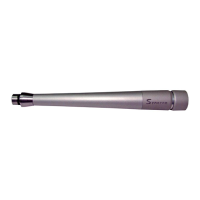

 To Next Page