EasyManua.ls Logo

Synology DS723+ - 2.6 Start Up Your Synology NAS

Synology DS723+
50 pages
Print Icon
To Next Page IconTo Next Page
To Previous Page IconTo Previous Page
Loading...
18
N
ot
e
s
:
H
o
ld
t
he
SS
D
m
o
d
u
le
b
y
i
ts
edge
a
nd
a
vo
id
tou
ching
t
he
g
o
ld
c
o
nnec
tors
.
S
t
a
rt
f
ro
m
t
he
s
l
ot
1.
I
n
s
e
rt
your
SS
D
m
o
d
u
le
in
to
t
he
em
pty
s
l
ot
:
a
A
lign
t
he
s
m
a
ll
g
a
p
be
tw
een
t
he
g
o
ld
c
o
nnec
tors
o
f
t
he
SS
D
m
o
d
u
le
w
i
t
h
t
he
n
ot
ch
in
t
he
em
pty
s
l
ot
.
I
n
s
e
rt
t
he
m
o
d
u
le
in
to
t
he
s
l
ot
.
Ma
ke
sur
e
t
h
a
t
t
he
m
o
d
u
le
i
s
prop
e
r
l
y
in
s
e
rt
ed
.
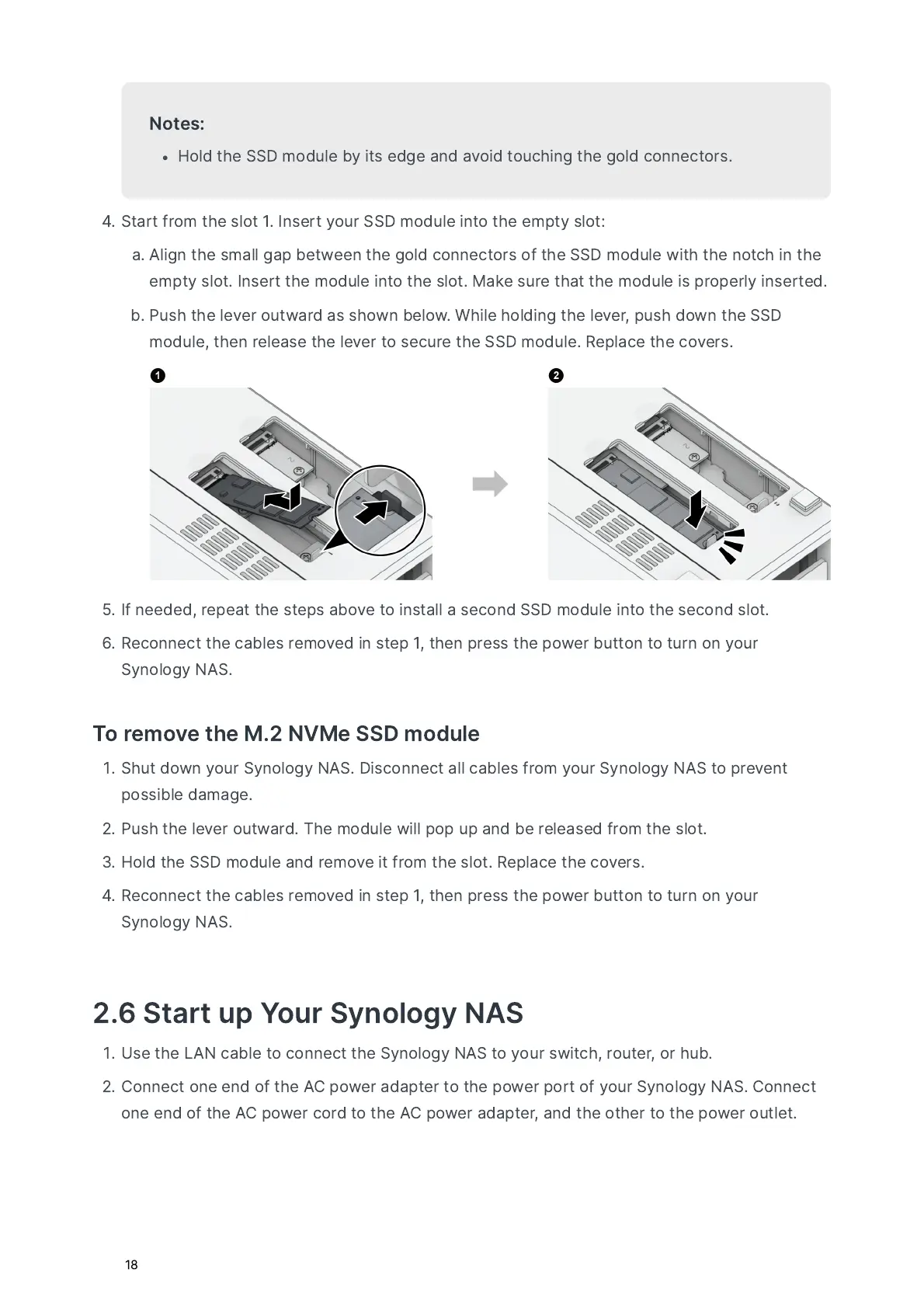
b
P
us
h
t
he
le
v
e
r
outw
a
r
d
a
s
s
h
ow
n
bel
ow
.
W
hile
h
o
lding
t
he
le
v
e
r
,
pus
h
d
ow
n
t
he
SS
D
m
o
d
u
le
,
t
hen
r
ele
a
s
e
t
he
le
v
e
r
to
s
ec
ur
e
t
he
SS
D
m
o
d
u
le
.
R
e
p
l
a
ce
t
he
c
ov
e
rs
.
I
f
needed
,
r
e
p
e
a
t
t
he
st
e
ps
a
b
ov
e
to
in
st
a
ll
a
s
ec
o
nd
SS
D
m
o
d
u
le
in
to
t
he
s
ec
o
nd
s
l
ot
.
R
ec
o
nnec
t
t
he
c
a
ble
s
r
em
ov
ed
in
st
e
p
1,
t
hen
pr
e
ss
t
he
pow
e
r
b
utto
n
to
tur
n
o
n
your
S
y
n
o
l
o
g
y
N
A
S
.
T
o
r
em
ov
e
t
he
M
.2
NVM
e
SS
D
m
o
d
u
le
S
h
ut
d
ow
n
your
S
y
n
o
l
o
g
y
N
A
S
.
D
i
s
c
o
nnec
t
a
ll
c
a
ble
s
f
ro
m
your
S
y
n
o
l
o
g
y
N
A
S
to
pr
e
v
en
t
poss
ible
d
a
m
a
ge
.
P
us
h
t
he
le
v
e
r
outw
a
r
d
.
T
he
m
o
d
u
le
w
ill
pop
up
a
nd
be
r
ele
a
s
ed
f
ro
m
t
he
s
l
ot
.
H
o
ld
t
he
SS
D
m
o
d
u
le
a
nd
r
em
ov
e
i
t
f
ro
m
t
he
s
l
ot
.
R
e
p
l
a
ce
t
he
c
ov
e
rs
.
R
ec
o
nnec
t
t
he
c
a
ble
s
r
em
ov
ed
in
st
e
p
1,
t
hen
pr
e
ss
t
he
pow
e
r
b
utto
n
to
tur
n
o
n
your
S
y
n
o
l
o
g
y
N
A
S
.
2.6
S
t
a
rt
up
Y
our
S
y
n
o
l
o
g
y
N
A
S
U
s
e
t
he
L
A
N
c
a
ble
to
c
o
nnec
t
t
he
S
y
n
o
l
o
g
y
N
A
S
to
your
sw
i
t
ch
,
rout
e
r
,
or
h
u
b
.
C
o
nnec
t
o
ne
end
o
f
t
he
AC
pow
e
r
a
d
a
pt
e
r
to
t
he
pow
e
r
port
o
f
your
S
y
n
o
l
o
g
y
N
A
S
.
C
o
nnec
t
o
ne
end
o
f
t
he
AC
pow
e
r
c
or
d
to
t
he
AC
pow
e
r
a
d
a
pt
e
r
,
a
nd
t
he
ot
he
r
to
t
he
pow
e
r
out
le
t
.

Related product manuals