EasyManua.ls Logo

Synology RS2423+ - 2.6 Expansion Unit Deployment and Topology

Synology RS2423+
46 pages
Print Icon
To Next Page IconTo Next Page
To Previous Page IconTo Previous Page
Loading...
21
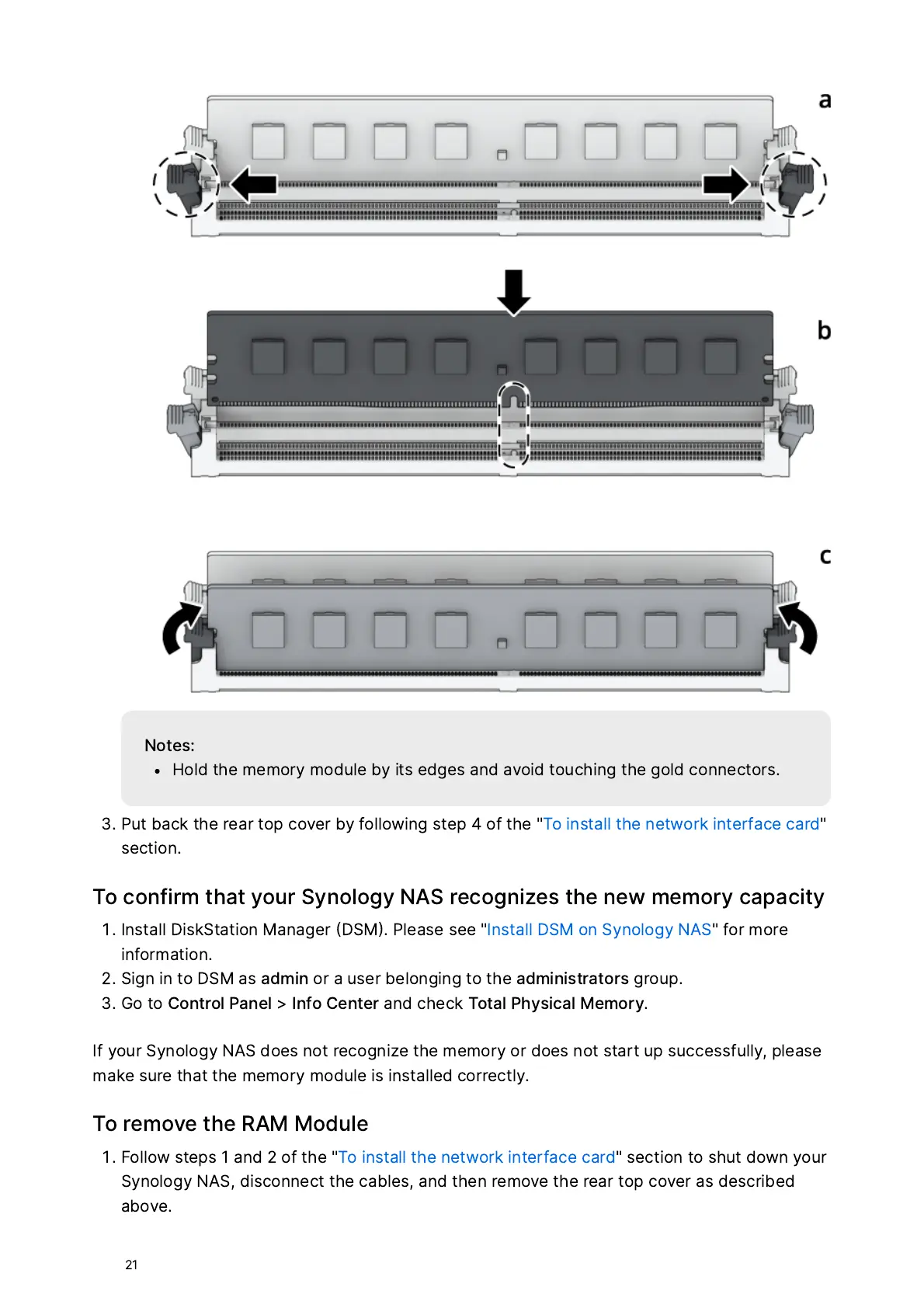
N
ot
e
s
:
H
o
ld
t
he
mem
ory
m
o
d
u
le
b
y
i
ts
edge
s
a
nd
a
vo
id
tou
ching
t
he
g
o
ld
c
o
nnec
tors
.
P
ut
b
a
ck
t
he
r
e
a
r
top
c
ov
e
r
b
y
f
o
ll
ow
ing
st
e
p
4
o
f
t
he
"
T
o
in
st
a
ll
t
he
ne
twor
k
in
t
e
r
f
a
ce
c
a
r
d
"
s
ec
t
i
o
n
.
T
o
c
o
nfi
r
m
t
h
a
t
your
S
y
n
o
l
o
g
y
N
A
S
r
ec
o
gni
z
e
s
t
he
ne
w
mem
ory
c
a
p
a
ci
ty
I
n
st
a
ll
D
i
s
k
S
t
a
t
i
o
n
Ma
n
a
ge
r
D
SM
.
P
le
a
s
e
s
ee
"
I
n
st
a
ll
D
SM
o
n
S
y
n
o
l
o
g
y
N
A
S
"
f
or
m
or
e
inf
or
m
a
t
i
o
n
.
S
ign
in
to
D
SM
a
s
a
dmin
or
a
us
e
r
bel
o
nging
to
t
he
a
dmini
str
a
tors
g
roup
.
G
o
to
C
o
n
tro
l
Pa
nel
>
I
nf
o
C
en
t
e
r
a
nd
check
T
ot
a
l
P
h
ys
ic
a
l
M
em
ory
.
I
f
your
S
y
n
o
l
o
g
y
N
A
S
d
o
e
s
n
ot
r
ec
o
gni
z
e
t
he
mem
ory
or
d
o
e
s
n
ot
st
a
rt
up
su
cce
ss
f
u
ll
y
,
p
le
a
s
e
m
a
ke
sur
e
t
h
a
t
t
he
mem
ory
m
o
d
u
le
i
s
in
st
a
lled
c
orr
ec
t
l
y
.
T
o
r
em
ov
e
t
he
R
A
M
M
o
d
u
le
F
o
ll
ow
st
e
ps
1
a
nd
2
o
f
t
he
"
T
o
in
st
a
ll
t
he
ne
twor
k
in
t
e
r
f
a
ce
c
a
r
d
"
s
ec
t
i
o
n
to
s
h
ut
d
ow
n
your
S
y
n
o
l
o
g
y
N
A
S
,
di
s
c
o
nnec
t
t
he
c
a
ble
s
,
a
nd
t
hen
r
em
ov
e
t
he
r
e
a
r
top
c
ov
e
r
a
s
de
s
c
r
ibed
a
b
ov
e
.

Related product manuals