TV Installation and Connection Guide
Connecting to a DVD Player with A/V or S-Video
Cables
Disconnect all power sources before making any connection.
Use this hookup if your DVD player does not have component (Y, Pb, Pr) jacks.
Note: If your DVD player has component video output connectors, for best picture quality, use
the connection described for Connecting to a DVD Player With Component Connectors.
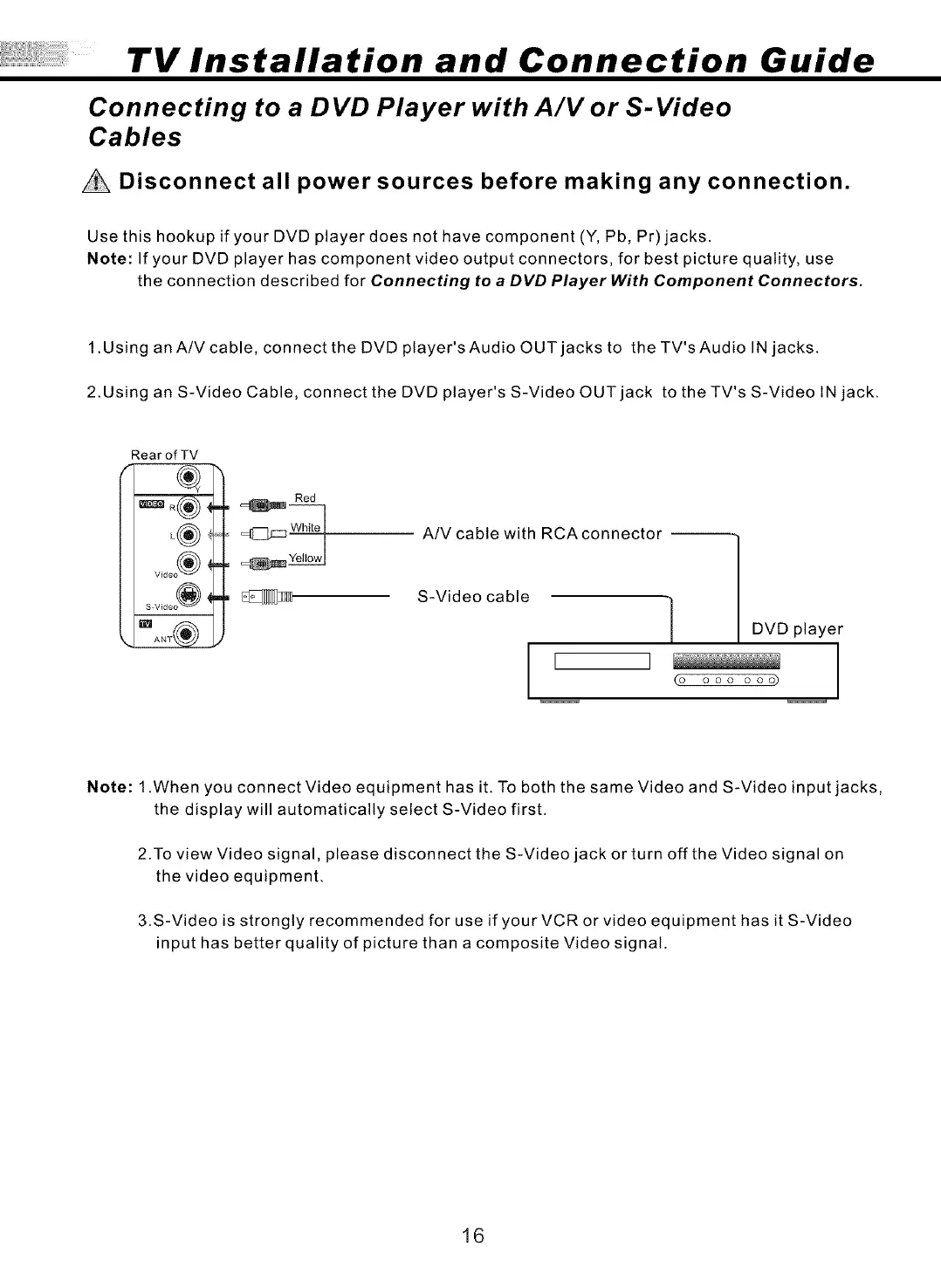
1 .Using an A/V cable, connect the DVD player's Audio OUT jacks to the TV's Audio IN jacks.
2.Using an S-Video Cable, connect the DVD player's S-Video OUT jack to the TV's S-Video IN jack.
RearofTV
L®
V_deo ®
S V_deo (_
Red
A/V cable with RCAconnector --
S-Video cable
1
I ]
(o
DVD player
ooo ooo) I
Note: 1 .When you connect Video equipment has iL To both the same Video and S-Video input jacks,
the display will automatically select S-Video first.
2.To view Video signal, please disconnect the S-Video jack or turn off the Video signal on
the video equipment.
3.S-Video is strongly recommended for use if your VCR or video equipment has it S-Video
input has better quality of picture than a composite Video signal.
16


 To Next Page
 Loading...