TV Installation and Connection Guide
Connecting to a Satellite Receiver or Cable Box
with A/V Cables
Disconnect all power sources before making any connection.
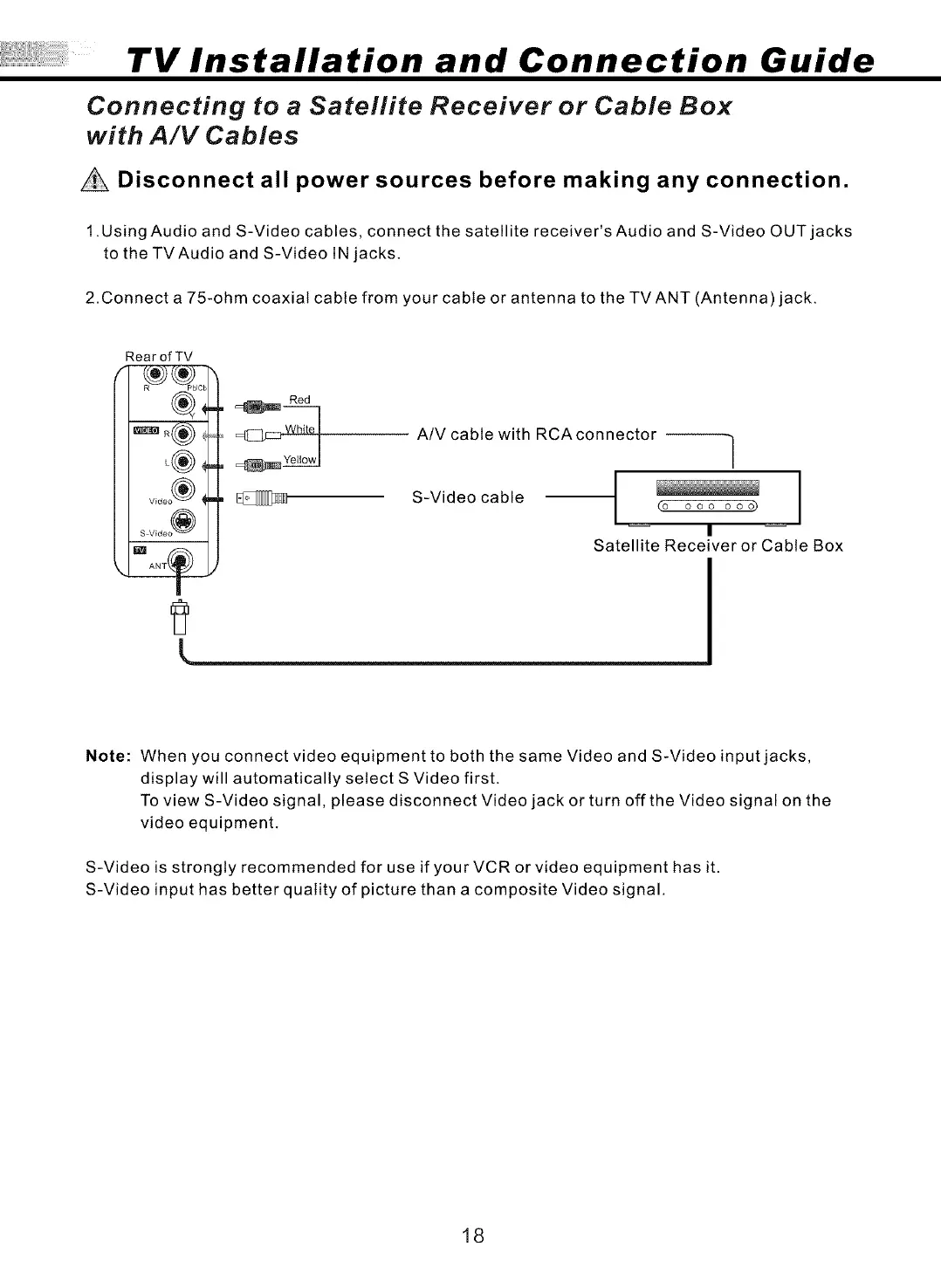
1 .Using Audio and S-Video cables, connect the satellite receiver's Audio and S-Video OUT jacks
to the TVAudio and S-Video IN jacks.
2.Connect a 75-ohm coaxial cable from your cable or antenna to the TV ANT (Antenna) jack.
Rear of TV
Red
A/V cable with RCAconnector ]
/
S-Video cable t
(o ooo ooo)
Satellite Receiver or Cable Box
Note: When you connect video equipment to both the same Video and S-Video input jacks,
display will automatically select S Video first.
To view S-Video signal, please disconnect Video jack or turn off the Video signal on the
video equipment.
S-Video is strongly recommended for use if your VCR or video equipment has it.
S-Video input has better quality of picture than a composite Video signal.
18


 To Next Page
 Loading...