The Combination Keys (Keyboard Mode)
Fn:
1. press and hold “Fn”(the panel only show the key icons that can be combined
with “Fn”) and press the combination key to realize the corresponding functions.
“Fn” + : backlit adjustment(3 levels)
“Fn” + : open/close buzzer
“Fn” + “ESC,1,2,3…..0 ` ” : “F1, F2, F3 ….. F12”
2. double click “Fn” to switch between “ESC,1,2,3…..0 ` ” and “F1, F2, F3 …..
F12” .After the product is switched to “F1,F2,F3….”mode, the character icons of
“F1,F2,F3….” become brighter. At this time, press only “ESC” means press “F1”…...
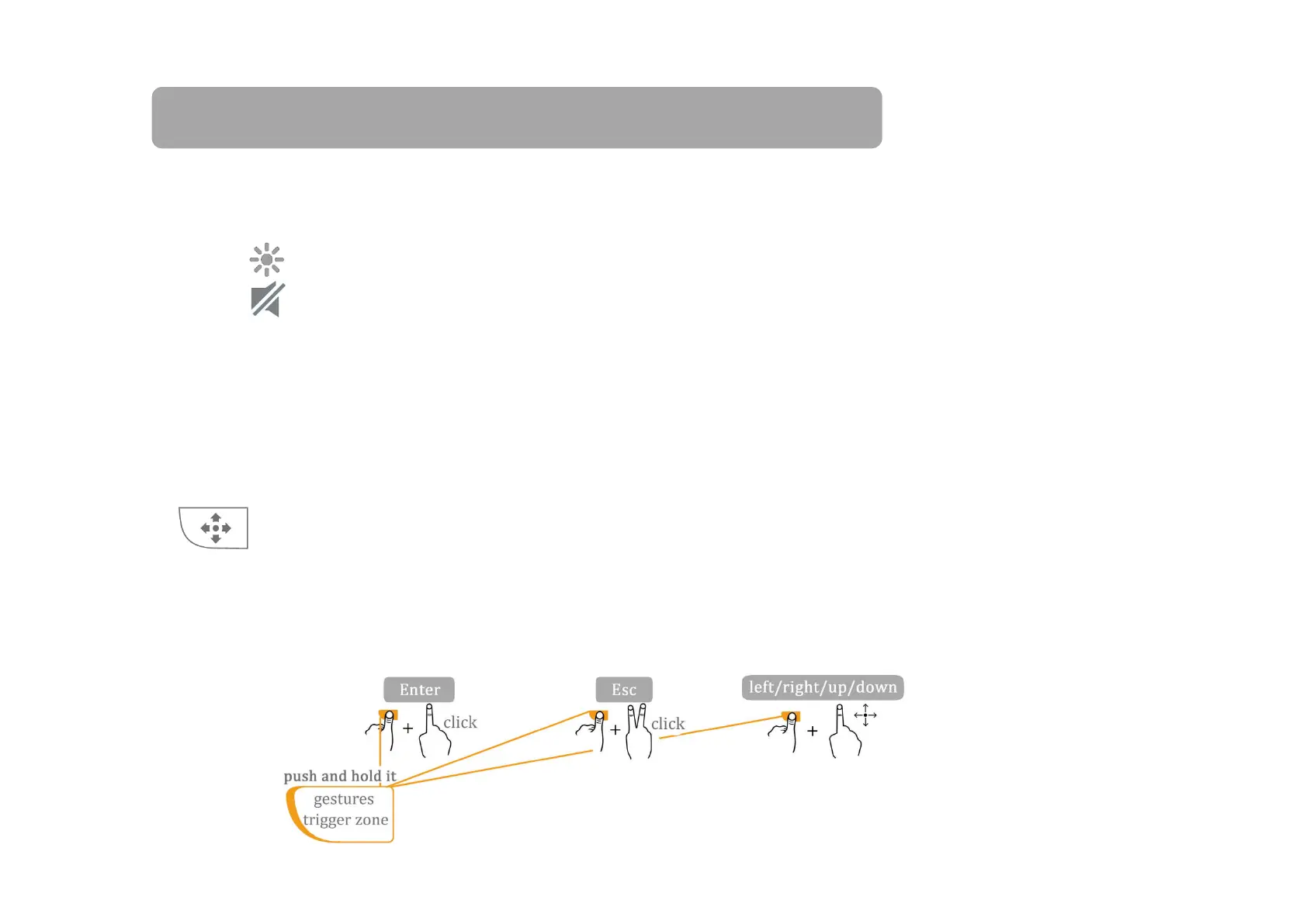
: We can press and hold this zone(zone(the right two orange light will be
on and the backlit is off at the same time) and the other finger(s) move on the
touchpad to realize the common controls. For example the Enter / Esc / Left / Right /
Up / Down functions (as the figure shows below).
“F1,F2,F3….” become brighter. At this time, press only “ESC” means press “F1”…...


 To Next Page