SHIFT RED Quick Start Guide
ⓒ this is engineering Inc. All rights reserved.
2
Pairing
Aircraft and controller are auto-paired after they are powered on.
Don’t forget. Level 4 is high-speed. Please be careful to flight.
Speed Setting
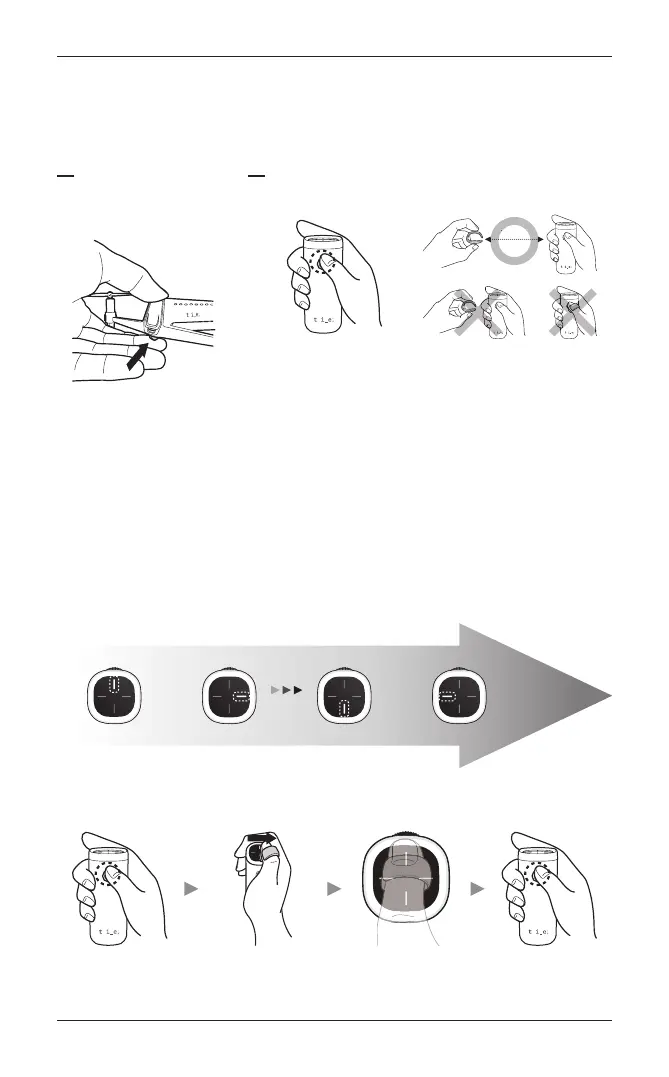
SHIFT drone supports 4-speed level modes.
To change the speed, briefly press the controller’s power button once.
Current mode appears on pad of the controller.
Speed
Casual Joy Sporty Extreme
Level 1 Level 2 Level 3 Level 4
Place your thumb with the ring on the mode you want. Then, touch the center of the pad to save your setting.
To release from the setting function, press the power button briefly.
Enter Select Save Set
Power On / Off
Aircraft Controller
Press the power button for 2 sec
for on/off the aircraft.
Press the power button for 2 sec for on/off the aircraft.
Note.
When it is turned on, place the controller ring at least 30 cm (1.0ft)
away from the controller.
30 cm



 To Next Page