3
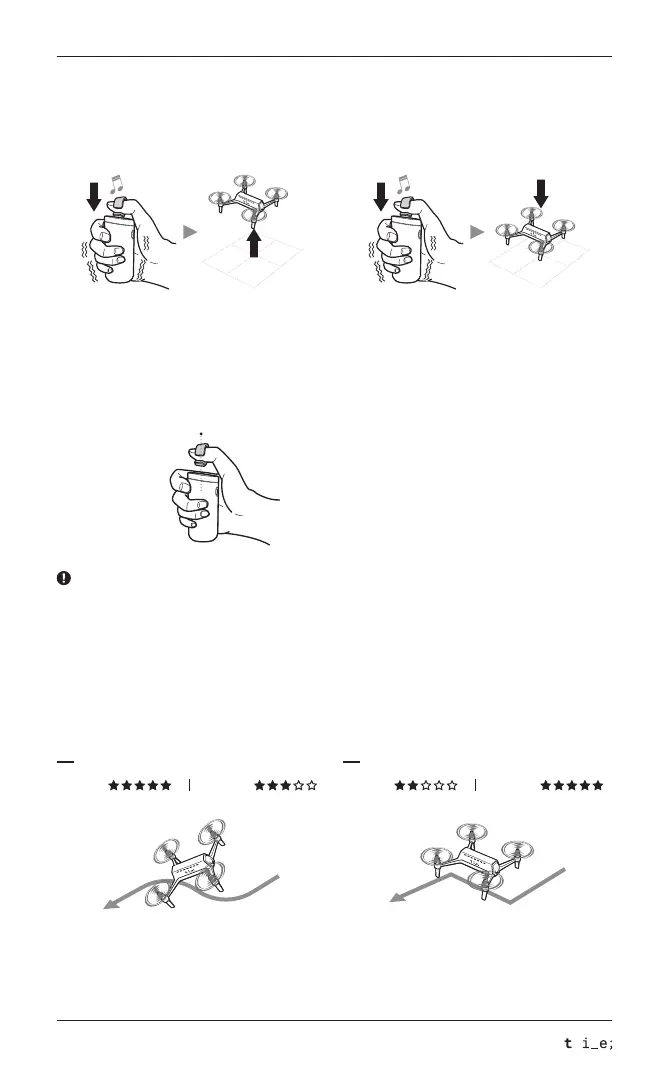
Take-off Landing
Touch the center of the pad with the ring for 1 sec
for take-off.
While the drone is hovering, touch the center of the
pad with the ring for 1 sec.
(Refer to below for hovering)
Aircraft flies according to control/movement by the
ring very dynamically. Recommend this mode to pro
and thrill-seeker.
Aircraft flies very stably by fixed speed and altitude.
(Flying at a right angle). Recommend this mode to
beginner and stable shootings of videos and pictures.
Switching Shooting Mode
You can switch between stable shooting mode and free flight mode.
To change the flight mode holding the jog during flight for 1 sec.
Free Flight Mode Stable Shooting Mode
Dynamic
Dynamic
Stability Stability
Hovering
For safe flying, aircraft is automatically hovering after take-off.
For operating manually, refer to the below way for hovering and its release.(Same way for both)
Center
Hold for 2 - 3 seconds
Place and hold your thumb into center of
the pad for 3 sec. (No touch on the pad)
When the ring goes out of range, the drone will enter the hovering mode and need to be released once again.



 To Next Page
 Loading...