ENGLISH
ENGLISH
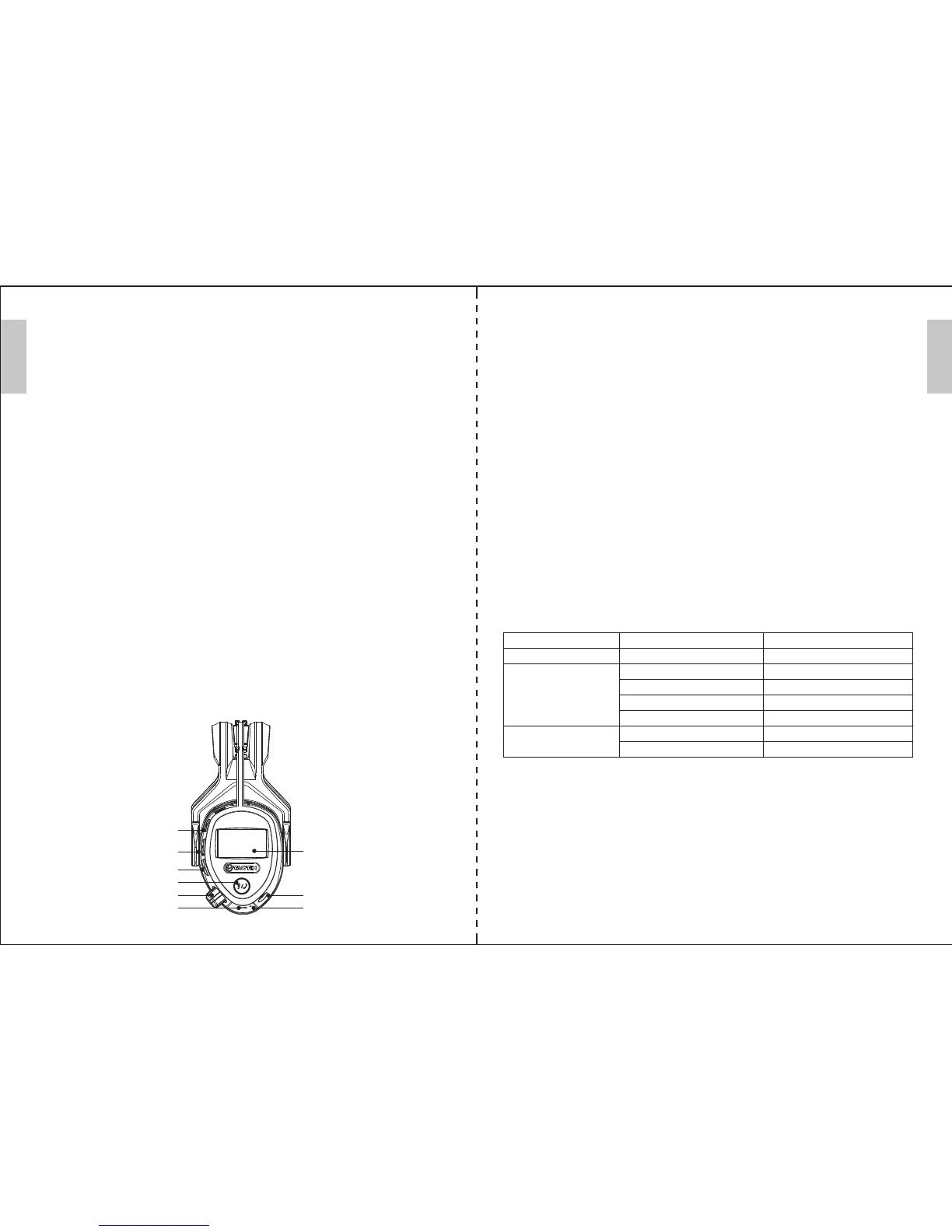
LCD Display
Aux In
Power / Charging
indicator light
[Select Down]
[Select Up]
[Mode]
[Listening Mode (LIS)/Phone]
[Volume/On-O]
Micro USB
Charge Port
CARE AND MAINTENANCE:
Regularly wipe the ear cups, cushions and headband clean using a soft, damp cloth. Never use abrasive cleaning
agents or solvents.
Turn the ear cups facing outwards to dry if they are moist on the inside.
STORAGE AND TRANSPORTATION:
Always store the product in the original packaging and away from any sources of direct heat, sunlight and rain.
When stored ensure the headband is not stretched (applies to headband version)
and the cushions are not compressed as this may damage the product.
When transporting use original packaging, Check packaging for further information.
CONTENTS:
Ear Mu, Micro USB Charging Cable, 3.5mm Audio Cord, User Manual.
OPERATING INSTRUCTIONS:
CHARGING EARMUFF:
Before use, charge the earmu using the included micro USB charging cable on power o, connect earmu to a
USB port for approximately 5 hours. When the battery is full , the red working LED goes out. The LCD screen
shows as full too when power on.
GETTING STARTED:
1. Turn the [Volume/On-O ] clockwise to power on the earmu.
2.Press the [Mode] to switch between FM Radio / Bluetooth modes.
3.Adjust the volume as needed on earmu using the dial.
4.Turn the [Volume/On-O] counter-clockwise to power o the earmu.
BLUETOOTH MODE:
1.Open Bluetooth on your mobile phone.
2.Power on the earmu and select Bluetooth mode.
3.In your Bluetooth device’s setting, selected “TACTIX-488131” and connect.
4.Once paired, BT logo stop icking, and the earmu plays music if you have opened the player already.
5.Press the [LIS/Phone] to play/pause the music.
6.Press the [Select Down]/[Select Up] to skip forward/backwards between songs.
Notes: 1. Turn o the earmu on bluetooth mode, it also goes into bluetooth mode when you turn on it.
2. Listen music on bluetooth mode, change to other mode, it will play music by itself when you back to
the bluetooth mode.
RECEIVING PHONE CALLS:
While the Bluetooth earmu is paired with your smart phone, answer an incoming call by pressing [LIS/Phone].
To end the call, press again the [LIS/Phone].
RESPONSIBLE DISPOSAL:
This symbol indicates that this product should not be disposed of with general household waste. This applies
throughout the entire EU, In order to prevent any harm to the environment or health hazards caused by incorrect
waste disposal, the product must be handed in for recycling so that the material can be disposed of in a responsible
manner. When recycling your product, take it to your local collection facility or contact the place of purchase. They
will ensure that the product is disposed of in an environmentally sound manner.
SPECIFICATIONS
:
Brand TACTIX
Radio FM 87.5-108 MHz
Bluetooth 2402-2408 MHz
Batteries 1500mAh (xed inside)
Weight 360 g
Bluetooth version 4.2
Noise level Max 105 dB(A)
Size(w x h x l) 16x19x10cm, Earmus t size S, M, and L
Battery life* FM + BT Up to 28 hours
*Dependent on the make of battery and temperature
Shelf time: 3 years after production
Problem Cause Solution
Nothing is shown on the display The battery is empty. Charging the battery.
No sound The volume switch is in the OFF position Turn the volume switch clockwise
The audio source is not switched on Start playback on the external audio source
The audio cable is not connected properly Check that the audio cable is fully plugged in.
Wrong mode selected. Select FM (radio) or BT (Bluetooth)
Background noise The radio station is not tuned in correctly Adjust the frequency
Poor signal reception Change the batteries
RADIO MODE:
1.Power on the earmu and select Radio mode using the [Mode].
2.Then press the [LIS/Phone] to auto-scan for a FM radio station, the detected radio station will be saved to the device.
If you press the [LIS/Phone] again while scanning, it will stop current auto-scan.
3.Press [Select Down]/ [Select Up] to switch between saved radio stations.
4.Press [Mode] more than 3 seconds until there are”<“ ”>”beside the frequency, then press [Select Down]/ [Select Up]
for precise adjustment on the frequency by hand. Press [LIS/Phone] to conrm the adjustment and save it.
Note: Earmu Radio will hold the last used radio station to enjoy next time without searching.
LISTENING MODE (LIS):
1.In any mode, press [LIS/Phone] more than 3 seconds to start listen.
2.Adjust the volume as need on earmu by using the dial.
3.Press [LIS/Phone] again more than 3 seconds to end listen.
Note: Listening function will stop current Bluetooth/Radio if you start it, after ending listen function, earmu will go
back to last Bluetooth/Radio mode.
AUX-IN MODE:
1.Power on the earmu.
2.To use the Aux Input, plug a 3.5mm cable into the Aux-In port on earmu.
3.Adjust the volume at your device.
4.Draw the cable out, the earmu go to Bluetooth mode.
Note: 1. It will stop current Bluetooth/Radio if you plug the cable.
2. It can be used at power o status too, the volume can be adjusted on your device.
WARNING:
This ear-mu is provided with level-dependent attenuation. The wearer should check correct operation before use. If
distortion or failure is detected, the wearer should refer to the manufacturers’ advice for maintenance and replacement
of the battery. Warning-performance may deteriorate with battery usage. The typical period of continuous use that can
be expected from the ear-mu battery is 15 hours. The output of the level-dependent circuits of this hearing protector
may exceed the external sound level. The ear mus provides electrical audio input.
TROUBLESHOOTING GUIDE
:
2 3


 To Next Page
 Loading...