
 Need help?
Do you have a question about the Talkpod N59 PoC and is the answer not in the manual?
The Talkpod N59 PoC Portable Radio is a robust communication device designed for occupational use, offering a range of features for efficient and reliable two-way communication. This user manual provides comprehensive guidance on its operation, installation, maintenance, and safety, ensuring users can maximize its performance while adhering to regulatory standards.
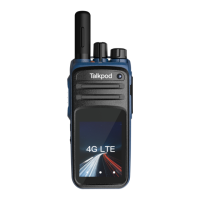
The N59 PoC Portable Radio serves as a portable communication tool, leveraging Push-to-Talk over Cellular (PoC) technology for wide-area communication. It enables group calls, single calls, and private calls, making it suitable for various professional environments where instant and clear communication is crucial. The device is equipped with a PTT (Push-to-Talk) button for initiating transmissions, a channel selection knob for navigating groups or functions, and programmable side buttons that can be customized for quick access to features like group/member/friend selection or SOS alarms. An SOS alarm button is also prominently located on the top for emergency situations. The radio features a built-in speaker and microphone for audio input and output, and an accessory jack allows for the connection of headsets or programming cables, enhancing versatility and user convenience. LED indicators provide visual feedback on the radio's status, such as green for receiving and red for transmitting, as well as charging status.
The N59 radio is designed for straightforward and intuitive operation. To power on the device and adjust the volume, users simply turn the Power/Volume knob clockwise. Turning it counter-clockwise powers off the device and decreases the volume. The channel selection knob allows users to easily select different groups, members, friends, or functions, depending on the radio's configuration and interface. The PTT button is the primary control for initiating calls; pressing it allows the user to transmit their voice in group, single, or private call modes. Two programmable side buttons offer customization options, enabling users to assign frequently used functions, such as quick access to specific groups or an SOS alarm, to these buttons. The SOS button on the top provides a dedicated emergency function, activating an alarm with a single click. The radio's design includes an antenna for signal reception and transmission, which should be properly assembled by spinning it into place. For optimal performance and to prolong the antenna's lifespan, users are advised not to swing the radio by its antenna. The device also features a back clip for secure attachment to clothing or belts, ensuring portability and accessibility during work. The N59 is equipped with a 2MP front camera and an 8MP rear camera, although their specific usage features are not detailed in the provided text. A screen provides visual information, and a 4G LTE indicator confirms network connectivity.
Proper maintenance is essential to ensure the longevity and optimal performance of the Talkpod N59 PoC Portable Radio. The manual provides clear guidelines for battery attachment and charging, which are critical aspects of device upkeep. The battery should be attached correctly, and users are reminded to turn off the radio before removing the battery. If a non-specified battery is used, the radio will issue an alarm tone upon powering on, though it will still operate normally. The radio's charging process is indicated by LED lights: blinking red for unchargeable status (due to low battery voltage or extreme temperatures), blinking orange for waiting to charge, steady red for rapid charging, blinking green for 90% charged, and steady green for fully charged. This detailed feedback helps users monitor the charging process effectively.
Beyond power management, the manual emphasizes general product care to prevent damage and ensure reliable operation. Users are advised against piercing or scraping the product with sharp objects and to keep it away from corrosive substances that could damage the circuit. It is also important not to hold the product directly by its antenna or earpiece cable, as this can affect performance or cause damage. When the accessory jack is not in use, it should be covered to protect it from environmental elements and prevent corrosion.
Troubleshooting guidance is provided for common issues such as power-on failure, weak or discontinuous voice reception, and inability to communicate with other members. Solutions include reassembling the battery, cleaning contacts, recharging, adjusting volume, reassembling the antenna, cleaning the speaker, and ensuring consistent frequency and signaling settings with other radios. For noise issues, users are advised to change frequency, adjust squelch level, move closer to other members, relocate to an open and flat area away from high buildings or underground areas, and avoid electromagnetic interference. These maintenance and troubleshooting tips empower users to address minor issues independently, contributing to the radio's overall reliability and extended service life. The radio is also designed with dustproof and waterproof features, with an IP54 standard and an optional IP66 rating, further enhancing its durability in various working conditions.
 General
| Category | Portable Radio |
|---|---|
| Frequency Range | 400-470 MHz |
| Talk Time | 12 hours |
| Water Resistance | Yes |
| GPS | Yes |
| Operating Temperature | -20°C to +60°C |
| IP Rating | IP67 |
| Operating System | Android |
| Wi-Fi | 802.11 b/g/n |
| Bluetooth | Bluetooth 4.0 |

 To Next Page