Installation
Installing the TC1000 in a Wall
You will need the following items:
• Two pieces of 2x stock to match your existing framing
• Saw to cut the hole in the wall
• Hammer or screw gun to attach the blocking to the existing frame
• Phillips head screwdriver to attach the grille
• Weather strip material
• Low expansion spray foam sealant
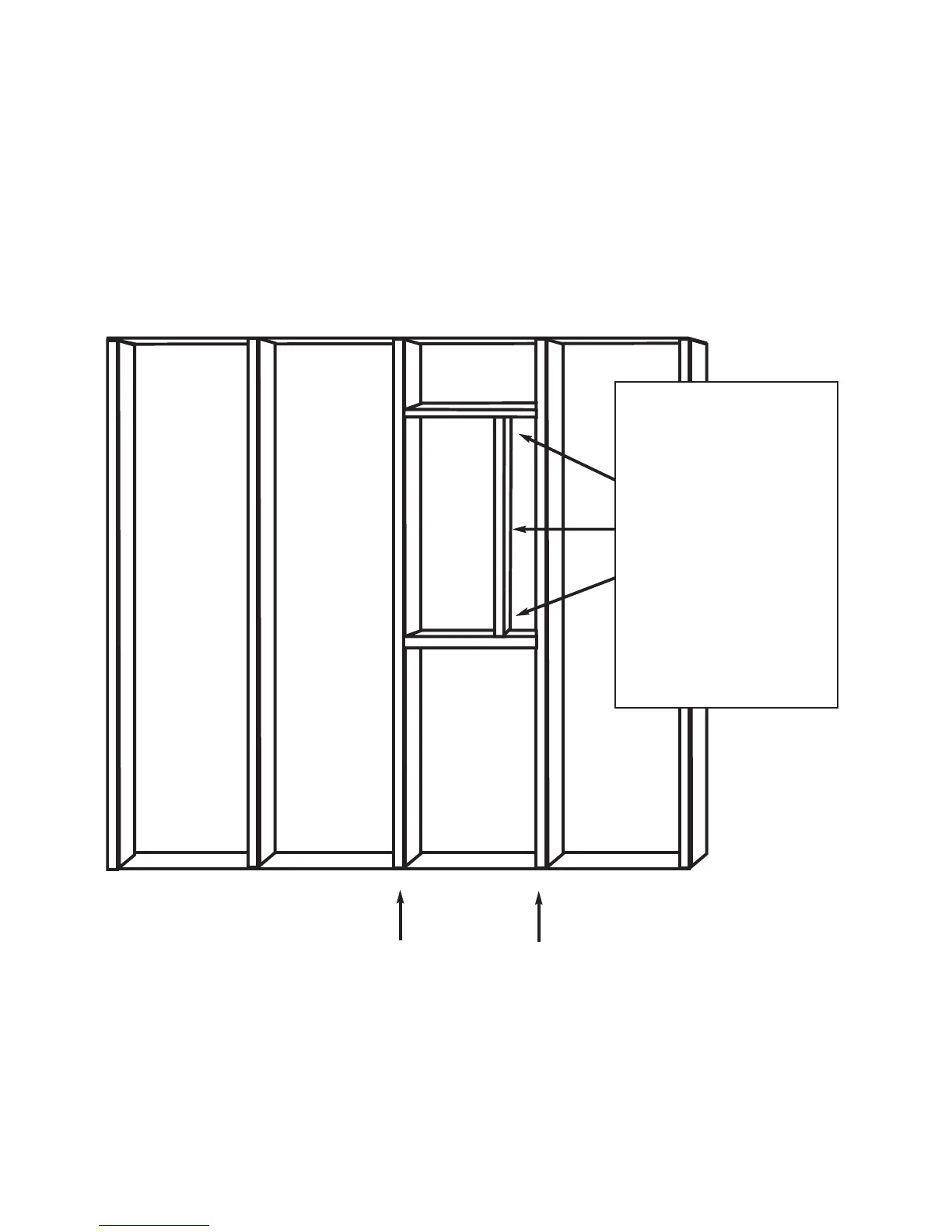
1. Create a box to hold the unit (Fig. 1).
2. Remove the sheathing that covers the box.
3. Attach TC1000, screwing through the mounting flange.
4. Install exterior finish materials over the mounting flange.
Note: additional flashing may be required above the unit to divert rain.
5. Remove any interior materials covering the box.
6. Install interior finish materials to trim the frame.
7. Attach optional grille to finish installation.
16” OC
Fig. 1
Add framing as
shown to create
a box of 12 1/2”
x 27. This box
will act to hold
the unit as well
as creating a
plenum for air
movement.


 To Next Page