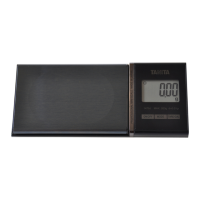
The Tanita Digital Scale Professional Mini, Model 1210N, is a compact and precise electronic weighing device designed for professional and personal use, particularly for measuring small objects with high accuracy. It features a sleek design with a protective cover that doubles as a weighing tray.
Function Description
The primary function of the Tanita 1210N is to accurately measure the weight of objects in multiple units. It is equipped with a digital LCD display that shows the weight, battery status, stability, and selected weighing mode. The scale supports various weighing modes, including grams (g), carats (ct), ounces (ozt), and grains (gr), allowing for versatility across different applications, such as weighing precious stones, jewelry, or small components.
The device includes a TARE function, which allows users to subtract the weight of a container or vessel, enabling the measurement of only the contents. This is particularly useful for weighing powders or liquids in a gem cup or other containers. The scale also features a calibration function to ensure consistent accuracy, which is recommended before each use. An auto power-off feature conserves battery life by automatically turning off the scale after a period of inactivity, with a programmable time setting.
Important Technical Specifications
- Test Weight: 20g (included for calibration)
- Capacity: 20g / 100ct / 0.64ozt / 308gr
- Graduation (Readability):
- 0.002g
- 0.01ct
- 0.0001ozt
- 0.05gr
- Power Source:
- DC6V AAA (LR03) × 4 batteries (included)
- AC adaptor (DC6V 200mA) (optional, to be equipped with condenser, 5.5mm DC jack, 9.5mm minimum length)
- Power Consumption: 12mA (max.)
- Auto Power Off: Default setting is 10 minutes, programmable from 0 (no auto power off) to 60 minutes in 10-minute increments.
- Operating Temperature Range: If the temperature change exceeds 5°C (10°F), wait at least 30 minutes before use.
- Overload Indication: "EEEEE" is displayed if the object being weighed exceeds the maximum capacity.
- Calibration: Manual calibration using the included 20g test weight.
Usage Features
Before Use:
- Placement: Use on a hard, flat surface with minimal vibration.
- Temperature Acclimation: If the temperature change exceeds 5°C (10°F), allow the scale to acclimate for at least 30 minutes.
- Power Source:
- Batteries: Open the lock release button, remove the battery cover, insert 4 AAA (LR03) batteries, and replace the cover.
- AC Adaptor: Use only a CE-marked AC adaptor with specifications of DC 6V 200mA, 5.5mm DC jack, and minimum 9.5mm length. Insert the DC plug into the inlet.
Weighing Procedure:
- Open Cover: Press the lock release button to open the protective cover.
- Turn On: Press the ON/OFF button. The display will flash, then show "0." and the stable mark, indicating readiness.
- Place Object: Place the object to be weighed on the tray. If using the gem cup, remove the tray first.
- Read Weight: The object's weight will be displayed.
- TARE Function: To subtract the weight of a container, press the TARE button. "0." will appear, and subsequent objects placed on the scale will show only their net weight.
- Unit Change: Press the MODE button to cycle through units: g → ct → ozt → grain.
- Turn Off: Press the ON/OFF button to turn off the scale. The scale will automatically turn off after 10 minutes of inactivity (default setting).
- Storage: Close the cover and push until it locks. If a gem cup was used, remove it and replace the weighing tray.
Calibration:
- Turn On & CAL: Turn on the scale and press the CAL button.
- Display: "CALIb" will flash.
- Place Test Weight: Place the included 20g test weight on the weighing tray. The scale will calibrate automatically.
- Confirmation: Messages "CALIb → End → 20.000g" will appear.
- Remove Test Weight: Calibration is complete. If "Err" appears, repeat the calibration procedure carefully.
Programming Auto Power Off:
- Access Setting: With the unit turned off, simultaneously press the MODE and ON/OFF buttons. The current setting will be displayed.
- Adjust Time: Press the TARE button to increase the time (in 10-minute increments) or the CAL button to decrease it. The range is 0 (no auto power off) to 60 minutes.
- Set: Press the MODE button to confirm the setting.
Maintenance Features
- Cleaning: Clean the scale using a mild detergent. Do not use chemicals.
- Disassembly: Do not dismantle the device.
- Protection: Keep the cover closed when weighing and when not in use to protect the weighing tray and sensor.
- Battery Replacement: Replace batteries when the low battery mark appears on the display. Dispose of used batteries responsibly according to local regulations (do not dispose of in household waste). The manual includes symbols for lead (Pb), cadmium (Cd), and mercury (Hg) content in batteries, indicating proper disposal requirements.
The Tanita 1210N is designed for reliable and precise measurements, making it a valuable tool for tasks requiring high accuracy in a portable format. Note that this device is not legal for trade in some regions, meaning it may not be certified for commercial transactions where legal metrology standards apply.

 Need help?



 To Next Page
 General