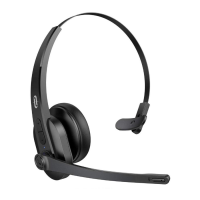
1. Flexible Headband
2. Volume +
3. Volume –
4. LED Indicator
5. Multifunction Button
6. Micro-USB Charging Port
7. Microphone
Package Contents
1 x TaoTronics Wireless Mono Headset (TT-BH041)
1 x Micro-USB Charging Cable
1 x User Guide
How to Use
1. Charging
1. Connect the charging port with any USB charging adapter or active computer USB port.
2. Charging will start automatically with the LED indicator turning red.
3. The headset is fully charged when the LED indicator turns off.
2. Pairing
1. Make sure the headset and your Bluetooth® device are next to each other (within 3 feet / 1
meter).
2. When the headset is off, press and hold the Multifunction Button for 2 seconds to bring the
headset into pairing mode with the LED indicator flashing blue and red alternately.
3. Activate Bluetooth® on your phone and search for nearby Bluetooth® connections.
4. Find “TaoTronics TT-BH041” in the search results. Tap on the name to connect. Once connected,
the LED indicator will flash blue once every 5 seconds.
Note:
Automatic Re-pairing: The Bluetooth® headset can remember devices paired previously. You
may simply turn on the headset and the device (with Bluetooth activated), and they will connect
to the last connected device automatically without going into the pairing mode.
3. Clear Pairing History
1. If the headset fails to pair with your Bluetooth® device clear the pairing history by pressing and
holding the Multifunction and Volume – Buttons simultaneously when the headset is on until the
LED indicator flashes red and blue at the same time indicating clearing successfully. Then re-pair
your Bluetooth® device as instructed in Pairing.


 To Next Page