E-4
OPERATING INSTRUCTIONS
1. POWER ON/OFF
Insert the front panel in the unit and push Power button in order to switch on the unit. Push
button newly in order to switch off the unit and push REL button (15) to release the front
panel.
Note: Never release the front panel when the unit is on. Power remains on even when car
radio is off.
2. SELECT
3. VOLUME UP/DOWN
Turing the VOL knob to right or left (3) to control the VOLUME. To select other functions, press
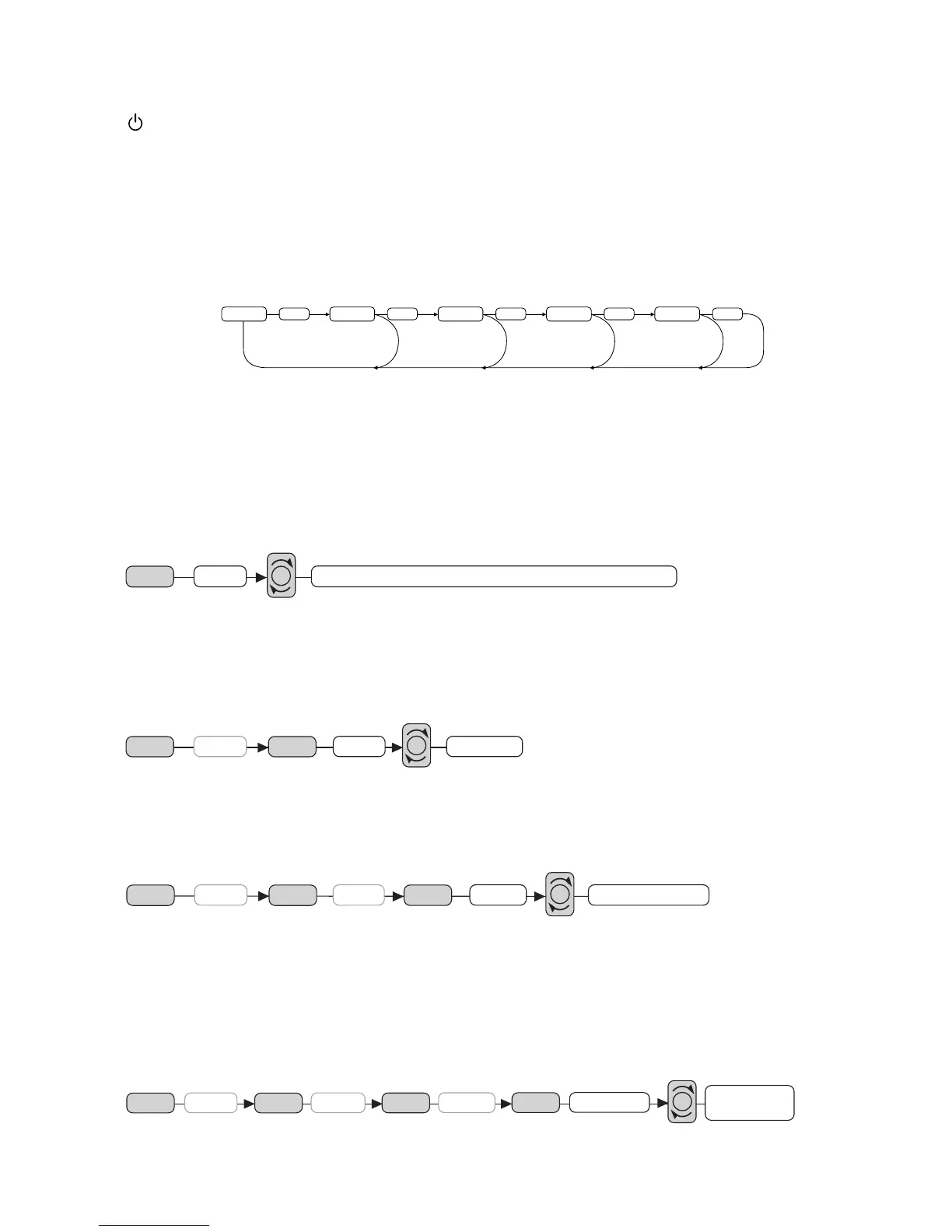
the SEL (2) button shortly until the desired functions is shown on the display. Figure 1 shows
how control functions are selected using the SEL button.
Fig. 1 Selection of sound control functions
1. VOLUME 2. SELECT 3. BASS 4. TREBLE 5. BALANCE 6. FADER
These buttons can be used to adjust the BASS, TREBLE, BALANCE and FADER.
AUDIO DSP CONTROLS (2)
When press the SEL button for more than 2 seconds, it is activated as selecting mode of these
function.
DSP can be selected by turing the VOL knob to right or left (3)
POP M---ROCK M---CLASS---FLAT M---DSP OFF
BEEP MODE (2)
When press the SEL button for more than 2 seconds, it is activated as selecting mode of these
function.
BEEP ON: BEEP sound can be heard from speaker when the buttons are pressed.
SEEK MODE (2)
When press the SEL button for more than 2 seconds, it is activated as selecting mode of these
function.
SEEK 1: When SEEK 1 mode is activated, AUTO SEEK SCAN is stopped when station is
detected even user still push SEEK button.
SEEK 2: Auto SEEK SCAN is not stopped even station is detected if user push SEEK button.
When release this SEEK button, then stop when station is defected.
VOL LAST/ADJUST (2)
When press the SEL button for more than 2 seconds, it is activated as selecting mode of these
function.
VOL LAST:The volume level which user adjust lately is selected whenever power is ON and OFF.
VOL ADJ: The initial volume level (user can adjust) is selected whenever power is ON and OFF
1 3
2
4
2
5
2
6
2
2
DSP
SEL
2 sec.
POP M --- ROCK M --- CLASS --- FLAT M --- DSP OFF
VOL
ON/OFFDSP
SEL
2 sec.
SEL
BEEP
VOL
DSP
SEL
SEEK
SEL
2 sec.
SEL
BEEP
SEEK1 / SEEK 2
VOL
VOL LAST /
VOL ADJ
DSP
SEL
SEEK
SEL
VOL LAST
SEL
2 sec.
SEL
BEEP
VOL


 To Next Page