EasyManua.ls Logo

Targus 65W - User Manual

Targus 65W
4 pages
Print Icon
To Next Page IconTo Next Page
Loading...
Contents
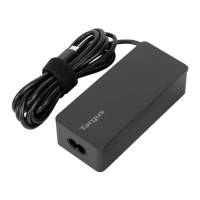
(A) Targus 65W USB Type-C Charger
(B) AC Power Cord
(C) User Guide
(D) USB Type-C cable
Introduction
Thank you for purchasing the Targus USB Type-C charger for laptops, phones & Tablets.
Charging Your Laptop
1. Attach the AC Power Cord to the Targus USB Type-C Charger and plug the AC Power Cord into a nearby wall socket.
2. Connect the USB Type-C cable to the Targus charger for laptops, phones & Tablets.
3. Once you have connected the USB Type-C cable for your Laptop to the Targus Charger, simply plug it into your Laptop. Charging will begin immediately.
(B)
(D)
(C)(A)
Electrical Rating
USB Type-C Charger (65 watt max AC adapter)
Input: 100V-240VAC, 50-60Hz, 1.7A
Output: Type-C: 5V/3A, 9V/3A, 12V/3A, 15V/3A, 20V/3A
USB A: 5V/2.4A max
* Information listed above illustrates common compatibility with various laptop models
sold at the date of printing. It is impossible to ensure 100% coverage.
For further information or if you have any doubts, we are happy to help. Please call our
Compatibility Hotline.
Compatibility Hotline
If you have any need, please call
us toll-free.
1 - 8 6 6 - 7 2 1 - 4 8 0 5
24 hours a day, 7 days a week.
65W USB TYPE-C CHARGER
Quick Start
APA104BT / 410-3803-001B
Features and speci󰘰cations are subject to change without notice. All trademarks and registered trademarks are the property of their respective owners.
All rights reserved. © 2019 Targus, 1211 North Miller Street, Anaheim, CA 92806.
Question and Answer IconNeed help?

Do you have a question about the Targus 65W and is the answer not in the manual?

Summary

Introduction

Electrical Rating

Product's power input and output specifications, including voltage and amperage.

Charging Your Laptop

Step-by-step instructions for connecting and charging a laptop using the Targus charger.

Technical Support and Product Information

Technical Support Contacts

Provides website, email, and telephone contacts for technical assistance in various regions.

Product Registration

Instructions and link for registering the Targus accessory after purchase.

Two Year Warranty

Details the limited product warranty, exclusions, and claims process for consumers.

FCC Statement and Declaration of Conformity

Compliance information regarding FCC rules, device testing, and EU directives.

Targus 65W Specifications

General IconGeneral
Power Output65W
Input Voltage100-240V AC
Output Voltage5V, 9V, 12V, 15V, 20V
Output Current3.25A
Connector TypeUSB-C

Related product manuals