Need help?
Do you have a question about the Tasco Space Station and is the answer not in the manual?
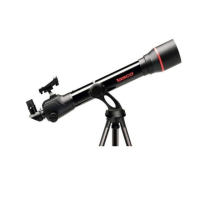
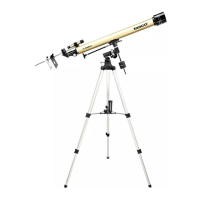
A warm welcome and congratulations on your new Tasco SpaceStation telescope.
Never look directly at the sun with your telescope as permanent eye damage may occur.
Discover celestial objects like the Moon, Saturn, Jupiter, Mars, Venus, Nebulae, Star Clusters, and Galaxies.
Diagram illustrating the various parts of the telescope assembly.
List of all components included with the telescope package.
Step-by-step visual guide for the quick assembly of the telescope.
Instructions for setting up the tripod and attaching the accessory tray.
Procedure for attaching the main telescope tube to the mount.
Steps for attaching the finderscope and eyepiece to the telescope.
Instructions on how to focus the telescope on a distant object.
Steps for connecting the remote computer controller and installing the battery.
Guide on how to align the finderscope with the main telescope for accurate aiming.
Guidance on selecting an initial object for observation, starting with the Moon.
How to center the target object in the finderscope and then the main telescope.
Advice on using low and high power eyepieces for detailed observation.
Explanation of how celestial objects move and the need for tracking.
Recommendations for setting up the telescope on a stable, level surface to minimize vibrations.
Tips on selecting a location with minimal light pollution for better viewing.
Strong recommendation against observing celestial objects from inside a building through a window.
Advice on observing objects high in the sky and understanding 'seeing' conditions.
Diagram showing the layout of buttons and the LCD display on the computer base.
Detailed explanation of each button's function for operating the telescope computer.
Information about the two-line, sixteen-character LCD display.
Description of the Explore Mode for browsing celestial objects by type.
Details on the Sky Tour Mode for guided tours of the night sky objects.
Explanation of the Telescope Mode for real-time pointing data.
Description of the Identify Mode for identifying objects in the telescope's field of view.
Explanation of the Align Earth Mode for easy telescope alignment using common data.
Details on the Align Star Mode for alignment using known star positions.
Description of the Align Object Mode for refining telescope alignment during observation.
Initial diagnostic check and leveling of the telescope tube.
Instructions for setting the correct time and time zone for the telescope.
Procedure for setting the correct date (day, month, year) for the telescope.
Steps for inputting the city and country for location-based alignment.
Centering a known star in the telescope's field of view using motorized controls.
Confirmation display indicating successful alignment and rating.
Instructions to select the EXPLORE mode and then the PLANET option.
How to view detailed information about celestial objects, including coordinates and descriptions.
How to use the 'GO' button to automatically locate and center selected objects.
Instructions on using the BACK button to navigate through menu levels.
How to select the Sky Tour Mode for guided observation of monthly celestial highlights.
How to select the Identify Mode to identify objects currently in the telescope's view.
How to select the Telescope Mode for real-time astronomical data.
Instructions for setting up the tripod and attaching the accessory tray.
Procedure for attaching the main telescope tube to the mount.
Steps for attaching the finderscope and eyepiece to the telescope.
Instructions on how to focus the telescope on a distant object.
Guide on how to align the finderscope with the main telescope for accurate aiming.
Guidance on selecting an initial object for observation, starting with the Moon.
How to center the target object in the finderscope and then the main telescope.
Advice on using low and high power eyepieces for detailed observation.
Explanation of how celestial objects move and the need for tracking.
Recommendations for setting up the telescope on a stable, level surface to minimize vibrations.
Tips on selecting a location with minimal light pollution for better viewing.
Strong recommendation against observing celestial objects from inside a building through a window.
Advice on observing objects high in the sky and understanding 'seeing' conditions.
Diagram showing the layout of buttons and the LCD display on the computer base.
Detailed explanation of each button's function for operating the telescope computer.
Information about the two-line, sixteen-character LCD display.
Description of the Explore Mode for browsing celestial objects by type.
Details on the Sky Tour Mode for guided tours of the night sky objects.
Explanation of the Telescope Mode for real-time pointing data.
Description of the Identify Mode for identifying objects in the telescope's field of view.
Explanation of the Align Earth Mode for easy telescope alignment using common data.
Details on the Align Star Mode for alignment using known star positions.
Description of the Align Object Mode for refining telescope alignment during observation.
Initial diagnostic check and leveling of the telescope tube.
Instructions for setting the correct time and time zone for the telescope.
Procedure for setting the correct date (day, month, year) for the telescope.
Steps for inputting the city and country for location-based alignment.
Confirmation display indicating successful alignment and rating.
Instructions on how to use the telescope after initial setup.
How to view detailed information about celestial objects, including coordinates and descriptions.
How to use the 'GO' button to automatically locate and center selected objects.
Instructions on using the BACK button to navigate through menu levels.
How to select the Sky Tour Mode for guided observation of monthly celestial highlights.
How to select the Identify Mode to identify objects currently in the telescope's view.
How to select the Telescope Mode for real-time astronomical data.
Diagram showing the layout of buttons and the LCD display on the computer base.
Detailed explanation of each button's function for operating the telescope computer.
Information about the two-line, sixteen-character LCD display.
Description of the Explore Mode for browsing celestial objects by type.
Details on the Sky Tour Mode for guided tours of the night sky objects.
Explanation of the Telescope Mode for real-time pointing data.
Description of the Identify Mode for identifying objects in the telescope's field of view.
Explanation of the Align Earth Mode for easy telescope alignment using common data.
Details on the Align Star Mode for alignment using known star positions.
Description of the Align Object Mode for refining telescope alignment during observation.
Initial diagnostic check and leveling of the telescope tube.
Instructions for setting the correct time and time zone for the telescope.
Procedure for setting the correct date (day, month, year) for the telescope.
Steps for inputting the city and country for location-based alignment.
Confirmation display indicating successful alignment and rating.
Instructions on how to use the telescope after initial setup.
How to view detailed information about celestial objects, including coordinates and descriptions.
How to use the 'GO' button to automatically locate and center selected objects.
Instructions on using the BACK button to navigate through menu levels.
How to select the Sky Tour Mode for guided observation of monthly celestial highlights.
How to select the Identify Mode to identify objects currently in the telescope's view.
How to select the Telescope Mode for real-time astronomical data.
Alphabetical list of constellation abbreviations used in the system.
List of Messier catalog objects with their RA, Dec, Magnitude, Size, Constellation, and Description.
List of stars with their coordinates, magnitude, size, constellation, and description.
List of stars with their coordinates, magnitude, size, constellation, and description.
List of stars with their coordinates, magnitude, size, constellation, and description.
List of stars with their coordinates, magnitude, size, constellation, and description.
List of stars with their coordinates, magnitude, size, constellation, and description.
List of stars with their coordinates, magnitude, size, constellation, and description.
List of stars with their coordinates, magnitude, size, constellation, and description.
List of stars with their coordinates, magnitude, size, constellation, and description.
Diagram showing the layout of buttons and the LCD display on the computer base.
Detailed explanation of each button's function for operating the telescope computer.
Information about the two-line, sixteen-character LCD display.
Description of the Explore Mode for browsing celestial objects by type.
Details on the Sky Tour Mode for guided tours of the night sky objects.
Explanation of the Telescope Mode for real-time pointing data.
Description of the Identify Mode for identifying objects in the telescope's field of view.
Explanation of the Align Earth Mode for easy telescope alignment using common data.
Details on the Align Star Mode for alignment using known star positions.
Description of the Align Object Mode for refining telescope alignment during observation.
Initial diagnostic check and leveling of the telescope tube.
Instructions for setting the correct time and time zone for the telescope.
Procedure for setting the correct date (day, month, year) for the telescope.
Steps for inputting the city and country for location-based alignment.
Confirmation display indicating successful alignment and rating.
Instructions on how to use the telescope after initial setup.
How to view detailed information about celestial objects, including coordinates and descriptions.
How to use the 'GO' button to automatically locate and center selected objects.
Instructions on using the BACK button to navigate through menu levels.
How to select the Sky Tour Mode for guided observation of monthly celestial highlights.
How to select the Identify Mode to identify objects currently in the telescope's view.
How to select the Telescope Mode for real-time astronomical data.
 General
| Type | Refractor |
|---|---|
| Aperture | 60 mm |
| Focal Length | 700 mm |
| Focal Ratio | f/11.7 |
| Mount Type | Altazimuth |
| Finderscope | 5x24 |
| Tripod | Aluminum |
| Eyepieces Included | 20mm, 4mm |
| Magnification Range | 35x, 175x |


 To Next Page