
 Need help?
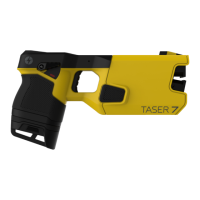
Do you have a question about the Taser 7 and is the answer not in the manual?
The TASER 7 Disconnect Battery Pack is an optional component for the TASER 7 energy weapon, designed to enhance user safety and control by providing a mechanism to disable the weapon if it is taken from the user. This quick start guide outlines its features, usage, and reset procedures.
The primary function of the TASER 7 Disconnect Battery Pack is to disable the TASER 7 energy weapon when its attached lanyard is disconnected. This feature is crucial for preventing unauthorized use or misuse if the weapon is seized from the user. The battery pack itself is a rechargeable power source, similar to other TASER 7 battery options, but it uniquely incorporates a lanyard attachment point at its bottom. When the lanyard is disconnected from the battery pack, the energy weapon is immediately disabled. To re-enable the weapon, an authorized user must reinsert the lanyard and then reinitiate the battery pack by placing it in a TASER 7 Dock. This process ensures that the weapon remains inoperable until a secure and authorized reset is performed. The system is designed to provide an audible alert (beeping) and a flashing disconnect icon on the Central Information Display (CID) when the weapon is disabled. If the weapon is discharging when the disconnect strap is detached, the electrical output will cease, and the Arc switch and trigger will become non-functional. The disconnect icon will continue to flash on the CID regardless of the safety switch position. To stop the beeping, the safety must be shifted to the down (SAFE) position, and the battery pack must be removed. Removing the battery pack also turns off the CID. Until the battery pack is reset, the energy weapon will resume beeping whenever the battery pack is inserted if the safety key is not attached.
The battery pack is designed for use exclusively with TASER 7 energy weapons. It is crucial not to disassemble the battery pack or expose it to extreme conditions such as excessive heat, cold, water, or fire, as this could compromise its functionality and safety. The reset process requires a TASER 7 Dock running firmware version 0.10.10 or later to be compatible with the Disconnect battery pack. The battery pack typically resets within a few seconds when placed in the dock, indicated by the LED changing to a solid green.
The TASER 7 Disconnect Battery Pack integrates with three types of lanyards, each designed for specific attachment points and user preferences:
A lanyard connects to a disconnect strap, which in turn connects to the Disconnect battery pack via a safety key interface. Users are advised against attaching a lanyard in a way that could be used against them or detaching a lanyard from its battery pack unnecessarily. It is also important to avoid letting the energy weapon dangle from the lanyard, as this could cause damage or accidental disengagement.
To disable the energy weapon, it must first be armed. If the connection between the disconnect strap and the Disconnect battery pack is removed, the weapon will be disabled in approximately 0.25 seconds. This action triggers an audible beeping alert and a flashing disconnect icon on the CID.
To reactivate the energy weapon:
While the guide does not explicitly detail maintenance features for the battery pack itself, it emphasizes proper handling and storage to ensure longevity and safety. Users are warned against disassembling the battery pack or exposing it to extreme environmental conditions. The requirement for a TASER 7 Dock for resetting the battery pack implies that the dock itself plays a role in maintaining the battery's operational status by facilitating the re-initiation process. Regular firmware updates for the TASER 7 Dock (version 0.10.10 or later) are essential for compatibility and proper functioning with the Disconnect battery pack. The process of re-inserting the battery pack into the dock for reset and observing the LED status (solid green) serves as a basic diagnostic and maintenance step to confirm the battery pack's readiness for use. For comprehensive maintenance and operational guidelines, users are directed to consult the TASER 7 Energy Weapon User Manual.
 General
| Brand | Taser |
|---|---|
| Model | 7 |
| Category | Battery Pack |
| Language | English |

 To Next Page