BoschHomeAppliances
Theon/offswitchturnsyourTASSIMO
machineonstand-byandoff.Whenitis
switchedon,all5displayitemslightup
briey.Thestand-bylightwillthenremain
onuntiltheapplianceisinuse.
iTosaveenergy,theappliance
shouldbeswitchedoffaftereachuse.
OncetheTDISCofyourchoiceisproperly
securedinyourTASSIMOmachine,you
maystartbrewingitbypressingthestart/
stopbutton.Pressagaintostopthebrewing
processearly,inordertoadjustthedrinkto
yourindividualtaste.
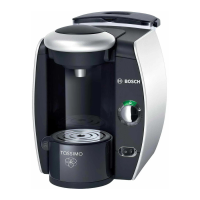
Stand-byiconlightsup(orange)whenthe
powerswitchisswitchedon.
Youcannowopenthebrewingunitand
removetheTDISCorinsertanewone.
O
OAutomaticiconlightsup(green)when
yourTASSIMOmachineisreadyforuse.
OAutomaticiconwillashduringabrew
cycleafterthestart/stopbuttonispressed.
!
Neveropenthebrewingunitduringthe
brewingprocess.



 To Next Page
 Loading...