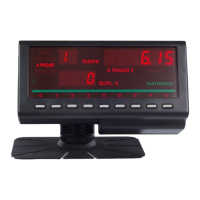
The TAXITRONIC TX30 is a taximeter designed for installation in vehicles, capable of managing tariffs and providing various functionalities for taxi operations. It is a compact device, measuring 180 x 50 x 32 mm, which allows for flexible installation options.
Function Description
The primary function of the TX30 taximeter is to calculate fares based on distance and time, manage different tariffs, and provide signals for external lights indicating the taximeter's status (e.g., "FREE" or "TAXI"). It can be integrated with both mechanical and electronic speedometers, utilizing a pulse generator for mechanical systems or an adapter for electronic ones. The device is programmable via a tariff charger, allowing for adjustment of the constant "K" (pulses per Km/ml), calendar-clock settings, and tariff recording. For vehicles with a radio-taxi company, the taximeter can use a light connector (L6) to inform the central system of its status.
Important Technical Specifications
General Characteristics:
- Feed Voltage: Nominal 12 V, Maximum 16 V, Minimum 8 V.
- Maximum Consumption (without external lights): 250 mA.
- Maximum Consumption (taximeter off): 25 mA.
- Maximum Consumption (inside battery): 5 µA.
- Maximum Power (external light): 36 W for each external light of 60 W if 3 outputs are connected in parallel. For the TX30-S model, the maximum power for the external light is 36 W.
- Maintenance of information (disconnected from vehicle's battery): 5 years.
- Surges Resistance: 45 V surges with a duration of 10 ms.
- Electrostatic Shocks Resistance: 7 kV.
- Protection: Incorporated inverse connection protection.
- Internal Protective Fuses: 6.3 A and 1 for protecting the CPU of 400 mA.
- External Fuse: 4 A.
- Operational Temperature: -20°C to +70°C.
- Storage Temperature (for keeping information): -40°C to +85°C.
- Dimensions: 180 x 50 x 32 mm.
- Approximate Weight: 204 gr.
- "K" Constant: From 400 to 80000 pulses per Km/ml.
Pulse Generator (for mechanical speedometers):
- Sensor Type: Hall effect cell.
- Number of Pulses / Revolution: 4 with double impulses train.
- Feeding Voltage: 4 to 18 V.
- Consumption at 5 V: 10 mA.
Electrical Connections:
The TX30 features four differentiated connectors:
- External Lights Connector (8 tracks):
- Contact 1: Light 6
- Contact 2: Light 5
- Contact 3: Light 4
- Contact 4: Light 3
- Contact 5: Light 2
- Contact 6: Light 1
- Contact 7: Position lights (output)
- Contact 8: Common return
- Note: The TX30-S model does not have an external lights connector, controlling only one external light via the green cable of the feed connector.
- Feed Connector (10 tracks):
- Contact 1, 2: Negative battery (Black)
- Contact 3, 4: Positive battery 12V (Red)
- Contact 5: Input (Yellow)
- Contact 6: Input (Blue)
- Contact 7: Light 1 (Green)
- Contact 8: External signal or passenger (Violet)
- Contact 10: External signal (Brown)
- Impulse Generator Connector (4 tracks):
- Contact 1: Ground (Mesh)
- Contact 2: 5 V (Red)
- Contact 3: Signal (Green)
- Contact 4: Signal (Blue)
- Data Transmission Connector: Cables depend on external equipment.
Usage Features
Assembly:
The TX30 taximeter can be built-in or assembled directly on the panel or a bracket. It has anchorages for self-threading screws on the rear, located on the connector cover. It can be fixed with two screws directly onto the dashboard or a support, or with a single screw in the center of the connector cover. For dashboard assembly, the connector cover is fixed first, then the taximeter is fitted back into the cover after cable connection. The electrical connection outlet can be on the rear or lower part, ensuring no visible cables or connections. It is recommended to assemble the taximeter on a rigid support to minimize vibrations.
Electrical Installation Recommendations:
- Disconnect the positive battery terminal before installation.
- Manipulate the taximeter or external lights only when disconnected from power.
- Always draw positive and negative power directly from the battery for stable, filtered feed.
- Connect cables to the battery via terminals, avoiding winding wires onto contacts.
- Use protective rubber casings where cables cross plates.
- Cut cables to the required length; do not roll them up.
- Verify sparking plug cables are graphite to prevent interference.
- Separate radio installation from the taximeter as much as possible.
- Inspect aerial earth connection and connectors.
- Avoid fixing taximeter-connected elements to the same support as the radio aerial.
Programming:
After installation, the taximeter is programmed using a tariff charger. The charger must be connected correctly to avoid blocking the microchip or CPU plate. The programming sequence involves:
- Starting with the taximeter in "For Hire" position and pressing the "O" pushbutton.
- Calculating or introducing the constant "K".
- Adjusting the calendar-clock (if necessary).
- Recording tariffs.
Detailed information is available in the "Operation Manual for the TX30 Tariff Charger".
Electronic Speedometer Adapter (for vehicles with electronic speedometers):
The taximeter can connect to electronic speedometer sensors via a sealable adapter. This circuit is inserted between the car's distance sensor and its speedometer, sending an identical signal to the speedometer and a compatible signal to the taximeter.
- Installation Steps:
- Localize the distance sensor (usually in the gearbox or transmission differential).
- Identify ground, power, and distance signal cables from the sensor to the speedometer.
- Connect these cables to the adapter (CN2 contacts: Ground, Oscillator, Power, Signal; leave empty if a signal is absent).
- Connect the adapter's cable to the CN1 connector and the other end to the distance sensor.
- Cover connections with thermoretractable cable and apply heat to seal.
- Connect the taximeter to the adapter's CN3 connector.
- Verify correct taximeter operation and adjust the "K" constant.
- Jumpers Configuration: The adapter's jumpers (SW1, SW2) are configured to match different sensor signals (Squared, Impulses, Triangular, Sine) and voltage levels. Default configuration is Level 0 < 1.5 V, Level 1 > 3.5 V, Hysteresis = 2 V. Specific jumper adjustments are detailed for weak signals, ground potential differences, fixed signal levels, or amplitude-modulated signals. An internal impulses divisor can be used if the vehicle's "K" constant exceeds the taximeter's maximum.
Maintenance Features
Opening the Taximeter Box:
If the TX30 malfunctions, the box must be opened to replace a defective CPU plate. There are two methods for opening:
- With Hands (Normal Way): Remove screws corresponding to the box (item 1) and connector cover (item 2). Open the box from the side where the seals are, following indicated arrow directions.
- With a Tool (for specific TX30 boxes): If manual opening is not possible, remove screws from the front face, take down the connector cover, and proceed as indicated in Drawing 8.
Precautions During Maintenance:
- Even when disconnected from external power, the CPU plate is internally fed by a battery; a short circuit can damage components.
- Avoid touching the plate with bare hands to prevent the microchip from blocking itself and consuming battery power.
Sealing:
The TX30 has three sealing points on the left frontal part to prevent access to screws:
- Seal N°1: Seals the taximeter box, protecting the electronic plate.
- Seal N°2: Seals the back cover of the connectors, securing the entire installation.
- Seal N°3: Seals the cover of the tariff charger connector.
Two types of seals can be used for any of these points:
- A OPTION: Stamped lead seal and/or plastic seal: Requires a flat square where the seal is fitted. The sealed screw cannot be reached without breaching the seal.
- B OPTION: With seal for cable: Requires a seal plate with a screw with a pierced head. A cable is passed through the pierced hole of each element and then sealed. The sealed screw cannot be reached without breaching the cable.
Different sealing methods (plastic/lead seals, cable seals, or combinations) are illustrated in Drawing 6.
Pulse Generator Sealing:
The pulse generator also has different sealing possibilities, shown in Drawing 11.

 Need help?
 General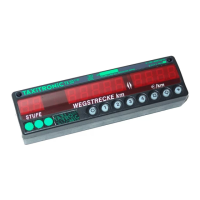

 To Next Page