EasyManua.ls Logo

Taylor 7209 - User Manual

Taylor 7209
6 pages
Print Icon
To Next Page IconTo Next Page
Loading...
Model 7209
Digital Scale with Cal-Max™ & BMI (Body Mass Index)
Instruction Manual
Thank you for purchasing a Taylor® scale. We strive to provide you with a high quality bath
scale that meets your needs. Your opinion and experience with our product is important to us. If
you are pleased with your Taylor product, please take a moment to share your thoughts with
others by writing an on-line review. If you have questions or are not satisfied with your
purchase, please contact us at prodsupport@taylorusa.com or call 1-866-843-3905.
These instructions contain important and useful information about this unit's operation. Please
read instructions thoroughly to ensure that you have the full benefit of all the unit's features.
Keep these instructions handy for future reference.
How does the Cal-Max™ Work?
The Cal-Max™ scale uses your gender, height, age and an activity level setting to calculate the
estimated number of calories you can consume a day to maintain your present weight.
This estimation may gradually help you with a weight loss, gain or maintenance plan.
Following are 2 examples of the Cal-Max scale in use:
Jack is:
6’ tall
35 years old
220 Lbs
• Cal-Max™ shows he needs to consume 2542 calories per day to remain at 220 pounds.
• Jack decides to cut 300 calories per day from his diet while maintaining his current activity
level.
• In less than 12 days Jack may lose up to a pound (based on calories alone)
• In one year Jack may lose up to 31.29 pounds (based on calories alone)
Jill is:
5’6” tall
32 years old
140 Lbs
• Cal-Max™ shows she needs to consume 1708 calories per day to remain at 140 pounds.
• Jill also decides to cut 300 calories per day from her diet while maintaining her current activity
level.
• In less than 12 days Jill may lose up to a pound (based on calories alone)
• In one year Jill may lose up to 31.29 pounds (based on calories alone)
IMPORTANT: Proper calorie intake and nutrition are important to maintain a healthy body.
Always consult a physician before undertaking any exercise or diet program.
Question and Answer IconNeed help?

Do you have a question about the Taylor 7209 and is the answer not in the manual?

Overview

The Taylor Model 7209 Digital Scale with Cal-Max™ & BMI is a personal bath scale designed to measure weight, estimate calorie needs, and calculate Body Mass Index (BMI). It aims to assist users in managing their weight through a combination of these features.

Function Description:

The primary function of this scale is to provide accurate weight measurements. Beyond basic weight, it incorporates the Cal-Max™ system, which estimates the daily calorie intake required to maintain the user's current weight. This estimation is based on user-programmed data including gender, height, age, and activity level. The scale also calculates the Body Mass Index (BMI), a widely accepted measure of weight relative to height, to help users understand if they are underweight, normal weight, overweight, or obese. The device stores personal data for up to four individuals, allowing multiple users to track their progress without re-entering their information each time. It also offers a weight-only function for quick readings without requiring personal data input.
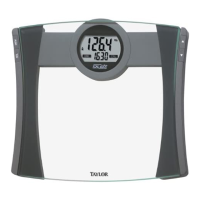
Important Technical Specifications:

  • Weight Capacity: 440 lbs (200 kgs)
  • Weight Graduation: 0.1 lb (0.1 kg)
  • Height Range: 2'7.5" - 7'2.5" (80.0-220.0 cm)
  • Age Range: 8-99 years
  • Unit Selectable: lb/in or kg/cm
  • Measurements: Weight, Cal-Max™ calorie estimates, and BMI
  • Data Storage: Up to 4 individual user profiles
  • Power Source: 1 CR2032 lithium battery (included)
  • Display: LCD screen with indicators for low battery ("Lo") and errors ("Err", "Err1").

Usage Features:

  • Personal Data Programming: Users can input their gender, height, age, and select one of five activity levels (AC 1: Sedentary/very inactive; AC 2: Limited Activity; AC 3: Moderate Activity; AC 4: Very Active; AC 5: Extremely Active) into one of four memory numbers (P1-P4). This data is used for Cal-Max™ and BMI calculations.
  • Initialization: The scale requires initialization before first use, after battery replacement, or if it has been moved or bumped. This is done by pressing firmly on the scale platform until the display turns on and off.
  • Unit Conversion: Measurement units can be switched between pounds/inches (lb/in) and kilograms/centimeters (kg/cm) by pressing the "UNIT" button on the bottom of the scale while it is on.
  • Weight-Only Operation: For a basic weight reading, users simply step onto the initialized scale. The display will count up to the weight, flash three times when locked, and then display the weight before automatically turning off.
  • Weight/Cal-Max™/BMI Reading: To obtain a comprehensive reading, users select their memory number, wait for the screen to show zero, and then step onto the scale. The scale will first display weight, then a moving zero pattern while computing calorie estimates and BMI, and finally display weight/calorie estimates and weight/BMI in sequence three times.
  • Viewing Previous Results: The scale saves the last measurement results for each memory number. These can be reviewed by pressing the "MEM" button, selecting the memory number, and pressing "MEM" again.
  • Clearing Memory: Personal data and results can be cleared from a memory number by turning the scale on, selecting the desired memory number, and holding down the "SEL" button for approximately 5 seconds until "CLr" appears.
  • Auto-Off Function: The scale automatically turns off after approximately 10 seconds of inactivity to conserve battery power.
  • Programming Timeout: If no buttons are pressed within 10 seconds during programming, the scale will turn off, requiring the user to restart the programming steps.

Maintenance Features:

  • Battery Replacement: The CR2032 lithium battery should be replaced when "Lo" appears on the LCD screen or readings become dim/irregular. Replacement involves removing screws from the battery compartment cover, replacing the old battery with a new 3-volt CR2032 battery (positive side up), and reattaching the cover.
  • Cleaning: Exposed parts of the scale should be cleaned with a soft, slightly damp cloth. Mild soap can be used for stains. Harsh cleaning agents, detergents, excess water, treated cloths, or sprays should be avoided.
  • Care and Handling: The scale contains sensitive electronic parts and should be treated with care. Users should avoid dropping, kicking, or jumping on it.
  • Storage: The scale should be stored on a flat, hard surface, away from cleaning chemicals whose vapors could affect electronic components. It should not be stored on its side or with anything placed on it to prevent battery rundown.
  • Battery Disposal: Batteries should be recycled or disposed of according to local regulations. They should not be disposed of in fire as they may explode or leak. If the scale will not be used for a long period, the battery should be removed.

Taylor 7209 Specifications

General IconGeneral
BrandTaylor
Model7209
CategoryScales
LanguageEnglish

Related product manuals