G-Sensor Function
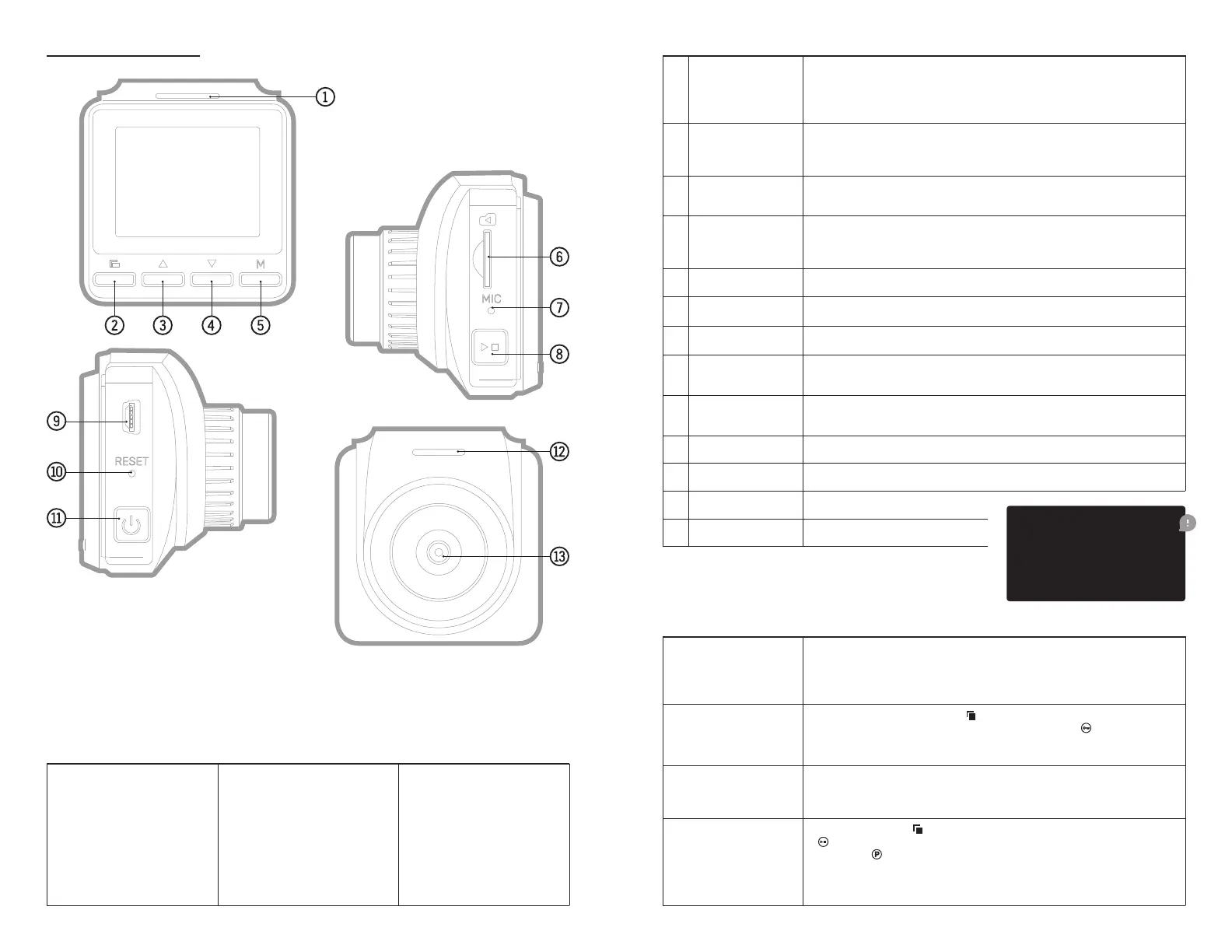
Product Diagram
SOS Function
During the recording process, press
on the screen.
Automatic ON/OFF
Parking Monitoring
Function
Short press the button
to set the parking monitoring function in the menu, select
and the icon
1 Work Indicator
— The red indicator on the right lights up to indicate that the unit is charging,
Button & Function Description
2 Menu Button — Short press this button to call up the function setting menu.
4 Select Button Down
6 TF Card Slot
3 Select Button — In the menu options, select the function key up.
5 Mode Selection Button
7 MIC — Recording receiver.
8 OK Conrmation
Button
to start recording, short press again to stop recording.
9 USB Data Interface
10 Reset Button — Dead reset button.
12 Speaker — Built-in.
11 Power Switch Button
13 Lens — Full HD.
Special Feature Description:
— SOS emergency data
protection
— G-sensor impact sensing
lock function
Product Features
— Supports charging
— Support high capacity
— Support motion detection
recording function
— Support parking
monitoring function
— Support pulse overvoltage
starting the car
2 3
Memory card must
be formatted after
installation:
simply does not see it.


 To Next Page
 Loading...