
 Need help?
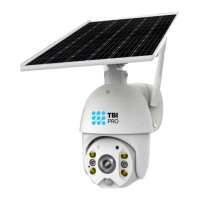
Do you have a question about the TBI PRO Engineering RAVISION PT-1 and is the answer not in the manual?
Details on chipset, sensor, compression, video stream, and internet connectivity.
Information on PIR+Radar detection mode, distance, angle, and notification method.
Details on Pan-Tilt-Zoom angle and rotation speed.
Specifications for colorful night vision, infrared, and white light range.
Details on built-in speaker power and microphone range.
Focal length and angle of the camera lens.
Information on cloud storage and local TF card capacity.
Details on power supply mode, solar power, battery capacity, and power ratings.
Working environment, temperature, humidity, net weight, and box size.
Guidelines and limitations for using the rechargeable battery.
Advice on optimizing battery performance and longevity.
Critical safety warnings and precautions for battery charging and handling.
Steps to ensure proper phone and Wi-Fi setup before pairing.
Instructions on downloading and installing the required mobile application.
Initial setup step in the app to add a device or family group.
Naming the device group for convenience and easy installation.
Inputting location details for the device.
Connecting the camera to the Wi-Fi network via the app.
Verifying the camera is in pairing mode via LED and voice prompts.
Confirming the discovered device in the app to proceed with setup.
Entering Wi-Fi name and password, choosing configuration method.
Options for connecting the camera using Sound Wave or QR Code.
Naming the device and completing the Wi-Fi setup.
Suggestions and solutions for common problems when pairing the camera.
Navigating to the sharing section within the app.
Process for adding other users and understanding their access levels.
Locating the push mode settings within the device's base settings.
Setting preferences for silence, notifications, or call-in alerts.
Tips for ensuring good Wi-Fi signal for optimal camera performance.
Guidance on the optimal mounting height for effective motion detection.
Instructions for installing the camera and solar panel separately on a wall.
Instructions for mounting the solar panel to the camera's universal bracket.
Overview of settings like muting audio, default resolution, and vibration.
Detailed configuration options for scene mode, sensitivity, and active time.
Selection of camera modes like Normal, Backlight, Night, and High Light Compensation.
Controls for volume, brightness, recording, and exiting full screen mode.
Options for Off, Low, Medium, and High sensitivity settings.
Recommendations to minimize unwanted motion detection alerts.
Configuration of recording duration when PIR sensor is triggered.
Selection between 50Hz and 60Hz power frequency settings.
Enabling or disabling the camera's LED indicator light.
 General
| Brand | TBI PRO Engineering |
|---|---|
| Model | RAVISION PT-1 |
| Category | Solar panel |
| Language | English |

 To Next Page