This document is a user manual for the TBI Pro Air Pro earbuds, providing comprehensive information on their function, technical specifications, usage, and maintenance.
Function Description:
The TBI Pro Air Pro are wireless earbuds designed for audio playback and phone calls. They feature Bluetooth 5.0 connectivity, allowing them to pair with various devices such as mobile phones, laptops, and other Bluetooth-enabled gadgets. The earbuds come with a charging case that not only stores them but also charges them, with a built-in LED display to show the battery level of both the case and the individual earbuds. The earbuds support master/slave mode, meaning either earbud can function independently, and if one earbud's battery drains, the other can automatically switch to master mode and continue operating. They offer multifunction buttons on each earbud for controlling music playback, answering/ending calls, switching calls between earbuds and phone, and activating voice assistants like Siri (for iOS devices).
Important Technical Specifications:
- Bluetooth Version: V5.0
- Bluetooth Chipset: Airoha AB1536U
- Connection Distance: 10-15 meters (in open space without obstacles)
- Earbuds Battery Capacity: 40mAh per earbud
- Earbuds Charging Time: 1 hour
- Play Time (on one charge): 4-6 hours
- Case Battery Capacity: 400mAh
- Case Charging Time: 3-3.5 hours
- Charging Input Port: Type-C USB
- Battery Level Indicator: LED display on the charging case
Usage Features:
- Power On:
- Method 1 (Automatic): Open the charging case, and the earbuds will automatically power on and pair with each other. Take them out, and the master earbud's LED will flicker white alternately.
- Method 2 (Manual): If earbuds are taken out of the case while powered off or if the case battery is drained, long-press the multifunction button on both earbuds for 2 seconds to power on. They will connect automatically, and the master earbud's LED will flicker white alternately. The left earbud is the default master earbud.
- Pairing:
- For first-time pairing, power on the earbuds (using Method 1 or 2). The master earbud's LED will flash alternately.
- Turn on Bluetooth on your device (phone, laptop, etc.) and select "AirPro V5" for connection.
- Once successfully paired, the device will show "CONNECTED," and the earbuds are ready for use.
- Subsequent connections will be automatic if the device is within range and Bluetooth is enabled. If earbuds are far from the paired device or Bluetooth is off, they will enter searching status (LED flashing).
- If no connection is established within 10 minutes, the earbuds will power off automatically.
- Power Off:
- Method 1 (Automatic): Place the earbuds back into the charging case and close the lid. They will power off automatically.
- Method 2 (Manual): If the charging case battery is at 0%, long-press and hold an earbud's multifunction button for 6 seconds. The LED will light for 1 second, then power off.
- If disconnected and unable to establish connection within 10 minutes, earbuds will power off automatically.
- Master/Slave Mode:
- Take out any earbud from the charging case, and it will connect to the device. If the other earbud is then taken out, it will also connect automatically for simultaneous use.
- If the master earbud's battery drains, placing it back in the case will cause the slave earbud to automatically switch to master mode and continue working.
- Phone Calls:
- Answer a call: Short press the multifunction button on any earbud.
- End a call: Short press the multifunction button on any earbud during a call.
- Call Switching Mode: During a call, long-press the multifunction button on any earbud for 2 seconds to switch the call between the earbuds and the phone. Repeat to switch back.
- Music Functions:
- On/Pause: Short press the multifunction button on any earbud to pause or resume music.
- Previous Song: Double press the left earbud.
- Next Song: Double press the right earbud.
- Auto Play: Music will automatically resume after hanging up a phone call if it was playing before the call.
- Mono Mode: All music functions operate the same as in dual mode.
- One-Key Siri: Long-press the multifunction button on any earbud to activate or close Siri (available for iOS devices only) when in standby or music playing mode.
- Wearing: Gently place the earbuds into the cochlea and adjust to a suitable angle.
Maintenance Features:
- Charging:
- Charging Case: Use a USB to AC adapter with DC 5V power output and the supplied Type-C USB charging cable. Avoid power supplies lower than 3V or higher than 5V. The LED display shows the battery capacity (1% to 100%). Unplug the cable when 100% charged.
- Earbuds: When the earbuds' battery is low, a voice prompt will sound. Place them into the charging case and close the lid. A white indicator light will turn on. The display will show left/right earbud charging status and turn off automatically when fully charged.
- Safety and Handling:
- Handle with care as they contain sensitive electronic components and batteries.
- Do not use damaged earbuds or case.
- Keep away from high temperature and high humidity environments.
- Avoid WIFI and other high-frequency transmitting devices, as they can interfere with the signal.
- Maintain a physical line of sight between the Bluetooth device and headset within 50 ft (15 m) for optimal performance.
- Troubleshooting:
- If earbuds cannot be paired:
- Ensure earbuds are fully charged.
- Ensure earbuds are powered on.
- Ensure earbuds are not currently paired with other active devices.
- Ensure the device's Bluetooth function is enabled and ON.
- Ensure the distance between earbuds and the Bluetooth device is less than 10m.
- Restore Default Factory Settings: If troubleshooting steps fail, power off the earbuds. Long-press the right/left earbuds for 5-10 seconds until the white light flashes for 1 second, then they will power off automatically. Power on the earbuds again, double-press the multifunction key of both earbuds after 2 seconds to pair them. The left earbud's LED will flash white. Power off the earbuds again and put them back into the charging case. After restoring, reconnect Bluetooth devices using the pairing methods.
- Reset Earbuds (if they don't work): Long-press and hold the multifunction button on both earbuds, then put them into the charging case, and release the multifunction button.

 Need help?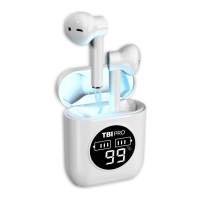

 To Next Page
 General