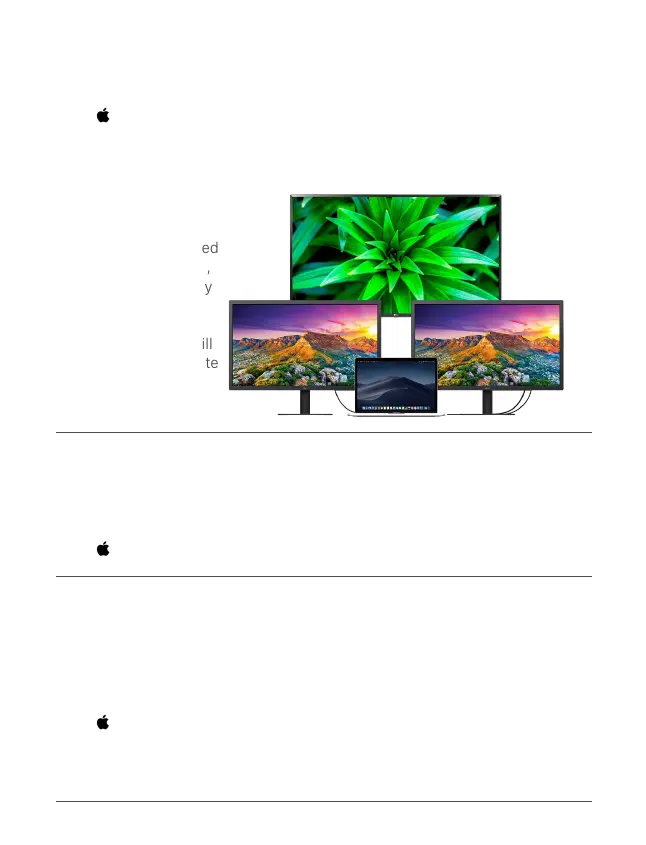
Attention! When 3
monitors are connected
to the Docking Station,
the HDMI-1 and Display
Port in non-mirror
mode will duplicate
each other, the rest will
have their own separate
desktop.
TO ENABLE NON-MIRROR MODE
Go to >System Preferences >Displays >Arrangement >Non-mirror Mode
(tick as per your needs) to set up HDMI Display.
Default: Mirror Mode.
RESOLUTION SETTING
To change the display resolution
Go to >System Preferences >Displays >Display >Scaled
SOUND SETTING
If you have connected speakers, headset, headphones, or a monitor with
speakers to the Docking Station. To change the audio playback device
Go to >System Preferences >Sound >Output
To select the audio device. Both display devices will play with sounds, but only
one device is listed.


 To Next Page