No additional software installation is necessary for your HyperDoc Docking
Station 15 in 1. This docking station uses the Plug-and-Play functionality, so
it is ready for use as soon as you plug it into a USB Type-C compatible laptop.
Your station does not require any additional drivers. Always wait a few seconds
after connecting to the laptop to ensure that the connection has been
established successfully. Your laptop will automatically sync with your docking
station.
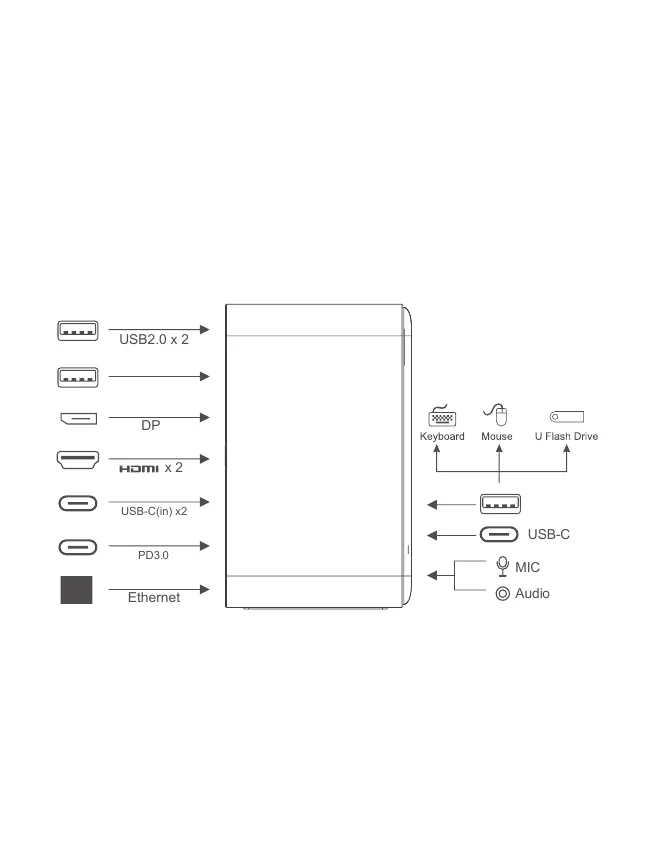
PORTS DESCRIPTION
MIC
Audio
USB-C(in) x2
PD3.0
Ethernet
USB2.0 x 2
USB-C
x 2
DP
3.5mm Audio
USB 3.1
USB 3.1
USB-C
USB 2.0
USB 2.0
Speakers, headset, microphone
Devices that support up to USB 3.1: 5Gb/s, 5V/0.9A@4.5W
Devices that support up to USB 3.1: 5Gb/s, 5V/0.9A@4.5W
Devices that support up to USB Type-C: 5Gb/s, 5V/0.9A@4.5W
Gaming mouse, keyboard, phone charging, etc: 480Mbps/s
Gaming mouse, keyboard, phone charging: 480Mbps,
5V/0.5A@2.5W
USB3.1 x 2
USB3.1 x 2


 To Next Page