Humidification
The humidification feature turns on automatically once you include water into
the appropriate container inside the top of the unit.
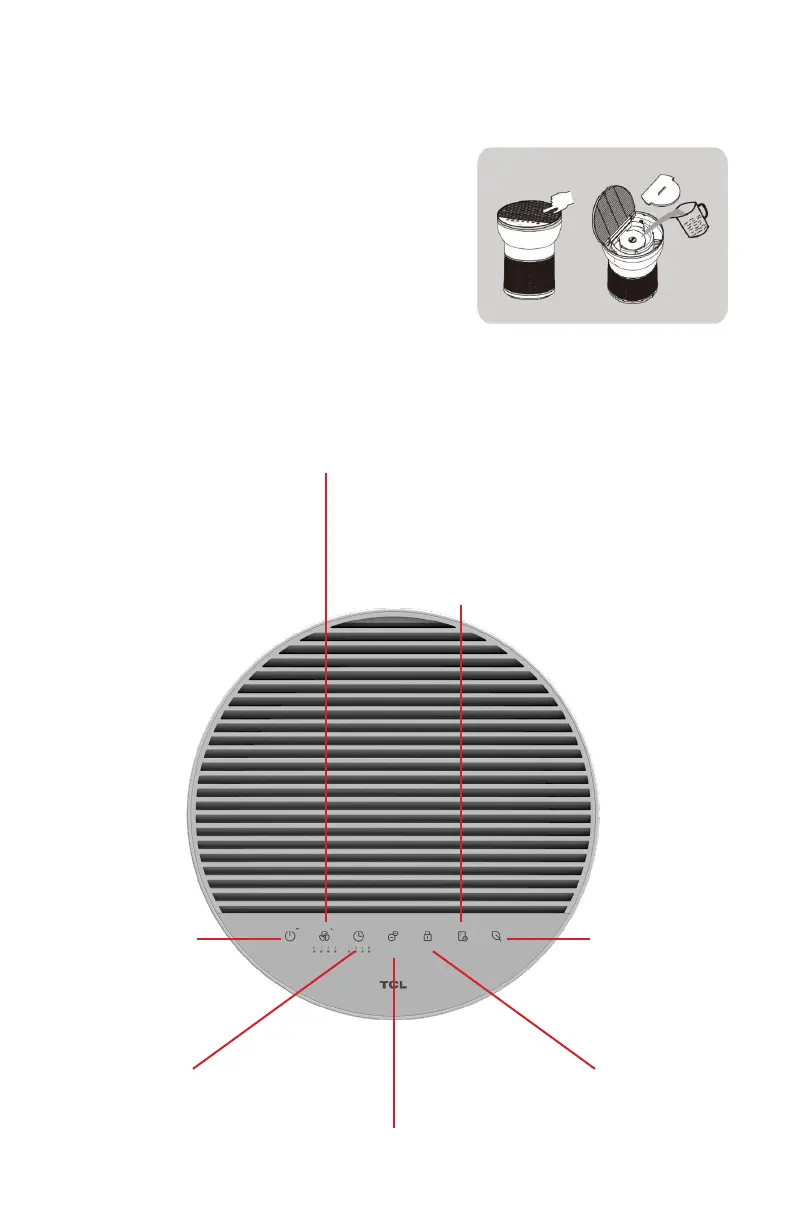
1. Press the air outlet grill and remove the
sink cover.
2. Pour in water but do not overfill.
3. Place the sink cover on top and close the
air outlet grill.
4. Turn it on and enjoy clean, refreshing air.
Control Panel
Anion
Turn on/o Anion
feature
Timer
Preset your air purifier
to turn o.
Child Lock
Press and hold for 3 seconds
to lock/unlock the panel
controls.
Filter Life Indictor
To turn o the light
after you’ve replaced
the filter, press and hold
for 3 seconds.
Fan Speed
Cycle through the fan speeds
from Sleep-1-2-3-Auto
Power
Turn your
air purifier on/o.
Air Quality
White: Great
Air Quality
Yellow: Decent
Air Quality
Red: Poor Air
Quality


 To Next Page