2) Connect a device that does not support the DP
output:
If you want to connect TCL NXTWEAR Air to
iPhone, Nintendo Switch or other devices that do
not support DP output, an additional conversion
interface is required.
*Note: Our App is not available on phones that do not
support DP output.
2. Wear and adjust TCL NXTWEAR Air
1) Put on TCL NXTWEAR Air and see whether the
image is complete.
2) If not, adjust the wearing angles and the nose
pads.
3. Adjust TCL NXTWEAR Air for short-/far-sighted
lenses
Bring the TCL NXTWEAR Air kit to your local
optician for your short-/far-sighted lenses.
*Attach the short-/far-sighted lenses to the inner side of
TCL NXTWEAR Air.
IV. Eye Comfort
Our product have received Rheinland's Eye Comfort
certification for low blue light and free of flicker.
However, visual fatigue can be caused from watching
any electronic display continuously.
You are highly advised to follow the "20-20-20 Rule"
to mitigate your visual fatigue.
*20-20-20 Rule: Every 20 minutes spent using a screen, you
should try to look away at something far away from you or roll
your eyes for at least 20 seconds.
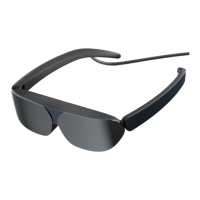
1. Dark lenses
2. Distance sensor
3. Speaker
4. Connection cable
III. User's Manual
1. Connect the device
1) Connect a device that supports the DP output:
Connect TCL NXTWEAR Air directly with the
device that supports the DP output via the Type-C
connection cable to project the image to
TCL NXTWEAR Air.
*Note: For more functions apart from screen projection,
please scan the QR code below and download our App.
I. Contents
1. TCL NXTWEAR Air (1)
2. Portable glasses case (1)
3. Cleaning cloth (1)
4. Accessories (1 kit)
II. Description



 To Next Page
 Loading...