8
Step 4 Get to know your TV
D
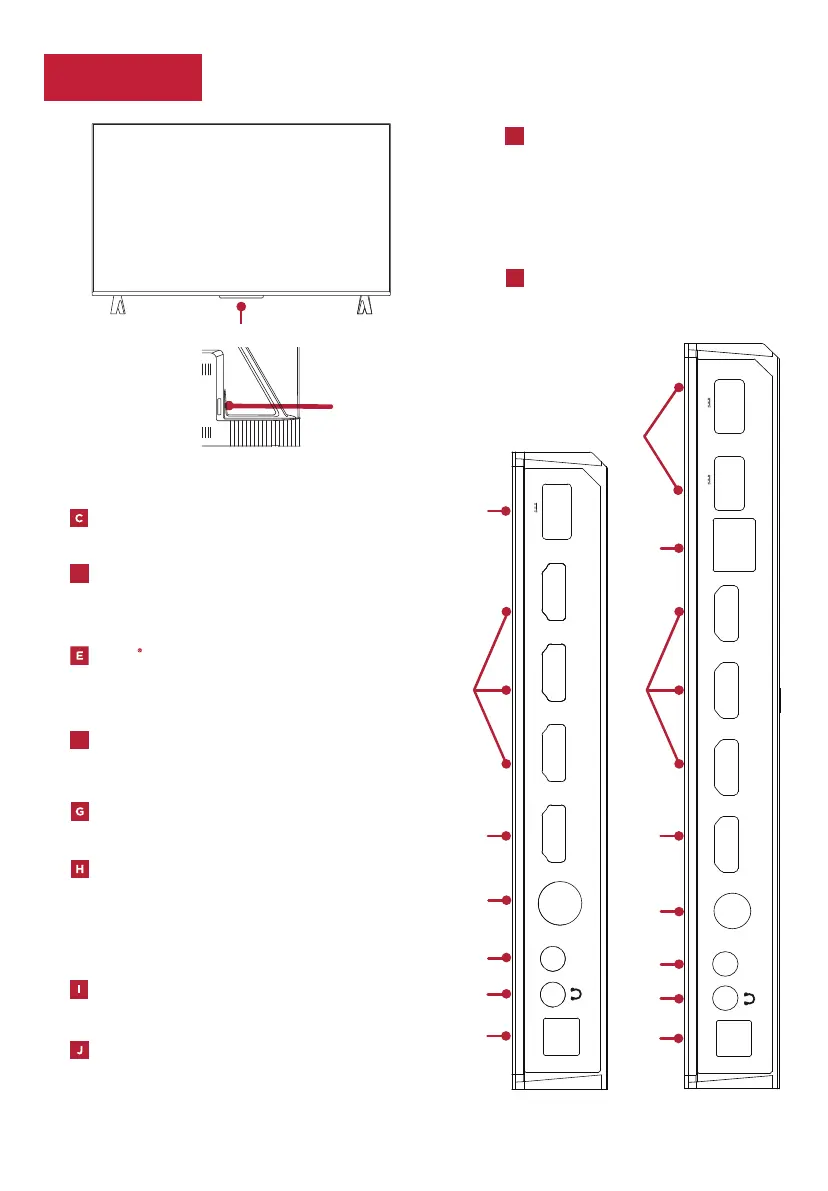
ETHERNET/LAN Connect an Ethernet/LAN cable to
your home Internet router or switch.
For 43”/50”/55”/65”, the Ethernet port is located
at the back of the TV.
HDMI (e)ARC PORT Connect HDMI (e)ARC
(audio return channel) capable audio devices
like sound bars or AV receivers.
F
PORT
Highest quality audio/video
connection. Connect cable box, Blu-ray player,
gaming console, or other devices to your TV
using HDMI cables.
HDMI
USB PORT Connect a USB device to access
photos, music and movies.
ANTENNA/CABLE IN
Connect an outdoor VHF/
UHF antenna or Cable TV feed.
OPTICAL (DIGITAL AUDIO OUT) Connect an
optical cable to an external digital audio system.
The AV Input can be used to connect older devices
that use analog audio/video outputs. Compatible
adapter (not included) connects to the RCA cable
(video - yellow and audio - white and red) that you
normally use to connect to that device.
AV IN adapter AV Input (analog audio/video).
HEADPHONE OUT Connect headphones or
other external speakers.
TV SIDE
(75”)
(43”/50”/55”/65”)
TV FRONT
TV BACK
A
IR RECEIVER
Receives signal from
the TV remote.
STATUS LIGHT
Glows when the
TV is in standby.
A
POWER PORT Connect your TV
to the power source with the
included power cable.
POWER and OPTIONS BUTTON
Press the button to turn the TV
on/o, or select the menu.
B
D
G
H
I
J
C
C
E/F
E
E/F
E
G
H
I
J
B
0.2
B
SU
A5.
0 V5
1
IMDH
2
IMDH
3
IMD
H
4
IMD
H
CRA)e(
ELBAC
ANT
NI VA
retpada
LACITPO
LTUO OIDUA
NI VA
retpada
LACITPO
LTUO OIDUA
ELBAC
ANT
4
IMD
H
CRA)e(
1
IMDH
2
IMDH
3
IMD
H
0.2
B
SU
A5.
0 V5
0.2
B
SU
A5.
0 V5
NAL


 To Next Page