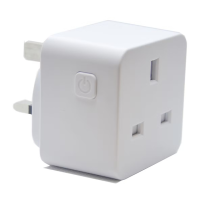
Plug the Smart Plug in to the desired socket. The Plug should
start to flash rapidly.
If the light on the Plug does not flash quickly, turn it off for 10
seconds, then hold the power button down for 5 seconds.
Stecken Sie den Stecker in die gewünschte Buchse. Der Stecker sollte dann schnell
blinken.
Wenn das Licht auf dem Stecker nicht schnell blinkt, schalten Sie diesen für
10 Sekunden aus. Halten Sie anschließend den Einschaltknopf für 5 Sekunden
gedrückt.
Choose your WiFi network & enter your password to connect.
If you are unsure of your details please check with your
broadband provider.
Press the ok button to connect to your device.
Wählen Sie Ihr WLAN-Netzwerk aus und geben Sie Ihr Passwort ein, um die
Verbindung herzustellen.
Wenn Sie die Informationen nicht haben, wenden Sie sich bitte an Ihren
Internetanbieter.
Drücken Sie auf OK, um Ihr Gerät zu verbinden.
The connection process will start, once the app finds the device
it will stop blinking and the connection wheel will each 100%. (If
this does not happen please see trouble shooting).
Der Verbindungsprozess beginnt. Sobald die App das Gerät gefunden hat, hört das
Gerät auf zu blinken und der Verbindungsstatus erreicht 100 %. (Wenn dies nicht
der Fall ist, sehen Sie bitte im Abschnitt „Fehlersuche“ nach.)
Your device is now connected and can be renamed to suit your
needs. We recommend you name the device for the appliance
it will be powering i.e. bedroom fan.
This stage is important if in the future you wish to connect to a
Smart Home Assistant such as Amazon Alexa or Google Home.
Ihr Gerät ist jetzt verbunden und kann nach Ihren Wünschen umbenannt werden.
Wir empfehlen, dieses nach dem Gerät zu benennen, für das es verwendet
werden soll, z. B. Ventilator im Schlafzimmer.
Dieser Schritt ist wichtig, wenn Sie später eine Verbindung mit einem SMART
Home-Gerät wie Amazon Alexa oder Google Home herstellen möchten.
Your device is ready to be used within your app.
For more information on how to use different functionality such
as timer and schedules please visit tcpsmart.eu/product-group-
power
Ihr Gerät ist nun für den Einsatz mit Ihrer App bereit.
Weitere Informationen zu unterschiedlichen Funktionen wie Timer und Zeitpläne
erhalten Sie auf tcpsmart.eu/product-group-power


 To Next Page
 Loading...