Need help?
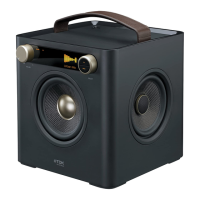
Do you have a question about the TDK 2 Speaker Boombox and is the answer not in the manual?
Key safety warnings regarding electric shock, interference, and general hazards.
Guidelines on protecting the unit from fire, shock, interference, and liquid damage.
Detailed instructions for safe operation, placement, maintenance, and servicing.
Identifies and describes the buttons and indicators on the front of the boombox.
Details the various input/output jacks and battery compartment on the unit's sides/rear.
Instructions for connecting the AC adapter and inserting D-cell batteries.
Guide on how to attach the carrying strap to the boombox.
How to turn the unit on/off, adjust volume, and set the equalizer.
Steps for tuning stations, selecting bands, and optimizing antenna reception.
Instructions for saving and recalling favorite radio stations.
How to connect an iPod via USB for music playback.
Connecting a USB drive and browsing its contents.
How to play, pause, skip, and search for tracks on a USB drive.
Instructions for enabling random playback of songs from a USB drive.
How to set repeat modes for single tracks or entire folders from USB.
Connecting external devices via LINE IN or RCA jacks for audio playback.
Connecting musical instruments and selecting input modes.
Adjusting instrument volume mix or solo playback settings.
Solutions for no sound, poor sound, and radio reception problems.
Troubleshooting common issues with iPod and USB device connections and playback.
Lists power source, speakers, dimensions, weight, audio formats, and radio frequencies.
 General
| Brand | TDK |
|---|---|
| Model | 2 Speaker Boombox |
| Category | Portable Stereo System |
| Language | English |


 To Next Page