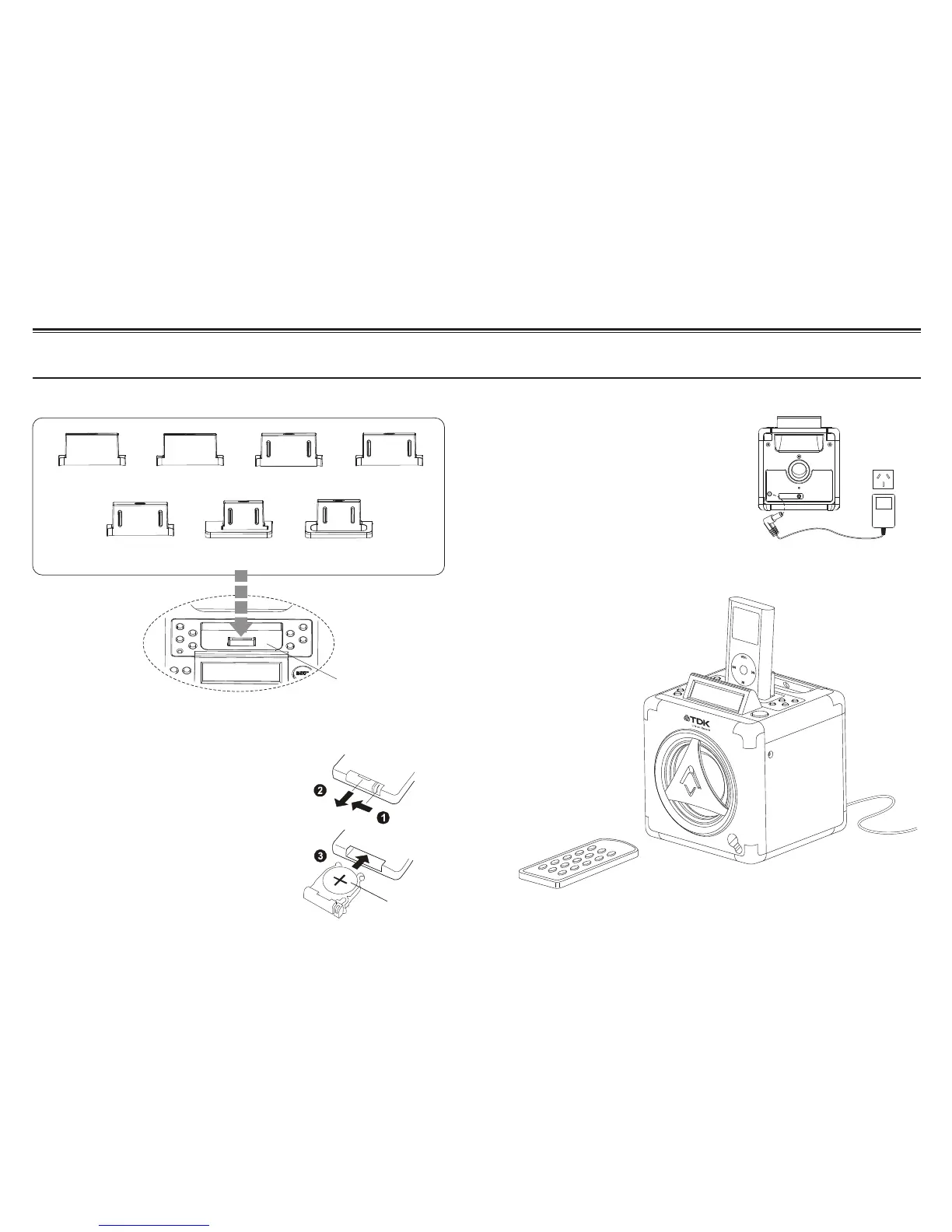
Preparing to Use
1. Use in C-display
-40GB/60GB-iPod
2. Use in iPod -40GB 3. Use in iPod-Video
-60GB
5. Use in iPod-Video
-30GB
6. Use in iPod-Nano
1GB/2GB/4GB
7. Use in Mini 4GB
/6GB iPod
Connector dock
CR2032
Select
4. Use in iPod-20GB
-U2
Setting a dock adapter
Putting the battery into the remote control unit
Power cord connection
Setting your iPod
Press down of the compartment cover, and slide the cover off
open the compartment. Place the one accessory CR2032
battery in the remote control according to the polarity markings
(“+” and “–”) inside the compartment and on the battery. Place
the cover into the compartment, press down lightly, and push it
inside until it snaps on.
Note: If the remote control is not in use for a long periods, the
battery will become weak, and the remote control will be not
function, please replace with new one if above happens.
Before using, connect the DC power cord to the DC outlet.
DC cord
9 10


 To Next Page