
 Need help?
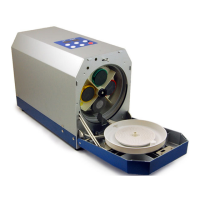
Do you have a question about the TDR Eco Clever and is the answer not in the manual?
Provides an initial setup guide including contents and machine setup explanation.
Instructions for performing the first repair cycle, placing the disc, and starting the machine.
Guidance on checking discs after repair and using different cycles for damage assessment.
Explanation of the multi-stage repair process and the four colour-coded abrasive pads.
Details on attaching colour-coded pads to holders and matching them to the turret labels.
Procedure for changing pads when the machine displays alarm codes and resetting the counter.
Instructions for ensuring sufficient polish supply and correct water/additive mixture.
Guidance on managing the waste tube, preventing kinks, and emptying the waste bottle.
Step-by-step instructions for priming the water and polish pumps for machine operation.
Procedure to clear polish from the tube to prevent drying when the machine is not in use.
Steps to manually open the door if it does not open and understanding display codes.
Table explaining various ST/TIME codes displayed by the machine.
Routine checks for pad holders, centre seal, pad fixing plate, and drain exit.
Information on consumable packs and individual items available for purchase.
Instructions for using the heavy pad (blue/red) for deep scratches beyond the standard '4' cycle.
Procedure to switch the machine to Blu-ray repair mode using violet pads and specific button presses.
Details on CD construction, data layer vulnerability, and repair limitations.
Explanation of DVD construction, data protection, and repairability.
Information on Blu-ray disc construction, differences from DVDs, and repairability limits.
Contact information and support hours for technical assistance via phone and email.
Essential safety tips for operating the machine, including location, power, and contact with polish.
Advice on avoiding machine damage, including disc placement, cleaning methods, and disassembly.
Guidelines on using authentic consumables, avoiding modifications, and proper usage.
 General
| Category | Service Equipment |
|---|---|
| Model | TDR Eco Clever |
| Power Supply | 220-240V AC, 50/60Hz |
| Material | Plastic |
| Operating Temperature | 0°C to 40°C |

 To Next Page