09
Special operation controls
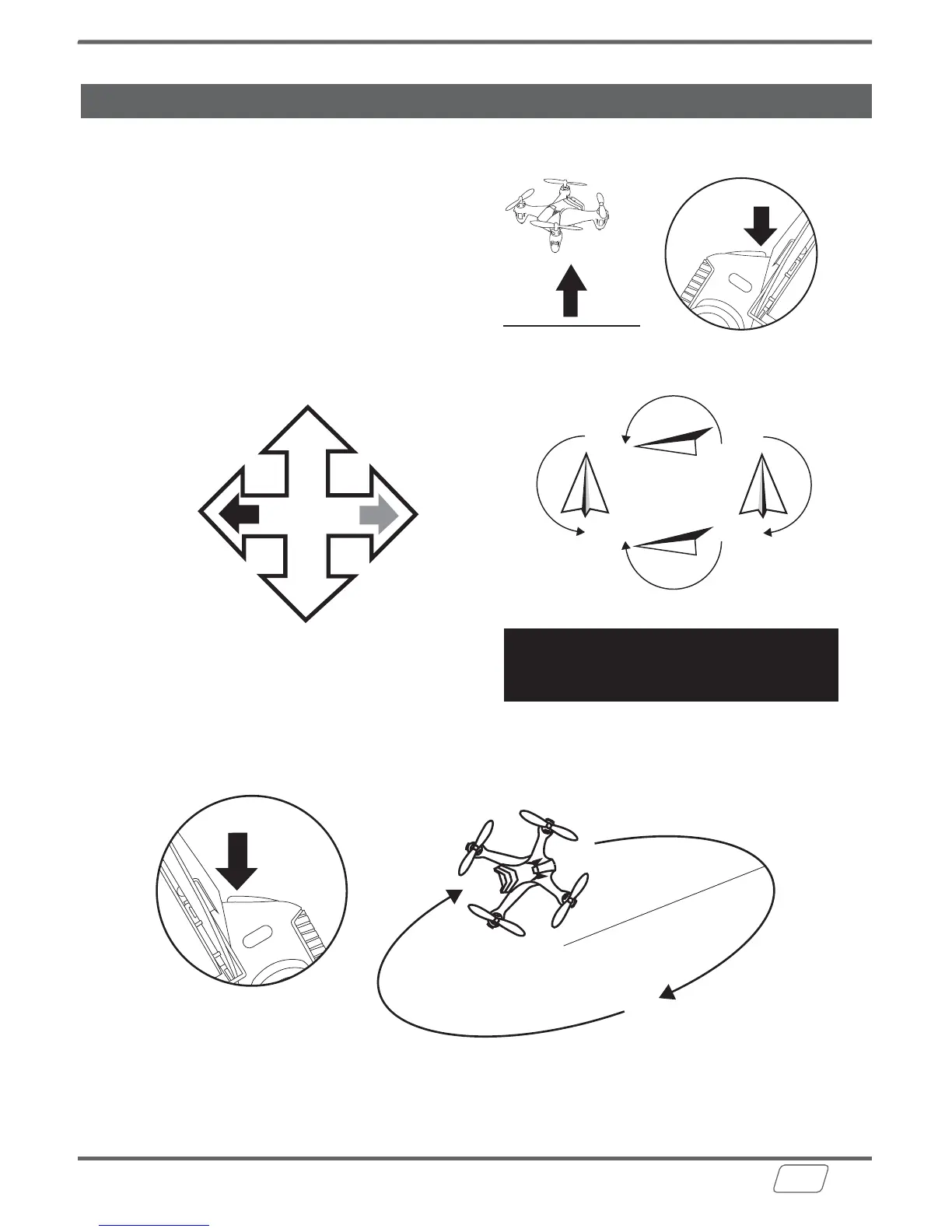
360° Roll
1. Bring the drone to a mid-air hover, without flying
towards any direction. Remove finger from the
direction (Elevator/Aileron) stick once in hover.
2. While hovering, press the 360° Roll button. The
remote will start beeping rapidly as the drone will
enter rolling-ready mode.
3. While the rolling-ready move, tap the direction
stick in the direction you want the drone to flip/roll.
Orbit Video
Press and hold the Photo Button for 1 second to start Orbit Video shooting. Press the Photo
or Video Button to stop.
1
.5
m
/ 5
f
t
Note:
The orbit radius is approximately 1.5m (5ft) please ensure there is enough space before using
the Orbit Video feature. It is recommended to have a 9ft radius of clearance when using this
feature. For best results, avoid using Orbit Video when it is windy.
Note:
The 360° Roll function cannot be
performed when battery power is low.
Forward flip
Backward flip
Left
flip
Right
flip
LEFT
RIGHT
FORWARD
BACKWARD
Press and hold the button
for 1 second to start Orbit Video.


 To Next Page