
 Need help?
Do you have a question about the TDT Medusa4Z and is the answer not in the manual?
Guide for collecting ABRs using TDT RZ6 system, Medusa4Z preamplifier, and BioSigRZ software.
Overview of ABRs, experimental aspects, hardware, software, and appendices.
Typical hearing range for mice, rats, and guinea pigs used in ABR tests.
Discusses how age affects hearing sensitivity in laboratory subjects.
Details two common anesthesia protocols (Xylazine+Ketamine, Isoflurane) for ABR testing.
Instructions for using a designated and grounded electrical outlet for testing.
Recommendations for using sound-attenuating chambers with Faraday cages to minimize electrical noise.
Guidelines for positioning the stimulus speaker to minimize acoustical reflection and interference.
Advice on mitigating noise from nearby equipment using anti-vibration tables.
Information on using heating pads to maintain subject's core temperature during sedation.
Details on suitable needle electrodes, connectors, and gauge for ABR testing.
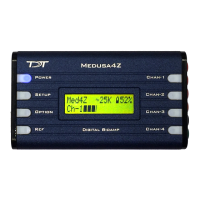
Description of the Medusa4Z preamplifier, its function, gain, and power.
Information on TDT's MF1 Multi-Field Magnetic Speaker for ABR testing.
Explanation of the RZ6 processor's role in stimulus production, data collection, and timing.
How the RZ6 connects to a PC via optical interface cards for system control and data display.
Explanation of click stimuli for ABR testing, their advantages, and use in screening.
Description of tone stimuli for ABR testing, targeting specific frequencies, and data collection.
Location and usage of pre-configured ABR experiment files for BioSigRZ.
How to access and adjust stimulus parameters like presentation rate and duration.
How to access and adjust acquisition parameters like duration, averages, and gain.
Instructions for correct placement of electrodes for single-channel ABR recording.
Procedure for checking electrode impedance using the Medusa4Z's built-in function.
Methods to verify subject sedation levels before and during ABR testing.
Steps to start stimulus presentation and enter Running Mode in BioSigRZ.
Explanation of real-time control functions for stimulus schedule and data averaging.
Using the Multi-Purpose Plot to display and control various signals during averaging.
How to manually terminate signal presentation and data acquisition in BioSigRZ.
Viewing averaged ABR records and associated SGI information in the History Plot.
Organizing and manipulating acquired data using the BioSigRZ Worksheet.
Procedures for exporting ABR data to ASCII or CSV file formats.
Method for measuring the environmental noise floor using a saline test.
Common sources of electrical noise and how to identify and resolve them.
Using the BioSigRZ Multi-Plot window for real-time problem identification and resolution.
Contact information and preparation advice for obtaining technical assistance from TDT.
Guidance on the frequency of system calibration based on usage and equipment.
Steps for setting up the system hardware for calibration, using a calibration microphone.
Requirements for performing closed-field calibration using speaker tubes and couplers.
Process for calibrating the RZ6 for tone stimuli using FIR filters.
Steps to calibrate the RZ6 for click stimuli using the RZ6_Click_Calibration.rcx circuit.
Using RPvdsEx circuits to test the functionality of speakers and microphones.
Explanation of how sound waves reflect off surfaces and cause interference within a chamber.
How phase delay, frequency, and distance create constructive or destructive interference.
Strategies to minimize reflections and interference by adjusting angle and using sound-absorbing materials.
Diagram showing the assembly of the MF1 speaker for closed-field configuration.
Step-by-step instructions for assembling the MF1 speaker for closed-field use.
How to access and view the SigGen Variable Control dialog for stimulus schedules.
Process for changing stimulus parameters like frequency, duration, and gate time.
Using SigGenRZ software to create and modify stimulus files (.sig) directly.
Recommendations for modifying tone stimulus files for mouse models.
Core components of noise exposure experiments: high dB, duration, and noise type.
Essential TDT hardware components needed for noise exposure experiments.
Recommendations for suitable external amplifiers for noise exposure testing.
Guidance on selecting appropriate speakers for delivering sound in noise exposure studies.
How to use RPvdsEx files to configure and deliver noise exposure stimuli.
Steps to customize RPvdsEx files for noise exposure tasks, including filters and output.
Step-by-step guide for setting up the Medusa4Z hardware before use.
Information on required software versions and where to find updates.
Instructions for updating RZ6 microcode to match BioSigRZ version.
Specific configuration changes needed in BioSigRZ for mouse models using Medusa4Z.

 To Next Page

 General