EasyManua.ls Logo

Teac A-650 - Playback Performance Verification; DC Voltage Adjustments (+13 V, +24 V); Record;Playback Head Azimuth Adjustment

Teac A-650
36 pages
Print Icon
To Next Page IconTo Next Page
To Previous Page IconTo Previous Page
Loading...
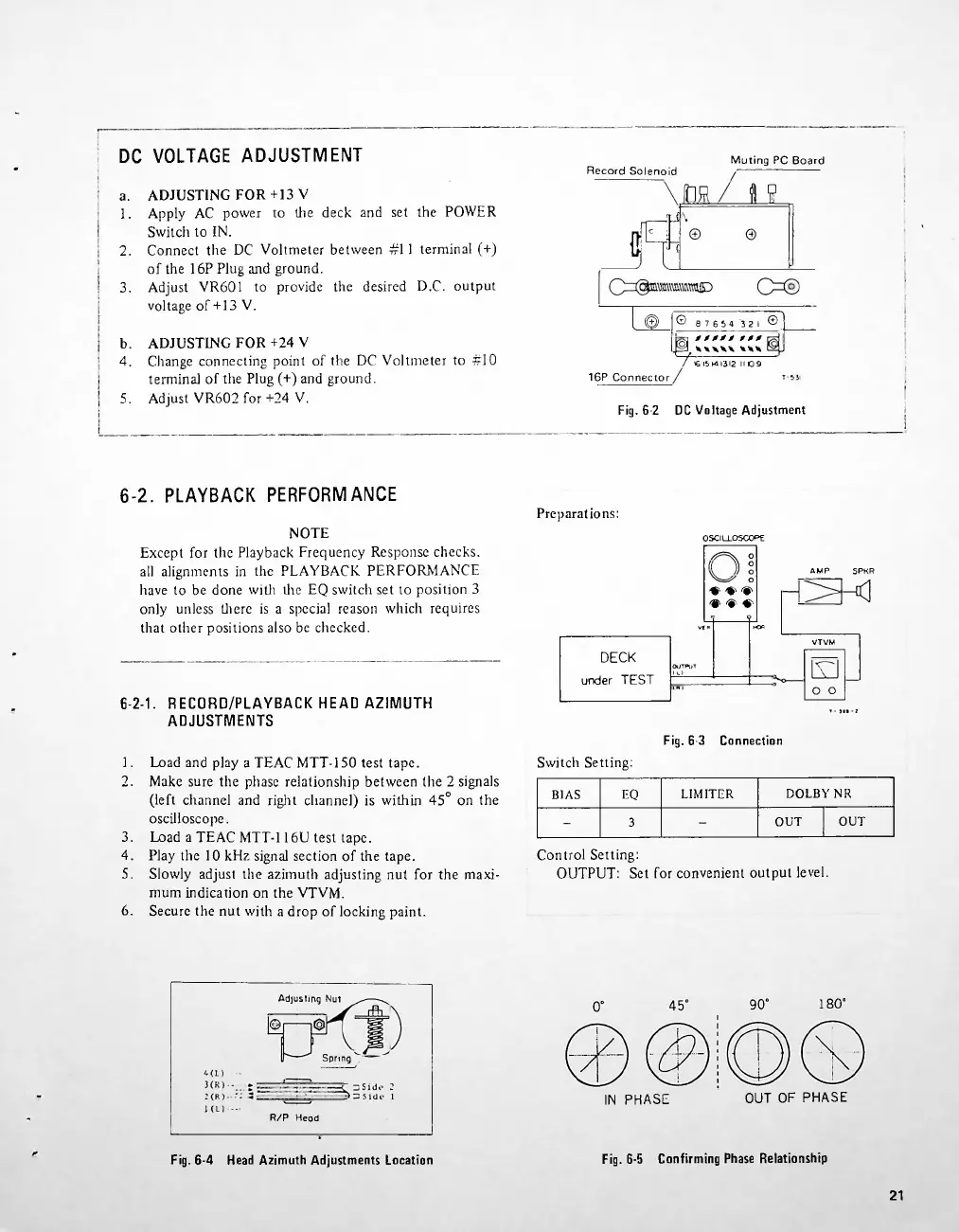
DC
VOLTAGE
ADJUSTMENT
Muting
PC
Board
o.
2.
3.
o
16P
Connector
5.
Fig.
6-2
DC
Voltage
Adjustment
6-2.
PLAYBACK
PERFORMANCE
Preparations:
AMP
SPKR
VtR
Fig.
6-3
Connection
Switch
Setting:
DOLBY
NR
EQ
LIMITER
BIAS
OUT
OUT
3
6.
Adjusting
Nut
180°
Spring
OUT
OF
PHASE
IN
PHASE
R/P
Head
Fig.
6-5
Confirming
Phase
Relationship
Fig.
6-4
Head
Azimuth
Adjustments
Location
21
b.
4.
3.
4.
5.
Load
and
play
a
TEAC
MTT-150
test
tape.
Make
sure
the
phase
relationship
between
the
2
signals
(left
channel
and
right
channel)
is
within
45°
on
the
oscilloscope.
Load
a
TEAC
MTT-116U
test
tape.
Play
the
10
kHz
signal
section
of
the
tape.
Slowly
adjust
the
azimuth
adjusting
nut
for
the
maxi
mum
indication
on
the
VTVM.
Secure
the
nut
with
a
drop
of
locking
paint.
Control
Setting:
OUTPUT:
Set
for
convenient
output
level.
1.
2.
NOTE
Except
for
the
Playback
Frequency
Response
checks,
all
alignments
in
the
PLAYBACK
PERFORMANCE
have
to
be
done
with
the
EQ
switch
set
to
position
3
only
unless
there
is
a
special
reason
which
requires
that
other
positions
also
be
checked.
ADJUSTING
FOR
+13
V
Apply
AC
power
to
the
deck
and
set
the
POWER
Switch
to
IN.
Connect
the
DC
Voltmeter
between
#11
terminal
(+)
of
the
16P
Plug
and
ground.
Adjust
VR601
to
provide
the
desired
D.C.
output
voltage
of
+
13
V.
ADJUSTING
FOR
+24
V
Change
connecting
point
of
the
DC
Voltmeter
to
#10
terminal
of
the
Plug
(+)
and
ground.
Adjust
VR602
for
+24
V.
DECK
under
TEST
a.
1.
Record
Solenoid
J?
L>
VTVM
o
o
ar*
4<L)
,
1(L)
6-2-1.
RECORD/PLAYBACK
HEAD
AZIMUTH
ADJUSTMENTS
OSCILLOSCOP
E
o
((
11
°
))
o
o
e
e
>
<
<•
<
o
K*
©
87654
3
21
®]
XXXXX
XXX
f
^XXXXX
XXX
/
>615141312
1109

Related product manuals